
Connecting an iCloud email account
The short version
Fambot signs in with Google or Outlook and reads email directly — it can't connect to an iCloud inbox on its own. If your family's school and activity emails land in iCloud Mail instead of Outlook or Gmail, the fix is to turn on auto-forwarding from iCloud to the Outlook/Gmail account you use with Fambot. Once that's on, everything new that hits your iCloud inbox flows into Outlook/Gmail automatically, and Fambot picks it up from there.
Why this matters
Fambot needs a steady stream of family-related email to build your Daily Digest. If your connected account is mostly quiet — because the school newsletters, sports schedules, and permission slips are actually going to an iCloud address — Fambot will look like it's stuck "scanning" for a long time, simply because there isn't much for it to find yet.
How to set up iCloud-to-Gmail forwarding
This is a native iCloud feature — no app-specific password, no third-party tool, nothing to install.
- Go to iCloud.com/mail in a browser and sign in with your Apple ID.
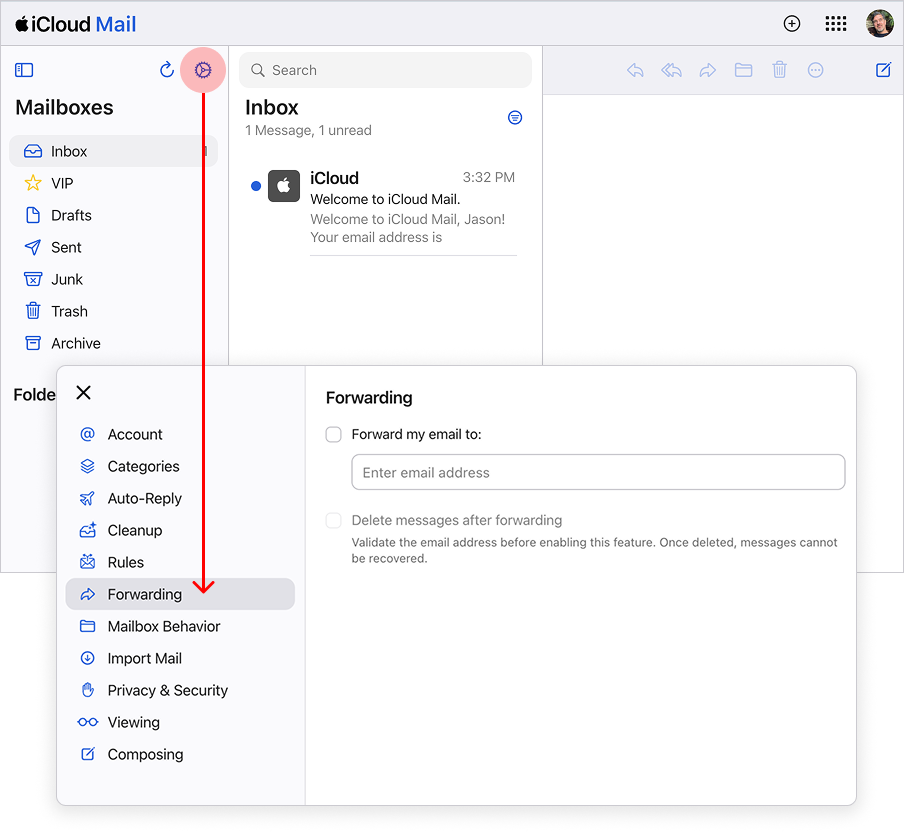
- Click the gear icon (Settings) at the top of the mailbox list.
- Choose Mail Forwarding. (Depending on which version of the iCloud.com layout you're on, this may appear under Rules or inside Preferences — Apple has been gradually rolling out a redesigned settings panel.)
- Check "Forward my email to" and enter your Gmail address — the same one you use to sign in to Fambot.
- Decide whether to check "Delete messages after forwarding." Leave it unchecked if you want to keep a copy in iCloud Mail in addition to the Gmail copy; check it if you only want the message to live in Gmail.
- Click Save.
From that point on, every new message that arrives at your iCloud address is automatically forwarded to Gmail — no ongoing maintenance required.
A couple of things worth knowing:
What about Apple/iCloud Calendar?
iCloud Calendar integration isn't available yet — it's on our roadmap. In the meantime, connecting any Google Calendars your family uses (many schools offer these) gets you most of the same benefit.




