
Back-to-school for families with 2 schools
By David Reich, Founder & CEO of Fambot
Published: August 13, 2026 · Last updated: September 1, 2026
Article Summary (TL;DR)
When 2 children attend different schools, back-to-school planning breaks because familiar phrases stop meaning the same thing. Early dismissal, orientation, lunch rules, supply lists, sports, and calendar changes need to be tracked by child, school, source, date, and next action. A shared calendar helps, but only after the family details are found and interpreted.
How do parents manage back-to-school for kids in different schools?
Parents manage back-to-school across different schools by treating each child's school as its own operating system. The useful unit is not "school stuff." It is the exact child, school, source, date, rule, and next action attached to each message.
That distinction matters because the school system itself is fragmented. NCES reported 49.5 million public PK-12 students in fall 2023 and 90,461 regular public schools in 2023-24, before counting special education, career and technical, alternative, and charter schools (NCES).
The phrase "orientation" might mean a 30-minute classroom visit at one school and a 2-hour campus event at another. "Early dismissal" might mean noon pickup for one child and a bus change for another. "Lunch account" might mean a cafeteria PIN for one school and a nut-free classroom policy for the other.
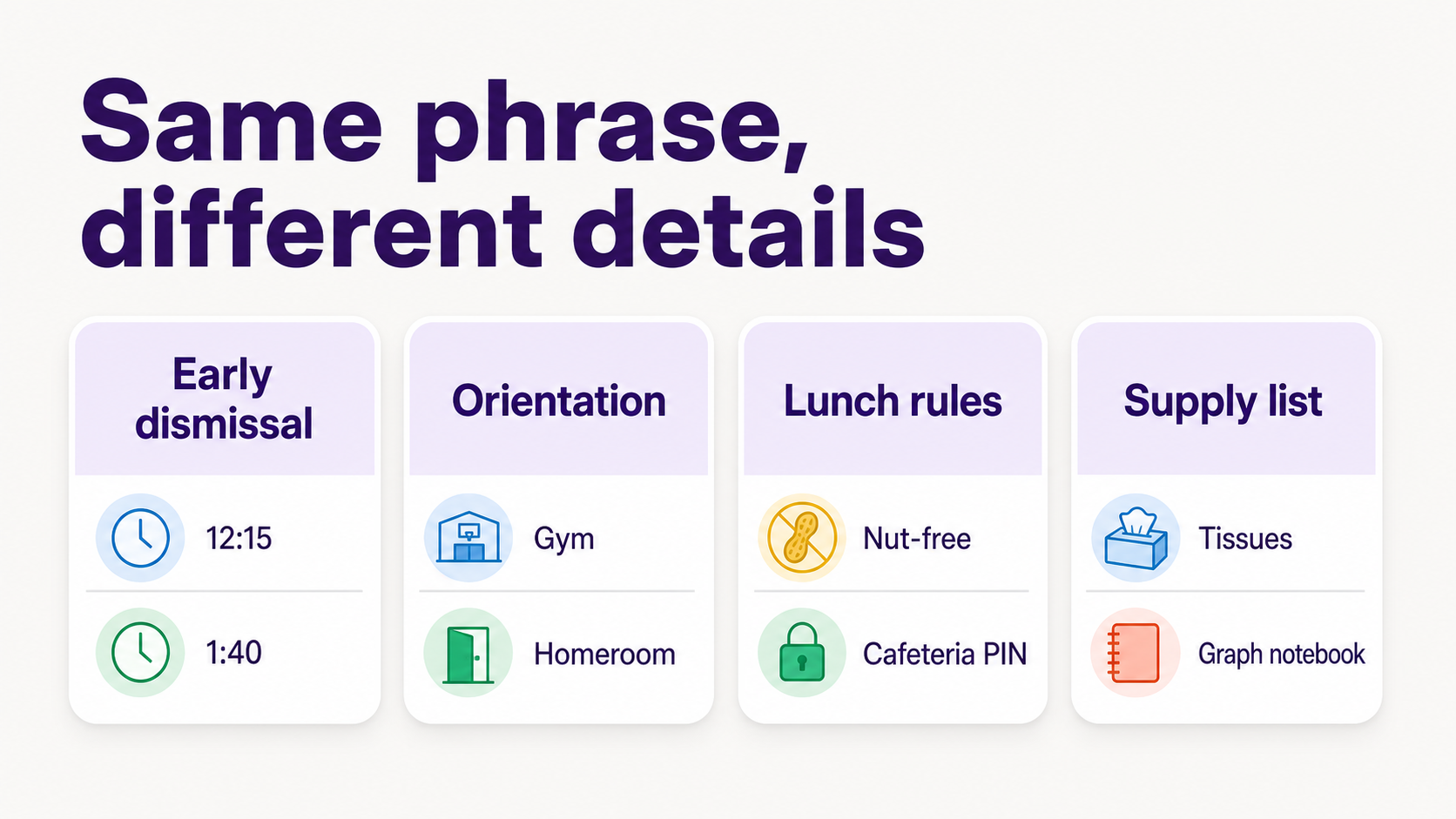
A practical setup has 5 fields for every school detail: child, school, date or deadline, source, and action. The source matters because parents often need to find the original email later when the rule changes or another caregiver asks, "Wait, where did that come from?"
What helps families track different school schedules?
Families track different school schedules best with one shared family calendar plus a shared family account that holds both kids, both schools, and the current plan. Calendar color-coding helps with visibility, but parents still need a way to catch changes buried in newsletters, PDFs, classroom apps, sports emails, WhatsApp groups, and one-off teacher notes.
Google Calendar supports calendar sharing with permissions, so caregivers can control what others can see or change (Google Calendar Help).
That shared calendar should separate people from sources. Use one color per child, but keep notes that say where the detail came from: teacher email, school newsletter, team app, PDF, classroom portal, WhatsApp group, or district calendar. This keeps the plan from turning into mystery appointments.
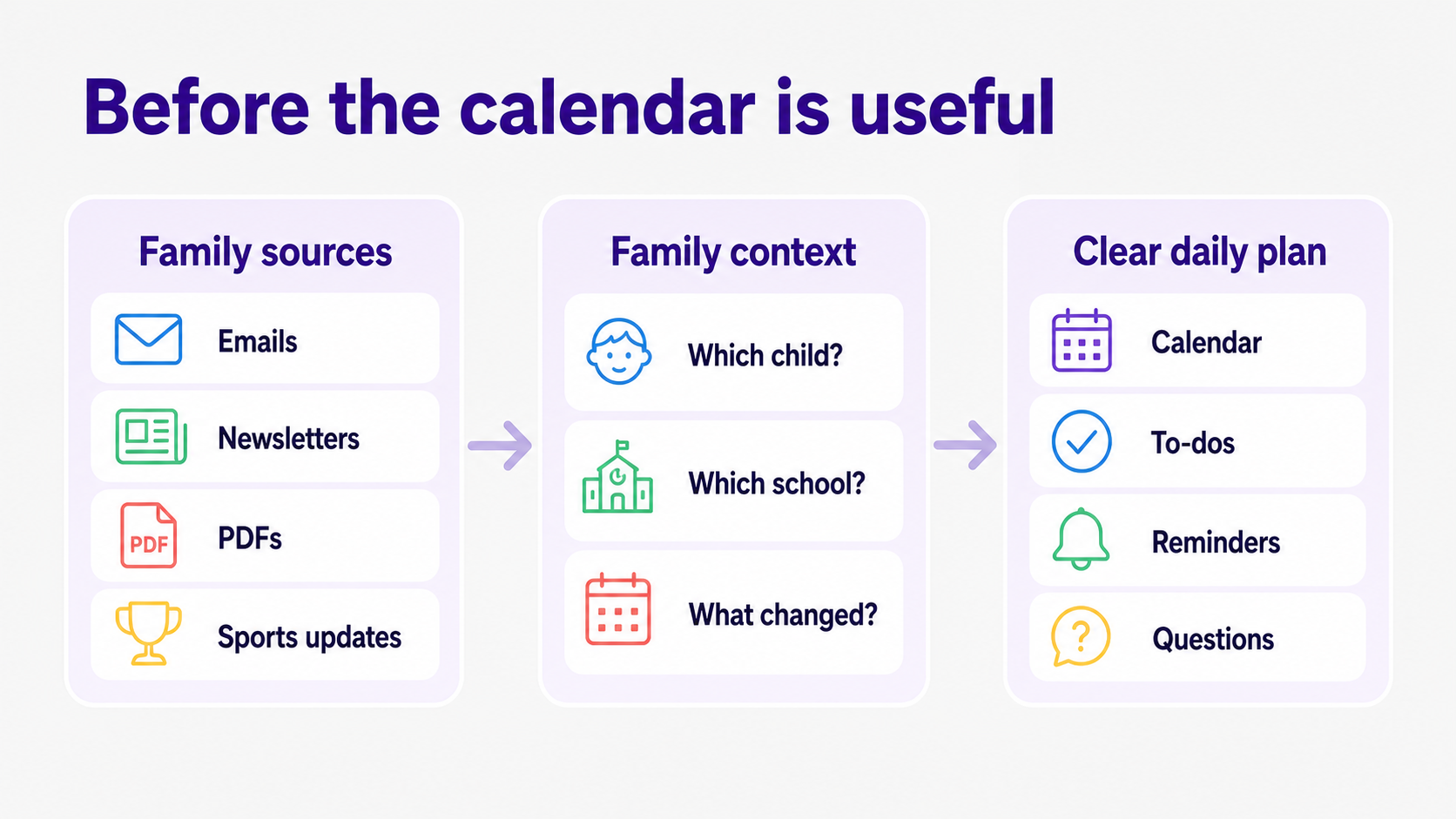
For households with 2 schools, the common failure is a calendar that shows only the final event. The parent still had to read both newsletters, compare both lunch rules, notice both orientation windows, and decide which details belonged on the calendar. That is the work before the calendar becomes useful.
How can I keep track of my kids' school events, activities, and schedule changes?
Keep track of school events, activities, and schedule changes by making every update actionable. If a message does not become an event, to-do, reminder, packing note, question, or delegation, it usually stays as inbox noise until the morning it matters.
Activities add real schedule load. Healthy People 2030 reports that 54.6% of children and adolescents ages 6 to 17 participated in a sports team or sports lessons in 2022-23 (Healthy People 2030).
The back-to-school checklist should include recurring categories: early dismissal, late starts, orientation, supply lists, lunch rules, medication forms, bus changes, pickup authorizations, sports practices, lesson start dates, picture day, field trips, spirit days, conference signups, payment deadlines, and gear.
The simplest rule: never store a schedule change only in the place you found it. If the soccer email says practice moved to field 3, the calendar event needs field 3. If the school says kindergarten dismissal is different for the first week, the pickup event needs that note, not just the school name.
How do I keep track of multiple kids' calendars, schools, sports, and activities?
The best way to track multiple children, schools, sports, and activities is to use one family plan with separate child context underneath it. Parents need a combined view for the day, but each event still needs child-level details so the family does not flatten 2 different routines into one vague reminder.
Use this structure for every back-to-school item:
This is where many color-coded systems start to crack. Color tells you whose event it is. It does not tell you that one child needs a labeled water bottle, another needs a PE uniform by Friday, and the district calendar changed the teacher workday after you already copied it.
Is there an AI tool that can help manage family calendar conflicts?
Yes, AI can help manage family calendar conflicts when it can read the family sources where changes appear, understand which child and school they apply to, and turn the result into calendar events, reminders, to-dos, and questions. A generic chatbot is less useful if parents still have to paste every detail into it.
Parents are already weighing AI for family and school contexts. Pew Research Center reported in February 2026 that more than 9 in 10 parents of teens had heard of chatbots, 51% said their own teen uses them, and roughly 6 in 10 would be comfortable with their teen using chatbots for schoolwork help (Pew Research Center).
For family logistics, the test is practical: can the tool find a conflict before you ask? If orientation overlaps soccer, if early dismissal hits during a work call, or if 2 supply lists both need the same item by different dates, the assistant should flag the conflict and ask what should happen next.
Fambot is built around that proactive job. Parents can connect Gmail, Outlook, Apple Calendar, Google Calendar, and WhatsApp, then Fambot turns school emails, newsletters, calendar updates, and other family sources into a clear daily plan without forwarding, tagging, or inbox sorting (Fambot).
What apps help parents coordinate school schedules, sports, lessons, and family events?
The right app depends on whether the family needs visibility, manual organization, physical display, or proactive help finding details. For a 2-school household, choose based on the work that is failing: seeing the day, entering events, catching changes, or deciding what matters.
Cozi is a strong manual family-calendar option because it supports color-coded schedules and up to 12 family members (Cozi).
Skylight is strongest when the family wants a shared kitchen display; its Calendar Plus features include Magic Import for forwarding emails or PDFs, or uploading photos of lists and flyers, to create calendar items (Skylight).
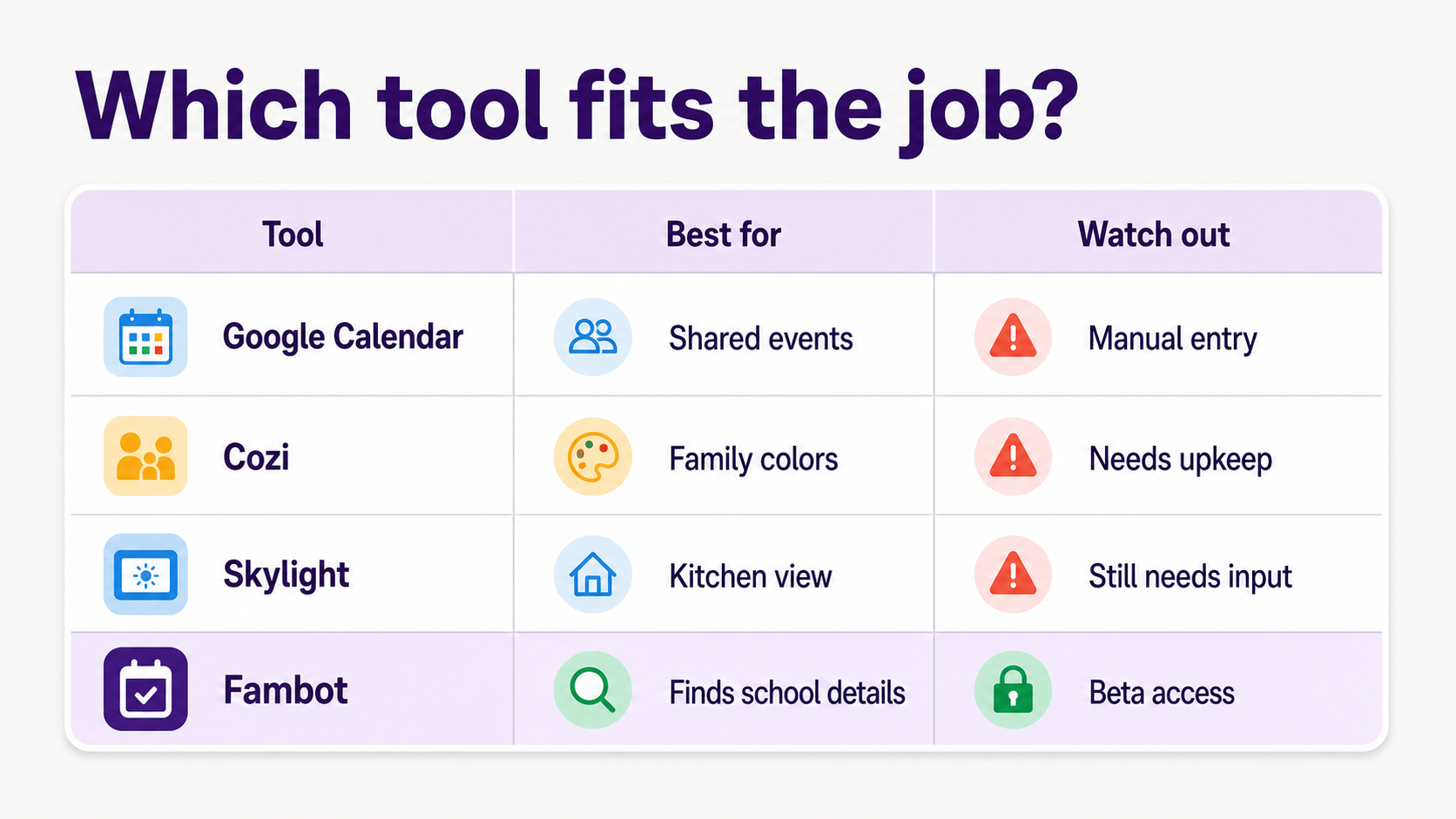
A simple decision matrix:
For many families, the best setup is not one app for everything. It is one source of truth for the day, plus a way to keep school updates from dying in the inbox. If your pain is visibility, a shared calendar or display may be enough. If your pain is reading and interpreting school communications, use an AI assistant that can do that work before you ask.
4
What should parents do the week before school starts?
The week before school starts, parents should turn every school message into a small set of actions. Do this once by child and school, then review it daily during the first 2 weeks because schools often send changes after the original packet.
- Make one child-by-school list for orientation, first day, early dismissal, lunch, transportation, supplies, forms, and pickup rules.
- Add every date to the family calendar with the school name and child name in the event title.
- Put rules that are not events, like lunch restrictions or pickup passwords, into notes or to-dos.
- Assign ownership for pickup, forms, shopping, and calendar cleanup.
- Keep the original source attached or named, so another caregiver can verify the detail later.
- Ask an assistant or family system to flag conflicts: overlapping orientations, early dismissal during meetings, sports pickup conflicts, and duplicate shopping needs.
The goal is not a prettier calendar. The goal is a family plan that survives real life: 2 schools, different rules, last-minute changes, and the 7:12 a.m. moment when somebody asks, "Wait, is today the short day?"
Sources
- NCES - Used for fall 2023 public school enrollment and 2023-24 public school counts.
- Healthy People 2030 - Used for the 2022-23 sports participation statistic for children and adolescents ages 6 to 17.
- Google Calendar Help - Used for calendar-sharing permissions and shared-calendar behavior.
- Cozi - Used for Cozi family-calendar features, including color-coded schedules and family member support.
- Skylight - Used for Skylight Calendar features, including Magic Import and family display positioning.
- Pew Research Center - Used for 2026 parent awareness and comfort with teen chatbot use.
- Fambot - Used for current public Fambot positioning, setup language, beta status, and supported account claims.




