
12 details hidden in back-to-school welcome emails

By David Reich, Founder & CEO of Fambot
Published: August 10, 2026 · Last updated: September 1, 2026
Article Summary (TL;DR)
Back-to-school welcome emails hide more than introductions: they carry dates, forms, sign-ups, pickup rules, teacher preferences, and tiny asks that quickly become family to-dos. Those details also spill into WhatsApp group reminders, class messages, and calendar changes, so parents should scan the first week for deadlines, ownership, and updates, then turn each detail into a reminder or task before it gets buried.
What should parents look for in back-to-school emails?
Parents should look for anything that changes the calendar, creates a form deadline, affects pickup or drop-off, asks for supplies, requires payment, or needs a caregiver decision. Week 1 emails sound friendly, but they often contain the operating rules for the next month of school.
This matters because school communication still leans heavily on email. Alchemer's 2026 K-12 Parent Trust Report found that email is the primary school communication channel for 51.3% of K-12 parents, ahead of portals, texts, phone calls, social media, and learning management systems (Alchemer).
The scale is large, too. NCES counted about 49.6 million students in U.S. public elementary and secondary schools in fall 2022, plus 5.5 million private elementary and secondary students in fall 2021 (NCES).
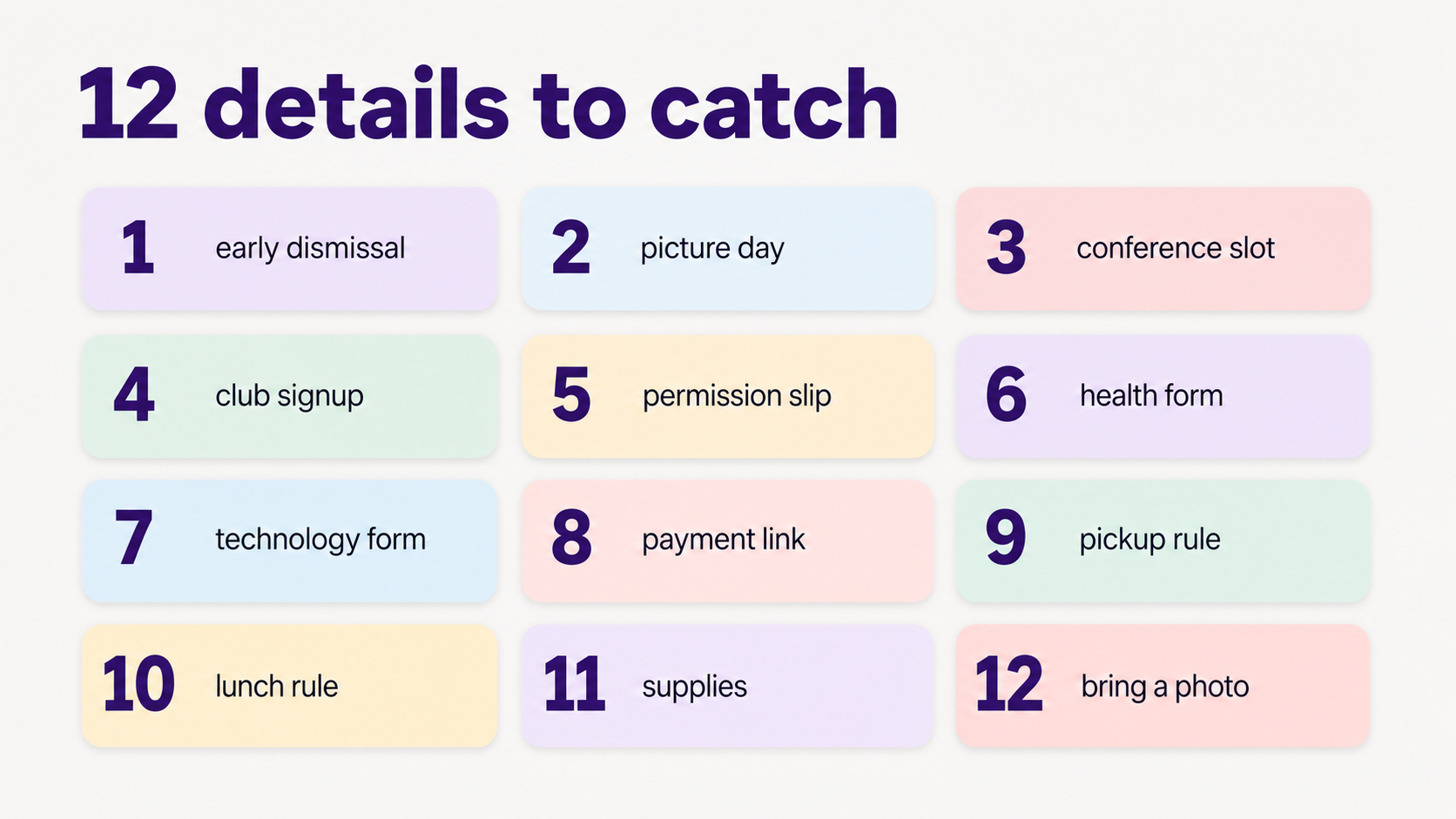
Which 12 details disappear inside welcome emails?
The 12 easiest back-to-school details to miss are early dismissals, picture day, conference slots, club sign-ups, permission slips, health forms, technology forms, payment links, pickup rules, lunch rules, supply asks, and small teacher requests like bringing a photo. Treat each one as an action, not background reading, and check WhatsApp groups too, where parent reminders and last-minute clarifications often show up after the original email.
How do I organize first week of school emails and forms?
Organize first-week school emails by turning each message into 4 buckets: read, extract, assign, and remind. Read only for action. Extract dates, forms, links, rules, and supplies. Assign the next step to a caregiver. Set reminders before the due date, not on it.
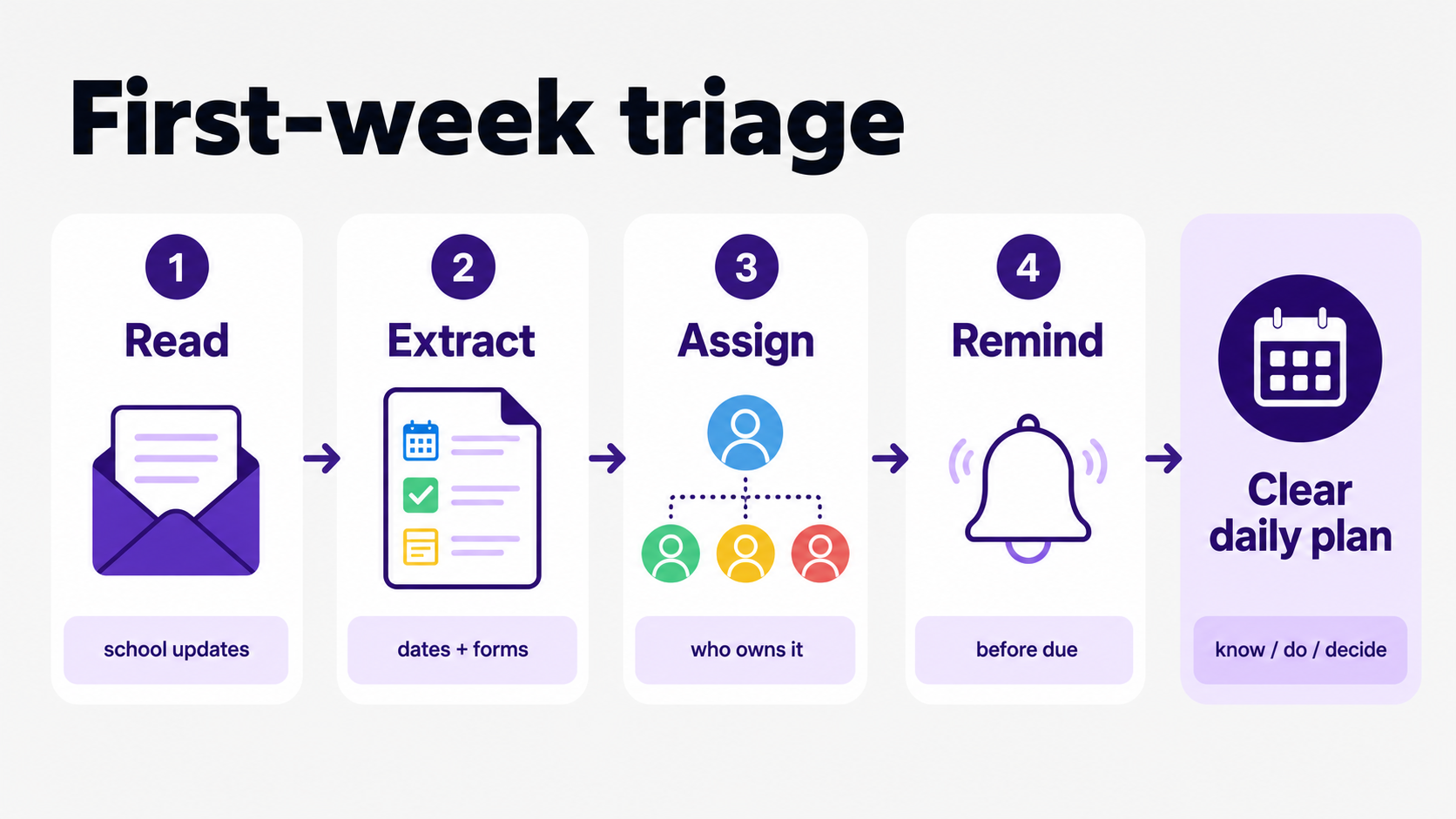
A simple rule helps: if the email asks the family to know, do, bring, sign, pay, choose, or show up, it belongs outside the inbox. Move it to a calendar event, task, reminder, shared note, or daily plan before you archive it.
Help me figure out how to stop missing permission slips and early dismissals buried in school emails
To stop missing permission slips and early dismissals, scan for verbs and dates before reading for tone. The risky words are sign, return, bring, register, RSVP, dismiss, arrive, wear, pay, choose, upload, and volunteer. Those words usually mean the email contains a parent action.
- Search the email for dates, PDFs, links, and words like "due," "return," "permission," "dismissal," "pickup," and "signup."
- Create one task per action instead of keeping a mental note that the email exists.
- Set the reminder 2 school days before the deadline, then a second reminder the morning of the deadline if the task is still open.
- Assign a person when the task requires a decision, signature, pickup change, payment, or supplies.
How can I keep up with permission slips, school forms, and activity deadlines?
Keep up by building a small family workflow, not a bigger inbox routine. Every school form needs 4 fields: what it is, who owns it, when it is due, and where the original email or link lives. Without those fields, the form is still loose.
The important distinction is ownership. A reminder that says "permission slip" still asks the family to figure out who is doing it. A reminder that says "Maya field trip slip, Jordan signs by Thursday" is much harder to ignore.
How can I stop forgetting school forms, permission slips, sign-ups, and deadlines?
Stop forgetting by separating capture from memory. Capture the action once, attach the source, and let reminders do the remembering. The weak system is "I'll come back to that email." The stronger system is "this is now a dated task with an owner and source link."
For week 1, make one running list called "school setup." Add every form, signup, rule, and supply request there. Review it once each evening until the list is empty. That rhythm is boring. Boring is excellent when the alternative is finding a permission slip at 10:37 p.m.
What app can read my Gmail and find school dates, forms, and deadlines?
An app that reads Gmail for school dates and deadlines should connect through Google account access, read family-related email, identify dates and forms, turn them into calendar events or tasks, and remind you before they are due. It should also let you review permissions and disconnect access.
Google says apps from developers other than Google can request access to products such as Gmail, Drive, Calendar, Photos, and Contacts, and users can review or remove linked app access at any time (Google Account Help).
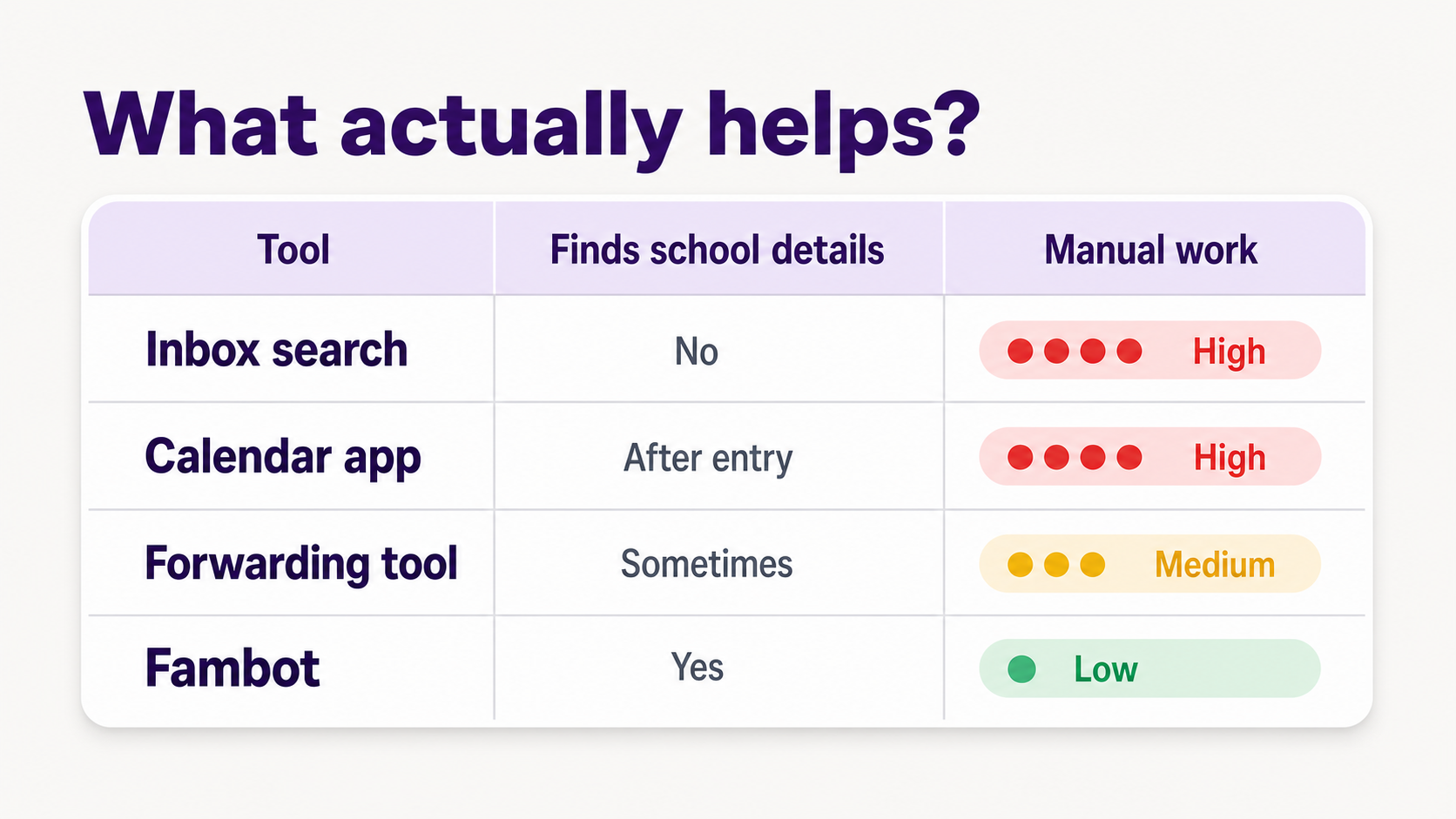
Fambot is built for this specific job: parents connect once with supported family sources, then Fambot reads family-related emails, school updates, calendar changes, and WhatsApp group reminders, finds useful details, adds events and reminders, creates to-dos, and sends a clear daily plan with what parents need to know, do, and decide.
What tool can remind me about school forms before they're due?
The best reminder tool for school forms reminds you before the due date, keeps the source email attached, names the owner, and separates "read this" from "do this." A plain calendar alert helps with dates. A proactive family assistant helps with the work around the date.
Look for reminders that can answer 5 questions at a glance: What is due? Who owns it? Which child is it for? Where is the link or form? What happens if we miss it? If the reminder cannot answer those questions, the parent still has to do the detective work.
How should parents handle privacy when an app reads school emails?
Parents should treat email access as a trust decision. Review what the app can access, why it needs that access, whether it uses secure sign-in instead of asking for a password, how to disconnect it, and whether children's information is handled carefully.
The FTC says the primary goal of COPPA is to give parents control over information collected online from children under 13, and its FAQs note that the rule was amended on April 22, 2025 (FTC COPPA FAQs).
That does not mean every family assistant is a child-directed app, but it does mean parents are right to ask direct questions before connecting family-related emails. Google's own help guidance says linked apps can only access the data and services a user authorizes (Google Account Help).
What is the week 1 back-to-school email checklist?
The week 1 checklist is a quick end-of-day pass through school emails, forms, calendar changes, activity updates, and family ownership. It should take less time than rereading the whole inbox. The goal is to finish each day knowing what changed, what is due, and who owns the next step.
- Add calendar changes: first day timing, early dismissal, meet-the-teacher events, picture day, conferences, activity starts, and no-school dates.
- Capture forms: emergency contacts, health forms, technology agreements, field trip slips, and class directory permissions.
- Save logistics: pickup rules, lunch rules, bus notes, classroom arrival routines, volunteer instructions, and supply updates.
- Assign decisions: signups, payments, donations, snacks, clothing days, activity choices, and who handles each deadline.
- Ask Fambot-style questions: "What are we forgetting?", "What is due this week?", "Who needs to bring what tomorrow?", and "Did any school email change pickup?"
Sources
- Alchemer - Used for 2026 K-12 parent communication channel data, including email as the primary channel and parent views on technology making engagement easier.
- NCES - Used for U.S. back-to-school enrollment scale and after-school activity context.
- Google Account Help - Used for how linked apps can request access to Gmail, Calendar, and other Google products, and how users can review or remove access.
- FTC COPPA FAQs - Used for children's online privacy context and the 2025 COPPA update note.




