
Best family calendar alternatives with less manual entry

By David Reich, Founder & CEO of Fambot
Published: July 14, 2026 • Last updated: September 1, 2026
Article Summary (TL;DR)
The best family calendar alternative for parents who hate manual entry is a low-input assistant that turns school emails, PDFs, activity updates, WhatsApp groups, calendar changes, and family messages into events, reminders, to-dos, and a clear daily plan. Fambot, Jam, Skylight, Ohai, Cozi, Maple, FamilyWall, and Google Calendar each solve a different slice of that problem.
What's a good family calendar that doesn't make me enter everything by hand?
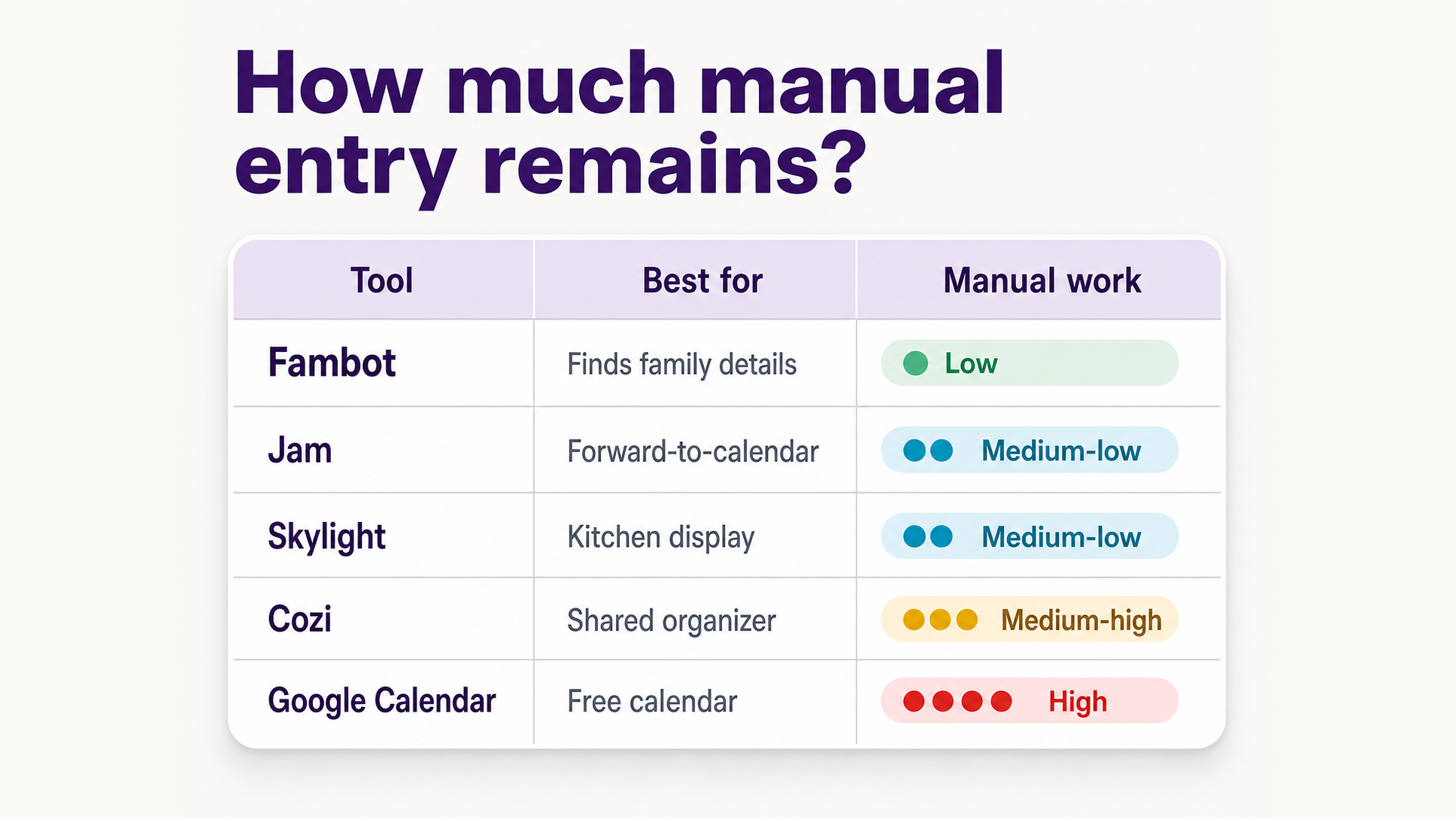
A good low-entry family calendar should capture details from the places family life already happens: email, school updates, PDFs, flyers, calendars, activity schedules, and WhatsApp groups. Fambot is the strongest fit when the problem is finding what matters and making it actionable, while Jam and Skylight are good options when families are willing to spend time forwarding, importing, and copy/pasting source material.
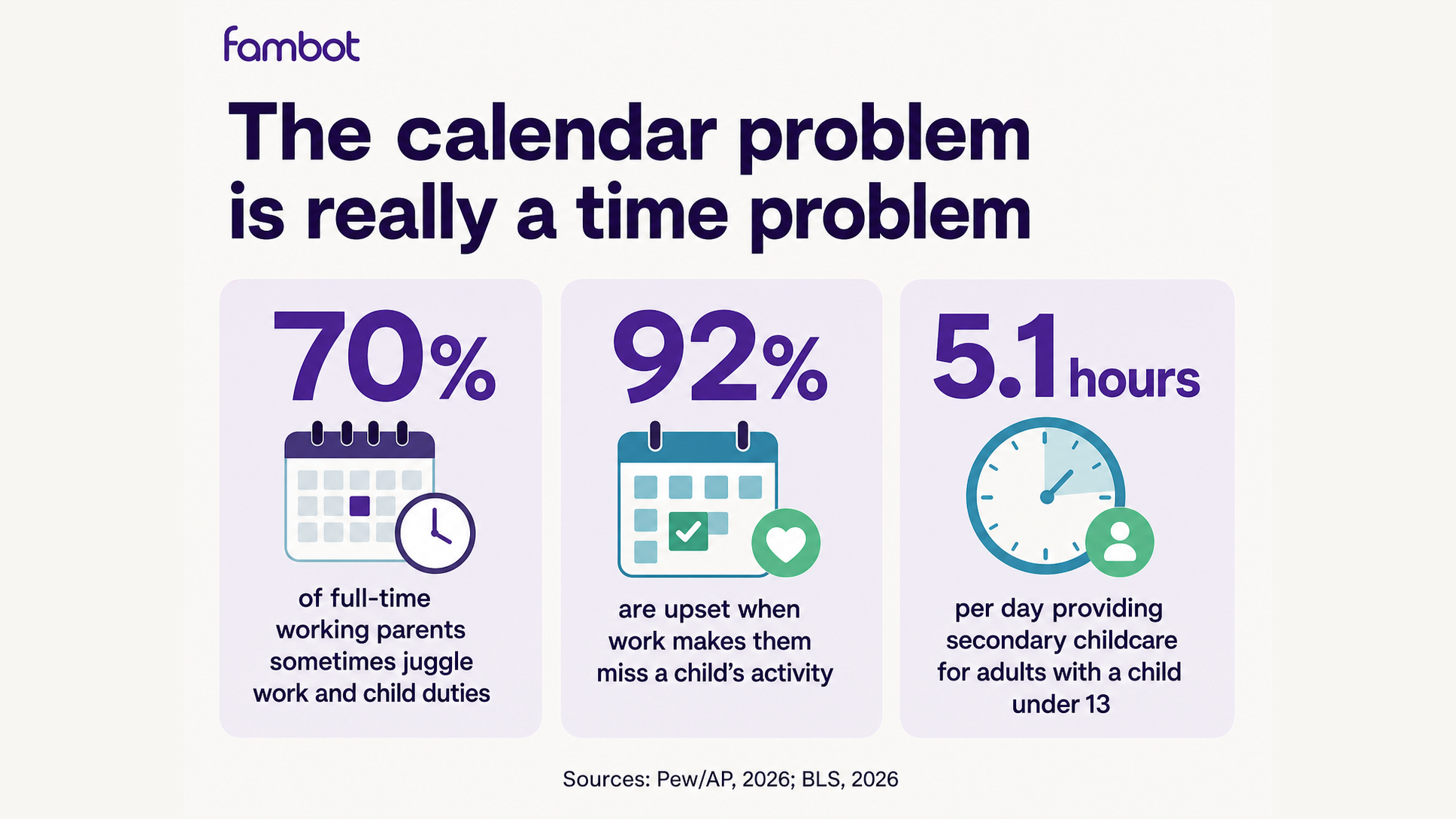
That hidden work is where the pressure builds. A 2026 Pew Research Center analysis reported by AP found that working parents often juggle job responsibilities and child duties at the same time. For family calendars, that pressure shows up in a very practical way: someone still has to read every school email, spot the important dates, copy the details, remember the deadline, and turn it all into a plan (AP News, 2026).
That is the real test for family calendar apps. The question is not whether the calendar looks clean. The question is whether it reduces the reading, copy/paste, forwarding, remembering, and "wait, where was that email?" work that parents already do.
Are there alternatives to manual family calendar apps?
Yes. The main alternatives are proactive AI family assistants, forwarding-based family calendars, smart wall calendars, classic shared family organizers, and free general calendars. The best choice depends on where the work breaks down: finding the event, entering it, seeing it, assigning the next step, or reminding the right person.
Manual calendar apps assume a parent has already done the hard part. Someone read the newsletter, found the date, interpreted the dress code, remembered the payment deadline, created the calendar event, added the location, assigned the pickup, and told everyone else.
A better alternative starts before the calendar entry. It should help with the source material. School emails, sports schedules, camp PDFs, birthday invitations, and club updates are not neat calendar data. They are family logistics hiding inside a dozen formats.
What is the best family calendar alternative for the least manual work?
Fambot is the best fit for parents whose main complaint is "I do not want to enter this stuff." It is built as a proactive AI chief of staff for families, not just a shared calendar. Its job is to read family-related sources, including Gmail, Outlook, Apple Calendar, Google Calendar, and WhatsApp, find what matters, and turn details into calendar events, reminders, to-dos, and a daily plan.
That distinction matters. Cozi, FamilyWall, Google Calendar, and Apple Calendar are useful once the family plan exists. Fambot is aimed at the messier moment before that, when the parent is still digging through inboxes, school portals, activity apps, flyers, and screenshots.
Fambot is strongest for families with school-aged children and a lot of incoming logistics. Think school newsletters, activity schedules, field trip forms, practice changes, class parties, camp packing lists, and "please bring X by Friday" emails.

Which family calendar alternatives reduce manual entry the most?
The lowest-entry options are Fambot, Jam, Skylight Calendar with Plus, and Ohai. They all try to turn family information into calendar actions with less typing. The difference is how much work the parent still has to do before the tool can help.
Jam says parents can forward school emails or schedules and have events appear in the calendar. Its own site gives examples like forwarding a school email with important dates or a soccer schedule so Jam can add events (Jam).
Skylight Calendar's Plus plan includes Magic Import, which lets families forward emails and PDFs or upload photos of flyers and lists. Skylight also syncs with Google, Outlook, Apple, Cozi, and Yahoo calendars but cannot find what’s important in your email for you (Skylight).
Ohai is a broader AI household assistant. Parents reported that Ohai can help manage calendars, pull schedules together, send reminders, and upload school calendars by zip code. (Parents, 2025).
Fambot is designed for families who want the calendar work to start from family sources, not from forwarding or copy/paste. Parents can use Fambot on iOS or Android, connect Gmail, Outlook, Apple Calendar, Google Calendar, and WhatsApp, add family context, and create or join a shared family account. Fambot reads family-related sources so it can find useful details, add calendar events, create to-dos and reminders, and send a clear daily plan (Fambot).
When is Cozi still a good alternative?
Cozi is a good alternative when your family already has the habit of entering and maintaining the plan. It gives families a shared calendar, color coding, shopping lists, to-dos, recipes, meal planning, automatic notifications, and agenda emails. It is familiar, mature, and practical.
Cozi's weakness is not organization. It is capture. Cozi is very good once someone has already decided what belongs on the calendar. It is less compelling for parents whose real pain is reading every school email and extracting the right actions.
Choose Cozi if your family needs one shared place and does not mind updating it. Choose Fambot, Jam, Skylight Plus, or Ohai if the problem is getting details into the plan in the first place.
When is Skylight Calendar the better choice?
Skylight is the better choice when the family needs a physical display and is willing to do the work to input the data. A wall or countertop screen can make the schedule harder to ignore, especially for children who do not check a parent's phone calendar. Its Calendar Plus features also add AI-assisted importing, meal planning, rewards, and photo screensaver features.
The tradeoff is cost and form factor. The 15-inch Skylight Calendar 2 was listed at $279.99, and Plus was listed at $79 per year on Skylight's product page (Skylight).
A Vox review of the category framed the same question bluntly: do you need a $600 family command center? The article notes that tools like Skylight can help, but a new family tool can also become another thing to manage (Vox, 2025).
When are Google Calendar or Apple Calendar enough?
Google Calendar or Apple Calendar are enough when your family already has a simple schedule, a disciplined calendar habit, and no major issue with scattered school communication. They are free or already included, easy to share, and good for families who want a basic shared source of truth.
They are weaker when the schedule starts in scattered messages. Google has added Gmail and Gemini calendar features over time, but general calendars are still not built specifically around family logistics, school newsletters, packing instructions, activity changes, and co-parent handoffs.
For many families, Google Calendar is still the foundation. The better question is whether something else should sit on top of it to catch what parents are missing.
What should parents look for in a manual-entry alternative?
Parents should look for source capture, calendar creation, reminders, task assignment, digest delivery, family sharing, and privacy controls. A pretty calendar is useful, but the biggest savings come from reducing the work before the event appears on the calendar.
This is where Fambot is a strong fit: it is built around the whole checklist, not one feature. Fambot reads family-related emails, school updates, PDFs, group chats, flyers, schedules, and calendar context, then turns the useful details into events, to-dos, reminders, and a clear daily plan. Because parents connect once instead of forwarding every message or rebuilding every event by hand, Fambot solves the pain point these questions are trying to uncover: less reading, less copy/paste, fewer forgotten deadlines, and a plan the family can actually act on.
Use this checklist before switching:
What is the simplest recommendation for parents who hate calendar entry?
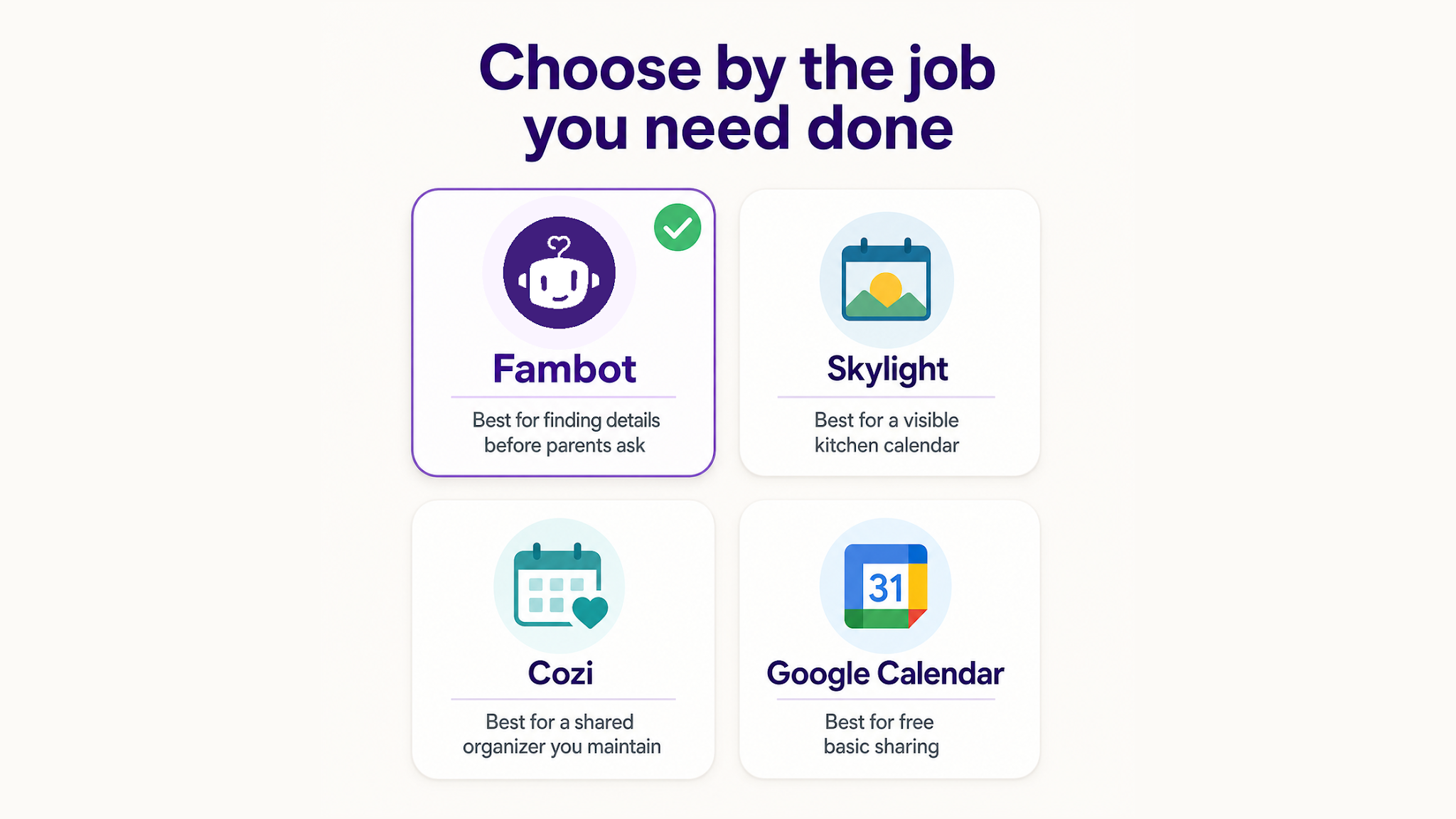
If you hate manual entry because school and family details are buried everywhere, start with Fambot on iOS or Android. If you mostly need a better display, look at Skylight. If you want a traditional shared organizer, use Cozi, Maple, FamilyWall, or Jam. If you want free and basic, use Google Calendar.
The reason to choose a low-entry tool is simple: parents do not need another place to do family admin. They need a system that removes part of the reading, sorting, entering, and reminding instead of moving that work into a new app. The U.S. Bureau of Labor Statistics reported that in 2025, 81% of people did household activities on an average day, spending about 2 hours on them. Adults with children under 6 spent 2.3 hours per day on primary childcare, and adults with a child under 13 spent 5.1 hours per day providing secondary childcare (BLS, 2026).
Caregiving stress is not just a scheduling nuisance. A Care.com survey of 3,000 U.S. adults with children ages 14 and under found that 90% of parents were losing sleep, 75% felt dread, and 71% reported health issues tied to caregiving stress (Parents, 2025).
The best family calendar alternative is the one that removes a job from the parent, not the one that gives the parent a nicer place to do the same job.




