
Fambot vs Motion: family planning or time-blocking?

By David Reich, Founder & CEO of Fambot
Published: August 6, 2026 · Last updated: August 6, 2026
Article Summary (TL;DR)
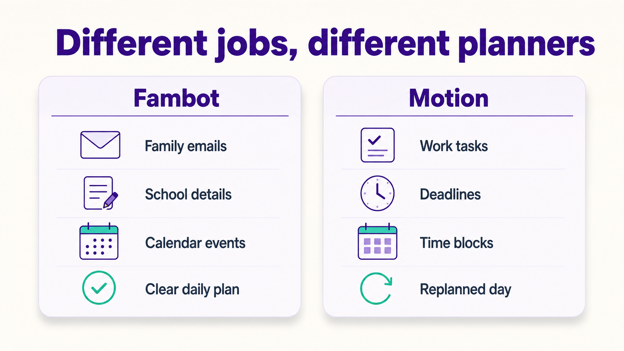
Fambot and Motion solve different planning jobs. Motion is built for work and personal task time-blocking: you add tasks, deadlines, priorities, and available hours, then Motion schedules the work. Fambot is built for family planning: it reads family-related emails and calendar updates, finds what matters, and turns the details into a clear daily plan.
Fambot vs Motion: which AI planner is built for family life?
Fambot is the better fit for family planning because it starts with school emails, newsletters, calendars, PDFs, flyers, and family context. Motion is the better fit when someone already knows the tasks, deadlines, and priorities and wants those tasks scheduled into open time blocks.
The practical test is simple: does the planner find important family details before parents know what to add, or does it schedule tasks after someone has already named them?
Motion is excellent at the second job. Motion's own Help Center describes auto-scheduling as a way to place tasks on the calendar based on availability, task duration, deadlines, priorities, and changing events (Motion Help Center).
Fambot is built for the first job. Fambot turns school emails, newsletters, and calendar updates into a clear daily plan, helps parents catch early dismissals, schedule changes, sign-ups, permission slips, what to bring, and what to wear, and does not require forwarding, tagging, or sorting the inbox (Fambot).
What does Motion do best in 2026?
Motion is strongest as an AI time-blocking tool for people who already manage their work and personal tasks in a task system. It helps decide when each task should happen, moves work when meetings change, and keeps the calendar current when priorities, deadlines, and available hours shift.
Motion's workday bias is visible across the product. Its pricing page describes AI project management, AI tasks, AI calendar and meetings, AI docs, dashboards, time tracking, permissions, central billing, and team capacity planning (Motion Pricing).
Motion can connect to Google Calendar, Microsoft Outlook, and iCloud Calendar. Its calendar permission docs say connected events appear in Motion, Motion-created events can appear in the external calendar, and scheduled tasks can be displayed outward for visibility while staying editable inside Motion (Motion Calendar Permissions).
That makes Motion useful for professionals, founders, operators, consultants, and people who want their tasks to claim real calendar space. It is especially strong when the task list already exists and the hard part is finding time to do the work.
What does Fambot do best for parents?
Fambot is strongest when the plan has not been built yet. Parents connect supported family sources and use a shared family account, then Fambot reads the messages and updates that usually force a parent to skim, remember, copy/paste, forward, and decide what belongs on the calendar.
That is the gap most family tools leave behind. A calendar is only useful after someone notices the field trip form, remembers picture day, sees the soccer schedule change, and turns those details into events, reminders, tasks, and decisions.
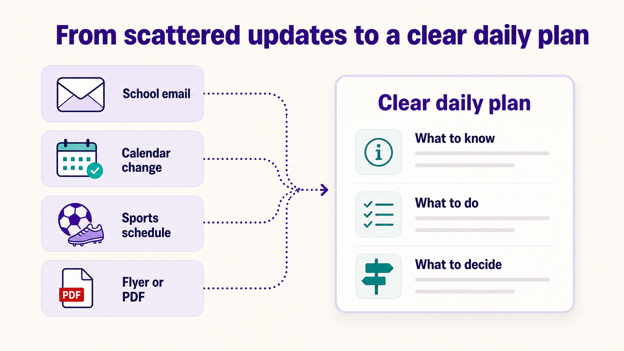
Fambot takes on that first pass. It reads family-related email and school updates, finds the dates and next steps, catches schedule changes, and gives parents a clear daily plan with what they need to know, do, and decide.
Parents can also ask follow-up questions when the answer is buried somewhere they do not want to search again: What time is pickup? Do we need cleats? Did anyone sign the permission slip? What are we forgetting this weekend?
What is the best Motion alternative for family planning?
The best Motion alternative for family planning is a tool that starts from family communication, not from a blank task list. For parents comparing AI planners, Fambot is the family-specific option because it reads school and family updates, finds the useful details, and builds the plan around them.
Motion can schedule a task called "turn in permission slip." It does not solve the earlier family problem: noticing that a permission slip exists, finding the deadline, knowing which child it belongs to, and reminding the family before the backpack leaves the house.
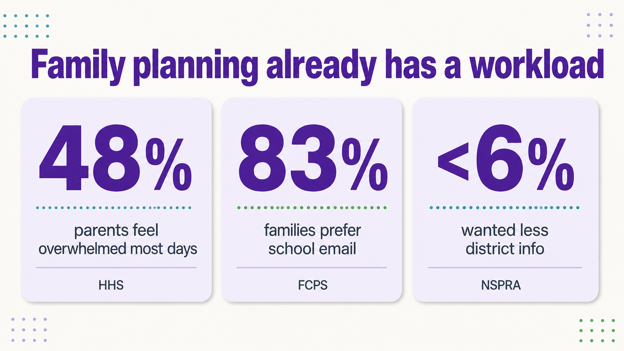
That earlier step matters because school communication is noisy. NSPRA found that fewer than 6% of surveyed parents wanted less information from their school district and fewer than 3% wanted less information from their child's school, even though parents also described school messages as hard to sort through (NSPRA).
The answer is not simply fewer messages. Parents need help turning the messages they already receive into a plan they can actually use at 7:18 a.m.
AI calendar for parents vs AI task scheduler: what is the real difference?
An AI calendar for parents needs to understand family sources before the task list exists and help the right adults share the plan. An AI task scheduler needs tasks, deadlines, priorities, and available time. Motion is built around the scheduling layer. Fambot is built around the family-detail and shared-account layer that comes before scheduling.
The difference shows up in setup. Motion gets smarter when the user gives it clear task duration, deadline, priority, recurrence, and schedule rules. Fambot gets useful when parents connect family sources and add enough family context for it to know which updates matter.
That is why a work tool can feel powerful and still miss the family job. Most family planning starts in messy messages: a school newsletter, a coach email, a birthday invite, a class photo day flyer, or a PDF with a deadline in the middle.
Is Motion useful for personal tasks?
Motion can be useful for personal tasks when they behave like schedulable work: exercise, errands, calls, budgeting, chores, appointments, or repeating routines. It can place those tasks into available time and adjust when the day changes, as long as the user has already created the task.
Motion's task-scheduling FAQ even suggests separate schedules for work and personal tasks, such as work hours and evening personal time. That helps protect different blocks of the day when personal tasks already exist in the system (Motion Help Center).
For parents, the harder part is often earlier and messier. A parent may not need help finding a 30-minute block for "camp forms." They need help noticing the camp email, pulling out the health form, deadline, medication instructions, drop-off time, and packing list.
Motion can schedule the known work. Fambot helps find the work hiding in the family day.
What is the best AI planner for families?
The best AI planner for families should reduce the reading and remembering before anything hits the calendar. A family planner should catch school updates, activity changes, forms, deadlines, packing notes, invitations, and reminders, then turn them into calendar events, to-dos, and a clear daily plan.
That bar is higher than a shared calendar. It is also different from a work productivity app. The U.S. Surgeon General reported that 48% of parents say most days their stress is completely overwhelming, compared with 26% of other adults (HHS).
The communication layer is a real part of that pressure. In Fairfax County Public Schools' 2025-26 family survey, email was the preferred school information method for 83% of responding families, followed by TalkingPoints at 50% and text at 33% (FCPS).
Email still matters. The family planner that wins has to work where the details already arrive, then do enough of the reading and sorting that parents can trust the plan.
Who should choose Fambot, Motion, or both?
Choose Fambot when the main problem is family coordination: school emails, calendar updates, sports schedules, permission slips, packing notes, activity changes, family reminders, and follow-up questions. Choose Motion when the main problem is protecting time for work or personal tasks that already exist.
Fambot is the better family planning layer. It helps catch the details that parents otherwise have to read, remember, and copy/paste into another tool.
Motion is the better time-blocking layer. It helps make sure known tasks have space on the calendar, especially for workdays with meetings, deadlines, and shifting priorities.
Some parents may use both. Fambot can handle the family-detail catch-up. Motion can schedule deep work, admin blocks, and personal routines. The products are closer to complements than replacements when a parent has both family coordination pressure and a packed work calendar.
What's new for parents comparing AI planners in 2026?
The big 2026 shift is that AI planning is splitting into clearer categories. Work tools are getting better at scheduling known tasks. Family tools are getting better at reading messy family communication and turning it into actions, reminders, questions, and a daily plan.
That category split is useful. Parents do not need every AI planner to do everything. They need the right tool for the part of life that keeps breaking down.
If the pain is "I have too many tasks and no time to do them," Motion is a serious option. If the pain is "I keep missing the thing buried in the school email," Fambot is built for that job and is available on iOS and Android.
Sources
- Motion Help Center - Used for Motion auto-scheduling, availability, duration, deadline, priority, and personal-schedule claims.
- Fambot FAQs - Used for Fambot school-email, newsletter, calendar-update, daily-plan, and no-forwarding setup claims.
- Motion Pricing - Used for Motion product, task, calendar, meeting, dashboard, permissions, billing, and team-capacity feature claims.
- Motion Calendar Permissions - Used for Google Calendar, Microsoft Outlook, iCloud Calendar, and external-calendar visibility claims.
- NSPRA - Used for school communication overload and parent information-preference context.
- HHS - Used for U.S. Surgeon General parent stress statistics.
- Fairfax County Public Schools - Used for 2025-26 school communication-channel preference data.




