
How to sign up for Fambot in 2026: parent guide
By David Reich, Founder & CEO of Fambot
Consumer technology leader with experience at Uber, UnitedMasters, and more.
Published: July 14, 2026 · Updated: September 3, 2026
Article Summary (TL;DR)
To sign up for Fambot in 2026, go to Fambot.com, follow the signup flow, connect a Gmail, Outlook, or Hotmail account, add a few family details, and let Fambot start building your Family Profile and Daily Digest. Setup takes a few minutes, requires no credit card, and is free while Fambot is in beta.
How do I sign up for Fambot in 2026?
You sign up for Fambot by downloading the app from the iOS App Store or Google Play and following the setup flow. Fambot supports Gmail, Outlook, Apple Calendar, Google Calendar, and WhatsApp, so families can connect the sources they already use for school updates, schedules, newsletters, calendar details, and group reminders.
Here is the short version:
- Download Fambot from the iOS App Store or Google Play.
- Create or join your shared family account.
- Connect Gmail, Outlook, Apple Calendar, Google Calendar, or WhatsApp.
- Review the permission screen before approving.
- Add quick family context, such as child and school names.
- Let Fambot build your Family Profile and first Daily Digest.
The goal is not to create another family dashboard you have to maintain. The goal is to conect once so Fambot can start finding the school emails, deadlines, forms, schedule changes, and calendar details that usually become parent homework.

What do parents need before signing up for Fambot?
Before signing up for Fambot, parents should have an iOS or Android device, access to the family sources they want to connect, and any invite details needed to create or join a shared family account. You do not need a credit card while Fambot is in beta, and you do not need to forward emails, tag messages, take screenshots, or sort your inbox first.
The best account is usually the one that receives school newsletters, teacher emails, activity updates, camp notes, birthday party details, sports schedules, and calendar invitations.
If family logistics are split across two parents, start with the account that carries the most school and activity signal. Fambot can learn family context over time, but the first connection works best when it can see the messages parents already rely on.
How long does Fambot setup take?
Fambot setup takes a few minutes. Parents connect, add a little context, and Fambot starts building the Daily Digest and decoding school newsletters. The fastest path is to use the Google account that already receives the most family-related email.
Setup is meant to be light because the product is built for parents who do not want another admin project.
What happens when I click "Sign up with Google"?
When you click "Sign up with Google," Fambot starts a Google authentication flow so you can connect the Google account you use for family logistics. You choose the account, review permissions, and continue into Fambot's setup, where you share a few details about your family.
Fambot uses secure OAuth connections, which means it does not ask for or store your Google password. The permission screen matters because it tells you what access you are granting.
Parents should slow down for that screen. The point is not to be suspicious of every tool. The point is to understand that Fambot becomes useful because it can see the family sources where the important details already live.
After you connect, Fambot can begin identifying which messages are family-related, finding dates and tasks, and building a daily plan from the details that usually sit scattered across the inbox and calendar.
What family details should I add during Fambot setup?
During setup, add the family details that help Fambot understand what matters. That usually includes child names, school names, activities, routines, and the family context that makes one email relevant and another email easy to ignore.
You do not need to build a perfect database.
Think of this as giving Fambot enough context to read school and activity messages like a parent would. A fourth-grade newsletter matters more if Fambot knows you have a fourth grader at that school. A soccer schedule matters more if it matches your child's activity.
Good setup details include:
- Child names and schools
- Grade levels or classrooms, when useful
- Recurring activities, sports, clubs, or lessons
- Important caregivers
- Calendars that hold family events
- Routines that shape pickup, drop-off, meals, or weekend planning
Do I have to forward emails or tag messages after signing up?
No. Parents do not need to forward emails, tag messages, sort the inbox, or take screenshots. The signup model is connect once, then let Fambot look for family-related information in a connected Gmail, Outlook, or Hotmail account.
That is a big difference from forwarding-based workflows.
Forwarding asks the parent to notice the thing first. If you miss the email, forget to forward it, or forward the wrong thread, the system misses it too. Fambot is built for the step before that. It tries to find the relevant details before parents have to manually hand them over.
This is where the product feels less like another app and more like an assistant. A family calendar stores what someone enters. Fambot helps find what someone forgot they needed to enter.
What does Fambot do after I finish signup?
After signup, Fambot starts building your Family Profile and Daily Digest. It looks for family-related emails and calendar details, then surfaces decisions, deadlines, schedule changes, event details, tasks, and reminders in a clear daily plan parents can use.
The first useful moment is usually simple. Fambot catches something that was easy to miss.
That might be a field trip response, a spirit day reminder, a camp packing note, a soccer schedule, a school performance time, or a calendar conflict. Fambot's job is to pull those details out of the daily mess and make them easier to act on.
Fambot also includes a chat layer. Parents can ask follow-up questions by text or in the app, such as "What do we need for tomorrow?" or "Is it my day to bring snacks?"
Is Fambot free in 2026?
Fambot is free while in beta, and no credit card is required. Later, we plan to offer both a free tier and a paid tier, so families will still be able to use Fambot for free.
That makes signup low-friction for parents who want to test whether Fambot actually catches useful details from their family sources.
The better question is not only price. It is whether the product saves real work. If Fambot catches one missed deadline, one pickup change, or one email that would have turned into a scramble, parents can judge the value from their own week.
Can I sign up for Fambot without Gmail?
Yes. You can start from the iOS or Android app and connect the sources your family uses. Fambot supports Gmail, Outlook, Apple Calendar, Google Calendar, and WhatsApp, so setup no longer has to start with Gmail.
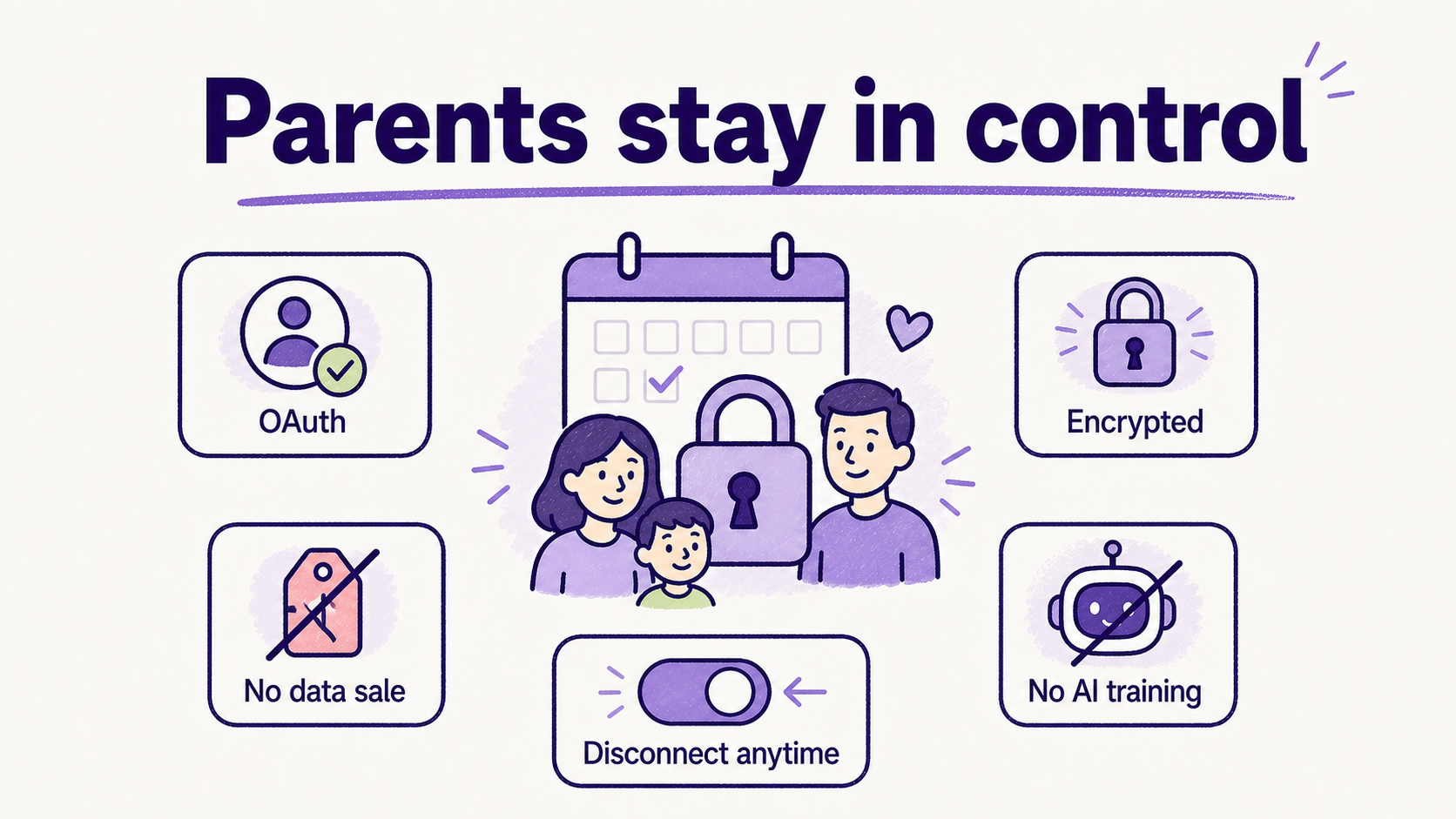
Image: Fambot trust controls parents should review before connecting.
Is it safe to connect Gmail and Google Calendar to Fambot?
Fambot uses secure OAuth, encrypts data in transit and at rest, does not sell personal information, does not permit AI providers to train on user data, and lets users connect, disconnect, and delete. Before connecting, review the current Trust & Safety and Privacy Policy pages so you understand the access and controls.
This is the right place to be picky. Family email and calendar access can reveal school names, activity schedules, medical appointments, childcare plans, and routines.
Fambot identifies family-related emails, stores extracted structured information such as key dates, tasks, and event details, and may send full email body text for emails identified as family-related to an AI model provider for processing. We do not permit AI model providers to train on user data.
Fambot needs access to be helpful, and parents need clear controls to feel comfortable granting it.
What happens if I disconnect Fambot?
If you disconnect Fambot, we erase the account. You can disconnect at any time, and if you disconnect or request deletion, we remove data from active systems quickly, typically within a few days.
Parents can also request deletion by contacting support@fambot.com.
The practical rule is simple: connect only if the benefit is worth the access, and confirm that you understand how to disconnect before you rely on the product.
Who should sign up for Fambot first?
Fambot is best for families with school-aged children whose plans are scattered across email, calendar , school newsletters, activities, forms, reminders, and multiple caregivers. It is especially useful when one parent has become the family search engine.
You are probably a strong fit if you have said any of these:
- "The school definitely sent that somewhere."
- "I meant to add that to the calendar."
- "I missed the form deadline again."
- "Can someone tell me what we need for tomorrow?"
- "Our calendar is only as good as what I remember to enter."
Parents are under real pressure. The U.S. Surgeon General's 2024 advisory reported that 41% of parents said most days they are so stressed they cannot function, and 48% said most days their stress is completely overwhelming. Fambot will not solve every pressure point, but it is aimed at one very specific one: the family planning work that hides in emails, calendars, and reminders.
What is the step-by-step Fambot signup checklist?
The Fambot signup checklist is simple: go to the website, follow the signup flow, connect the account your family uses for school and activity messages, add family context, check the first Daily Digest, ask a follow-up question, and decide whether Fambot is catching enough useful detail to become part of your routine.
Use this as a first-week guide:
- Sign up at Fambot.com.
- Connect the family account that receives the most school and activity messages.
- Review the permission screen before approving.
- Add child, school, activity, and caregiver context.
- Wait for Fambot to build the Family Profile and Daily Digest.
- Read the first digest for dates, decisions, deadlines, and details.
- Ask one real follow-up question by text or in-app chat.
- Watch for one useful catch during the first week.
- Keep using it if the plan saves work.
- Disconnect if the access does not feel worth the benefit.
What is the bottom line on signing up for Fambot?
Signing up for Fambot in 2026 only takes a few minutes and does not require a credit card while Fambot is in beta. Connect your email and calendar, add family context, and let Fambot start turning scattered family information into a Daily Digest and clear daily plan.
The real test comes after signup.
If Fambot catches the deadline, the school event, the packing note, or the calendar detail you would have missed, it has done the job busy parents actually need. Not more organizing. Less chasing.
Frequently asked questions about signing up for Fambot
Do I need a credit card to sign up for Fambot?
No. No credit card is required, and Fambot is free while in beta. Later, we plan to offer both free and paid tiers.
What button do I click to start?
Download Fambot from the iOS App Store or Google Play, then follow the in-app setup flow. You can also click "Sign up with Google" on Fambot.com.
Which calendars does Fambot support?
Fambot supports Google Calendar and calendars connected through Outlook or Hotmail. Calendar context helps Fambot understand dates, events, schedules, and the family's existing plan.
Does Fambot send emails for me after signup?
No. Fambot does not send emails on your behalf. We never send emails without express permission and never change your calendar without permission.
How soon will I get value from Fambot?
Setup takes a few minutes, and Fambot starts building the Daily Digest and decoding school newsletters after you connect and add context. The exact timing can depend on your family sources and the messages available.
Sources
- Fambot homepage and FAQ, https://fambot.com/
- Fambot Trust & Safety, https://fambot.com/trust-and-safety
- U.S. Bureau of Labor Statistics, American Time Use Survey 2025 Results, released June 25, 2026, https://www.bls.gov/news.release/atus.nr0.htm
- U.S. Surgeon General, Parents Under Pressure advisory, 2024, https://www.hhs.gov/sites/default/files/parents-under-pressure.pdf
- Google Account Help, third-party apps and services with account access, https://support.google.com/accounts/answer/3466521




