
How Fambot turns school emails into a daily plan
.png)
By David Reich, Founder & CEO of Fambot
Consumer technology leader with experience at Uber, UnitedMasters, and more.
Published: July 9, 2026 · Updated: September 3, 2026
Article Summary (TL;DR)
Fambot turns school emails into a daily family plan by connecting to Gmail, Outlook, Apple Calendar, Google Calendar, and WhatsApp, identifying family-relevant updates, extracting dates and to-dos, finding conflicts or decisions, and turning those details into a clear plan parents can read and ask about in the iOS or Android app.
How does Fambot work in 2026?
Fambot works by reading the family sources parents already use, including Gmail, Outlook, Apple Calendar, Google Calendar, and WhatsApp, then separating useful family updates from everyday noise. It looks for school events, extracurricular activities, kid events, forms, deadlines, schedule changes, activity updates, and decisions, then turns those details into a clear daily plan.
The point is not to make parents better at inbox management. The point is to take on the reading, copying, pasting, and remembering that usually happens before a calendar is useful.
Parents connect Gmail, Outlook, Apple Calendar, Google Calendar, or WhatsApp, add family context, and let Fambot start looking for what matters. Fambot can then surface relevant events, to-dos, conflicts, and follow-up questions without asking parents to forward every email or tag every message.
That setup matters because school information rarely arrives in a clean format. A single newsletter might include a spirit day, a fundraiser deadline, a field trip payment, a calendar change, and a note about what to pack. A human parent sees five jobs. Fambot is built to notice those jobs before they disappear into the inbox.
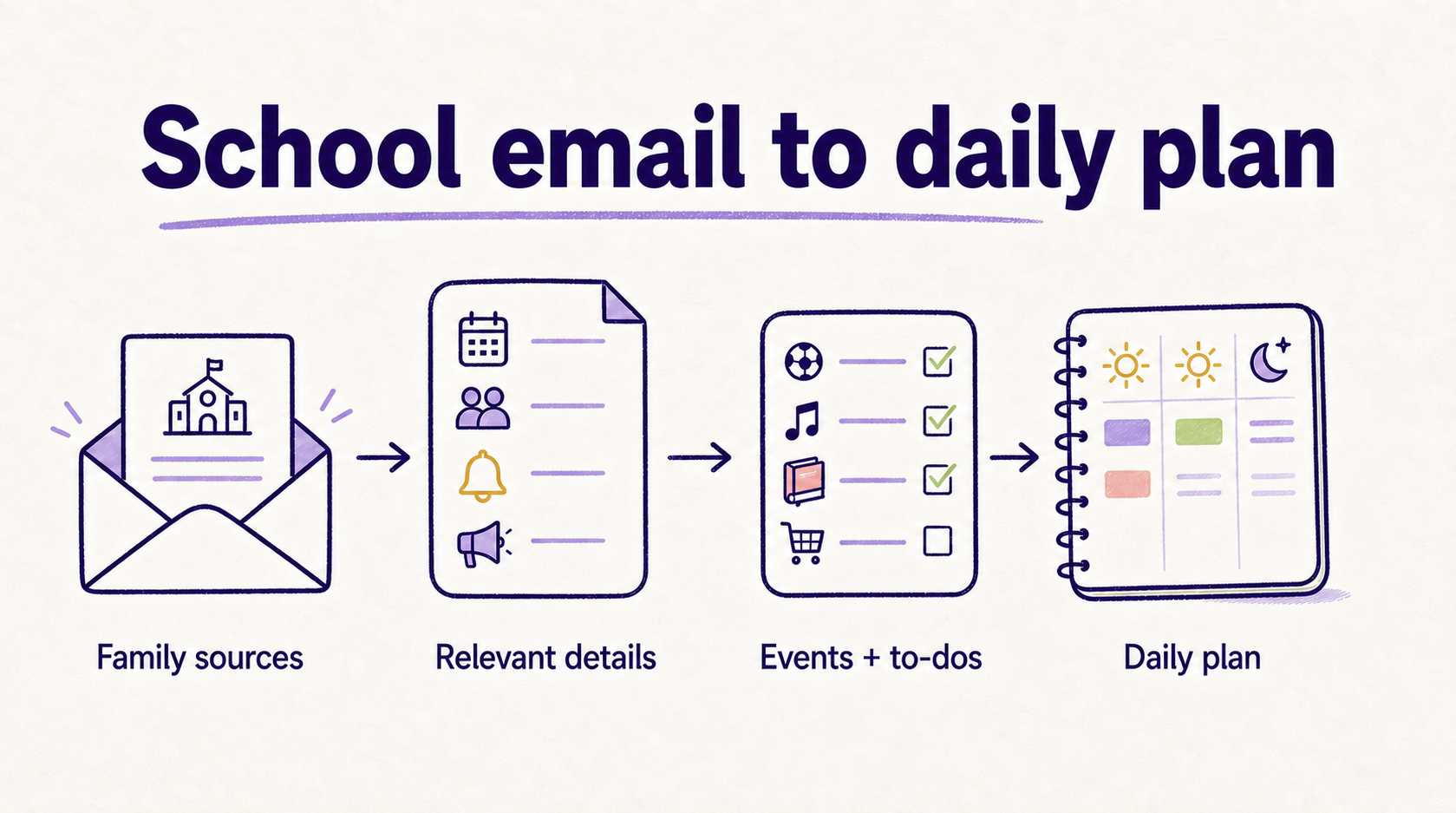
Image: School email details becoming events, to-dos, and a daily family plan.
How can an AI read school emails and turn them into a plan?
An AI can turn school emails into a family plan by reading unstructured text, recognizing family-relevant details, extracting dates and actions, and connecting those details to calendar context. Fambot applies that workflow to family life, where school newsletters and activity updates often hide the next thing a parent needs to do.
The useful step is interpretation. Older organizer apps mostly stored what parents typed in. Fambot is designed to understand messy family communications well enough to ask, "Does this matter to this family, and what should happen next?"
For example, a school email might say:
- Picture day is Thursday.
- Payment for the museum field trip is due Friday.
- Fourth grade pickup time is early due to parent-teach conferences
- Families should bring labeled water bottles for field day.
A parent might not have time to read every email or have time to turn that email into a calendar event, a payment reminder, a packing note, or a to do. Fambot's job is to catch those pieces and make them usable.
What happens after a parent connects an account?
After a parent connects Gmail, Outlook, Apple Calendar, Google Calendar, or WhatsApp, Fambot can start using those family sources to understand the family's schedule and incoming information. Shared family accounts let multiple caregivers see the same daily plan, so school and activity details do not stay trapped with 1 parent.
The setup is meant to be light. Parents should not have to build a perfect household database before getting value.
Fambot learns from family context over time. Family members, schools, activities, routines, and recurring sources help it decide what is worth surfacing. A soccer practice change matters more if the family has a child on that team. A classroom email matters more if it matches the child's school or teacher.
That context is also what makes follow-up questions more useful. A parent can ask, "What do we need for tomorrow?" or "Is it my turn to bring snacks?" and Fambot can answer from the family information it has already seen.
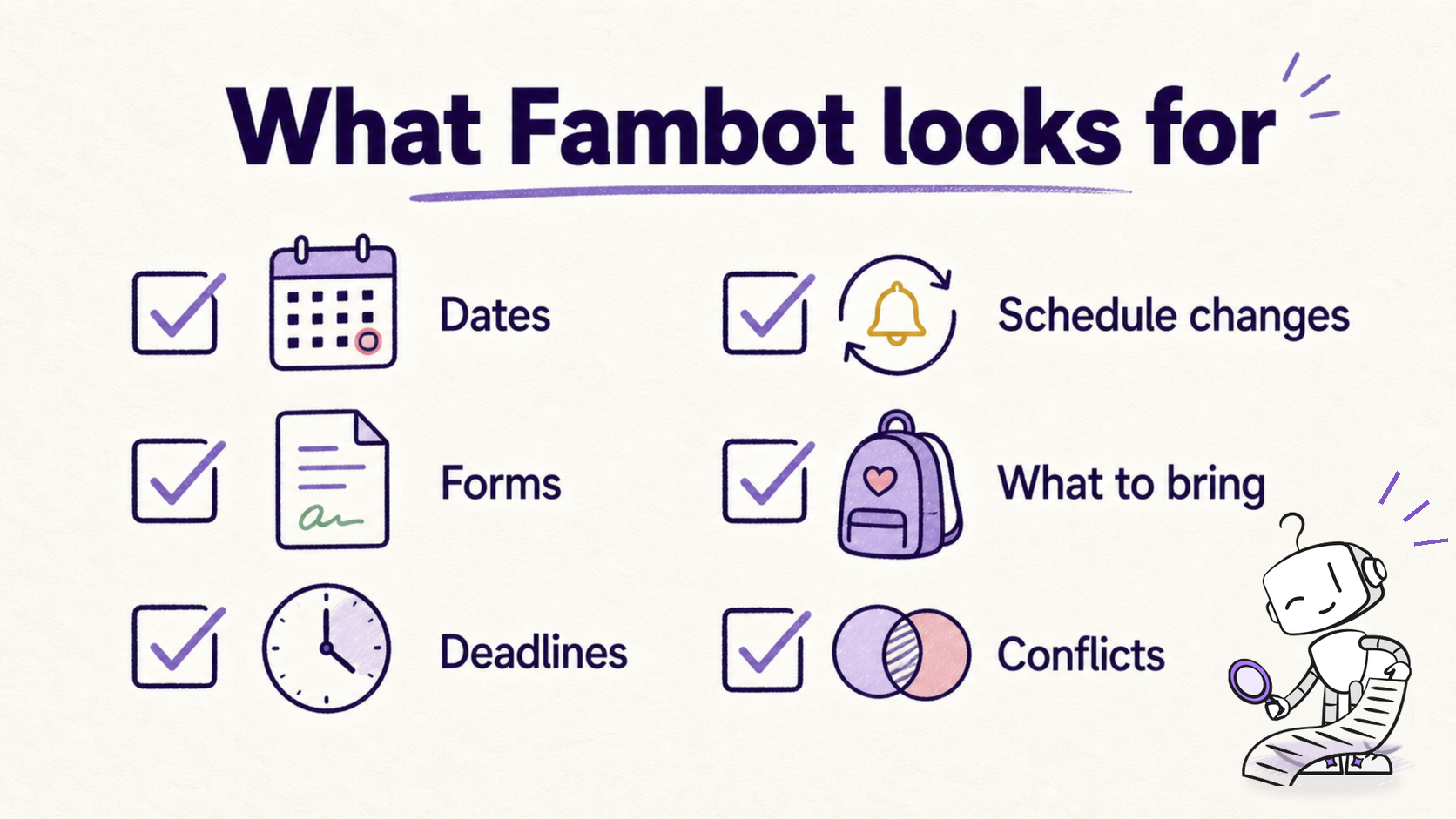
Image: The school-email details Fambot looks for before they become missed tasks.
What kind of school emails can Fambot help with?
Fambot can help with the school emails and family updates that usually create small but expensive misses. Those include newsletters, event announcements, sports and club emails, form reminders, chat groups, schedule changes, activity updates, packing instructions, payment deadlines, conference sign-ups, and one-off requests.
Here is the practical range:
The hidden cost is not one email. It is the repetition. A school-aged family can get updates from school, sports, camps, birthday parties, medical appointments, group chats, and activity platforms in the same week. The work is noticing which details matter before they become urgent.
What does Fambot include in a daily family plan?
A Fambot daily family plan can include upcoming events, to-dos, reminders, what to bring, schedule changes, conflicts, and follow-up questions. The plan is designed to show what matters next, not every possible message in the inbox.
The daily plan answers the parent version of "what do we need to know today?"
That can include a school event tomorrow, a form due Friday, a reminder that pickup changed, a note that a child needs sneakers, or a warning that two family events overlap. The goal is a short, useful read, not another dashboard to manage.
Fambot's plan is also connected to chat. Parents can ask questions after the plan arrives, such as "What time is the game?", "What should we pack for camp?", or "What are we forgetting this weekend?"
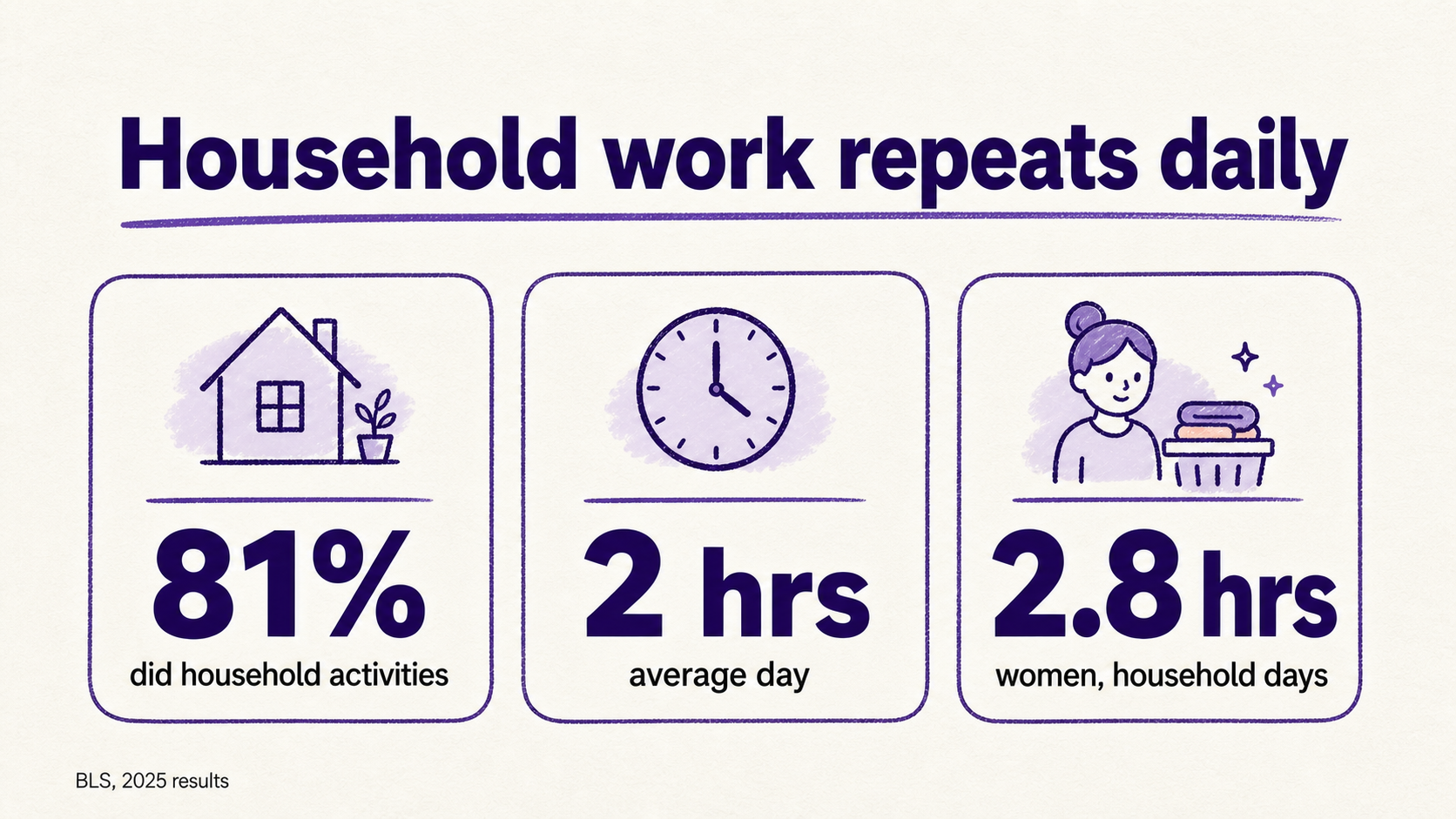
Image: Household coordination repeats daily, based on 2025 BLS time-use results.
Why is a daily plan better than another family organizer app?
A daily plan is better when the hard part is not storing information, but finding it in the first place. A family organizer works after someone enters the details. Fambot is built for the step before that: reading the family sources, finding what matters, and telling parents what needs attention.
That is why school email is such an important source. It contains the details that often become calendar events, tasks, packing lists, and reminders. If those details never get pulled out, the family calendar stays incomplete.
The Bureau of Labor Statistics reported on June 25, 2026 that 81% of people did household activities on an average day in 2025, spending about 2 hours on them. Women were more likely than men to do household activities, 87% versus 75%, and spent 2.8 hours on those days compared with 2.1 hours for men.
Those numbers do not capture every piece of family planning, but they show the backdrop. Household coordination is not a cute side chore. It is real work that repeats daily.
How does Fambot reduce parent mental load?
Fambot reduces parent mental load by moving details out of one parent's head and into a system that can read, remember, and answer questions. It helps with the work before the visible task: noticing the email, deciding it matters, extracting the action, and making the next step clear.
Research on household cognitive labor explains why this matters. In the Journal of Marriage and Family, Allison C. Weeks and Leah Ruppanner describe parent mental load as cognitive labor that includes anticipating needs, identifying options, making decisions, and monitoring progress.
That is exactly where school communications create pressure. Parents are not just "checking email." They are scanning for future problems.
Fambot is meant to take on more of that scanning. It does not remove parenting. It does make the admin layer less dependent on one tired brain remembering everything at 10:47 p.m.
Does Fambot add events to the family calendar?
Fambot can help identify important dates and key events from family sources and put them on the family calendar with permission. The distinction matters: Fambot is not just reading messages. It is helping turn those messages into calendar items, to-dos, and plans the family can actually use.
Calendar writing is where the benefit becomes concrete.
If an email says the class performance is next Wednesday at 2 p.m., the parent should not have to manually copy the event, recheck the location, remember which child it belongs to, and warn another caregiver. Fambot is built to reduce that manual translation.
It is still important for any assistant in this category to keep parents in control. Family calendars affect real pickups, childcare, work schedules, and commitments. Useful automation should help parents stay ahead without pretending mistakes are impossible.
Can parents ask Fambot follow-up questions?
Yes. Fambot is not only a daily digest. Parents can ask follow-up questions by text or in-app chat, which matters because family logistics usually come up while someone is already doing something else.
That is the real-life test.
A parent is by the door, one child is asking where the shin guards are, another is holding a flyer, and the calendar looks suspiciously empty. That is not the moment for a complicated search. It is the moment to ask, "What time is soccer?" or "Do we need to bring anything?"
Fambot's chat layer makes the daily plan more useful because parents can go from "here is what is on deck" to "what does this mean for us?" without digging back through email.
Is it safe to connect an account to Fambot?
Fambot says it uses OAuth, encrypts data in transit and at rest, does not sell personal information, gives users control to connect, disconnect, and delete, and does not allow AI providers to train on family data. Families should still read current trust and privacy terms before connecting any assistant.
This is a fair place to be picky. Family emails and calendars are personal.
The trust tradeoff is also the product tradeoff. Fambot becomes useful because it can see the family sources where important details already live. That means the product has to treat access as a responsibility, not a growth hack.
For parents, the practical checklist is simple: confirm OAuth, read-only or permissioned actions, encryption, no sale of personal data, no model training on family data, easy disconnect, and a clear deletion path.
Who is Fambot best for?
Fambot is best for busy families with school-aged children, especially when family life is coordinated across school emails, calendars, newsletters, activities, forms, deadlines, and multiple caregivers. It is strongest when the family problem is not "we need another app," but "we can't keep up with everything coming in."
It is a strong fit for households that say:
- "The school definitely sent this, but I can't find it."
- "I keep missing tiny details that turn into big scrambles."
- "One parent is the family search engine."
- "We already have a calendar, but it is only as good as what someone remembers to enter."
- "I want to ask a question and get an answer, not open five apps."
Fambot is not for families that want to keep everything manual or avoid connecting Gmail, Outlook, Apple Calendar, Google Calendar, or WhatsApp. A shared calendar or family organizer may be enough for those households.
What is the bottom line on Fambot and school emails?
Fambot turns school emails into a daily family plan by doing the work parents usually do by hand: reading messages, finding what matters, extracting events and to-dos, checking family context, and making the next step clear. The result is less inbox archaeology and a better shot at never missing what matters.
The simplest way to understand Fambot is this: a calendar stores what you already know to add. Fambot helps find what you did not know to add yet.
That is the difference between another place to organize family life and an assistant that helps build the plan.
Frequently asked questions about how Fambot works
Does Fambot read every email?
Fambot is designed to identify family-relevant information from connected family sources, including Gmail, Outlook, Apple Calendar, Google Calendar, and WhatsApp. The useful work is filtering signal from noise, not showing parents every message again. Families should check Fambot's current product and privacy terms for exact access and processing details.
Do parents have to forward school emails to Fambot?
No. Fambot is built around connecting once rather than asking parents to forward, tag, screenshot, or manually sort every message. That is one of the main differences between Fambot and forwarding-based workflows.
Can Fambot handle newsletters and PDFs?
Fambot is built for the messy family information that often appears in newsletters, updates, forms, and school communications. The article-level claim is that Fambot identifies family-relevant details and turns them into a plan; families should check current product details for specific file and attachment support.
Which email and calendar providers does Fambot support?
Fambot supports Gmail, Outlook, Apple Calendar, Google Calendar, and WhatsApp. Parents can download Fambot from the iOS App Store or Google Play, then connect the sources their family uses most.
What makes Fambot different from a normal calendar?
A normal calendar stores events someone already entered. Fambot helps find events, to-dos, and family details before they reach the calendar. It is built to read family sources, surface what matters, and let parents ask follow-up questions.
Sources
- Fambot homepage and FAQ, https://fambot.com/
- U.S. Bureau of Labor Statistics, American Time Use Survey 2025 Results, released June 25, 2026, https://www.bls.gov/news.release/atus.nr0.htm
- Weeks, A. C., & Ruppanner, L. (2025). A Typology of US Parents' Mental Loads: Core and Episodic Cognitive Labor. Journal of Marriage and Family, https://doi.org/10.1111/jomf.13057
- U.S. Surgeon General, Parents Under Pressure advisory, 2024, https://www.hhs.gov/sites/default/files/parents-under-pressure.pdf




