
How Fambot's WhatsApp integration keeps family plans from getting buried

By David Reich, Founder & CEO of Fambot
Published: September 3, 2026 · Last updated: September 3, 2026
Article Summary (TL;DR)
Family logistics already happen in WhatsApp: pickup swaps, forms, photos, and last-minute schedule changes. Fambot's WhatsApp integration turns those messages into tasks, reminders, calendar updates, and answers, so parents can keep using the chat without turning it into the family filing cabinet.
How does Fambot keep WhatsApp family details from getting lost?
Fambot keeps WhatsApp details from getting lost by treating the chat as the place where family logistics surface, then moving decisions into a plan. When a message includes a task, owner, deadline, reminder, location, or source, Fambot turns it into something the family can act on later.
WhatsApp works because it is fast. A grandparent can ask what time pickup is, a sibling can confirm who has the car seat, and a co-parent can drop in a photo of the revised practice schedule. The trouble starts when the thread becomes the only place the answer lives.
That matters because family coordination already takes real time. In 2025, BLS reported that 81% of people did household activities on an average day and spent about 2 hours on them. Adults in homes with at least one child under 13 also spent 5.1 hours a day providing secondary childcare while doing other things (BLS American Time Use Survey).
The WhatsApp integration gives families a small rule: the chat can decide, but the plan has to remember. When someone says, "I can take soccer snack duty," Fambot can turn it into a task. When someone shares, "Pickup moved to 4:30," Fambot can turn it into a calendar update and reminder.
A good family plan captures these fields:
- What changed
- Who owns the next step
- When it is due
- Where the details came from
- Who needs to know
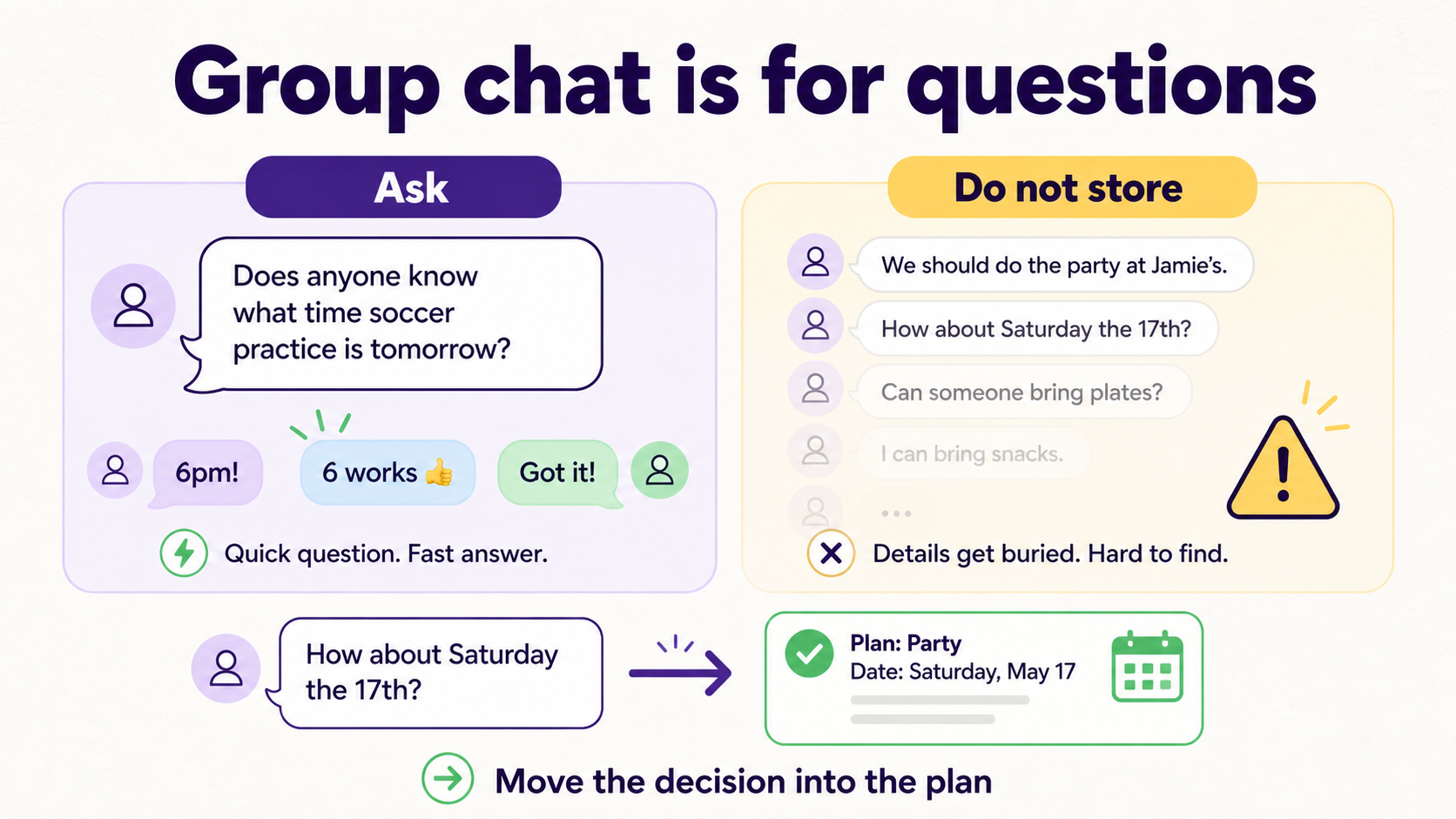
What belongs in WhatsApp, and what should Fambot move into the family plan?
WhatsApp is the right place for quick questions, updates, and handoffs. Fambot catches the details that need follow-through. If the message has a date, deadline, location, supply list, payment, form, or owner, it should become part of the plan.
Use this split when a WhatsApp thread starts to sprawl:
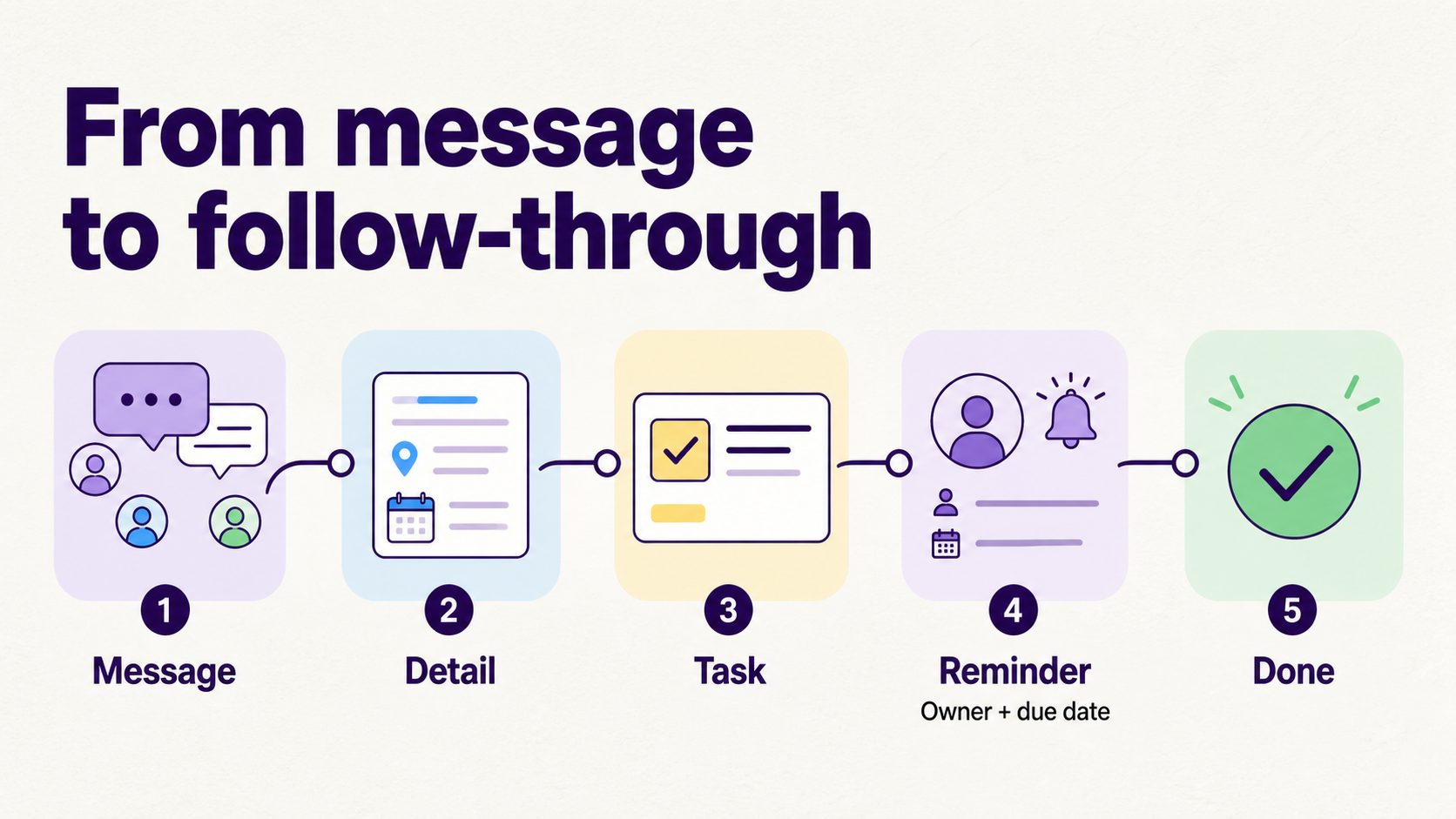
How does the WhatsApp integration turn messages into tasks and reminders?
The useful step is translation: WhatsApp message, actionable detail, task or reminder, done. Families can do that manually with a shared task app, or they can use Fambot to find the detail in the conversation and turn it into the next action.
Generic task tools can help once the family already knows what to add. Google Tasks, for example, supports tasks, subtasks, due dates, notifications, and tasks created from Gmail or Calendar (Google Tasks Help).
Without WhatsApp support, a parent or caregiver still has to do the first hard part: notice the message, decide whether it matters, copy the detail, assign the owner, and set the reminder. That is the step families skip because they are answering from the grocery aisle, a work meeting, or the school pickup line.
Fambot's WhatsApp workflow asks 5 questions every time a message needs follow-through:
- Does this need a task, event, reminder, or answer?
- Who owns it now?
- When should the family be reminded?
- Does the calendar need to change?
- What source should the family be able to find later?
How does Fambot's WhatsApp integration work?
Fambot's WhatsApp integration is meant for the place family logistics already happen. Parents can bring a WhatsApp message, photo, or question to Fambot, and Fambot can turn the useful parts into reminders, calendar updates, tasks, answers, and a daily plan.
That matters because WhatsApp rarely holds just one kind of detail. A single thread can include a soccer schedule photo, a school-form reminder, a birthday-party address, and a last-minute pickup swap. Fambot connects those messages with the rest of the family's context, including supported email and calendar sources, so the plan reflects what is happening across the week.
The real value is less reading, copy/paste, forwarding, remembering, and manual entry before the list becomes useful.
Here is the practical difference:
- WhatsApp answers fast, then buries the answer.
- A shared note stores details, if someone remembers to update it.
- A calendar stores events, if someone enters them correctly.
- A task app tracks to-dos, if someone creates and maintains them.
- Fambot turns WhatsApp messages and other family sources into a clear daily plan, then stays available for follow-up questions.
How do I manage WhatsApp reminders without maintaining another to-do list?
Manage WhatsApp reminders without another to-do list by choosing a system that captures reminders from the places family details already appear. The reminder should come from the WhatsApp message, school email, flyer, calendar change, or parent question rather than a separate list you have to rebuild by hand.
The reminder also needs an owner. "Remember picture day" is weaker than "Remind Alex Monday night to put the blue shirt by the backpack." Ownership turns a reminder from background noise into a next step.
With Fambot on WhatsApp, the lighter pattern is to ask in the moment: "Remind me tomorrow to send the field trip form," "Add picture day to the calendar," or "What do we need to bring for Saturday?" Fambot turns the detail into something the family can act on later.
This is especially useful for recurring family work that never sits neatly in 1 place: snack duty, conference sign-ups, permission slips, birthday gifts, costume days, sports gear, medication forms, pickups, and weekend plans.
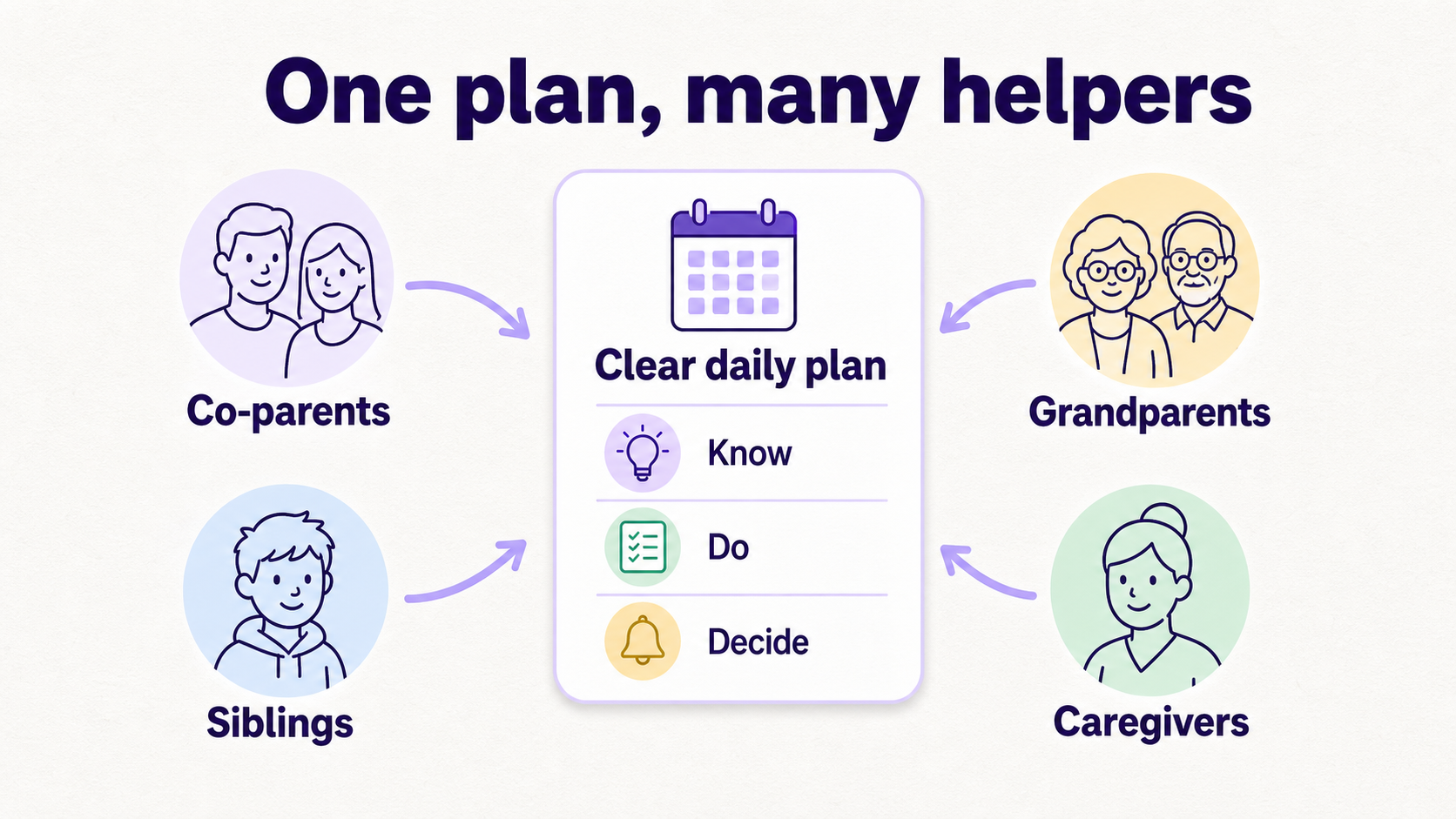
What should parents, grandparents, and siblings agree on before the next busy week?
Parents, grandparents, and siblings should agree on where the plan lives, who owns each category, and which chat details must become tasks or reminders. The goal is fewer misses, fewer repeat questions, and less dependence on one person remembering everything.
Multi-caregiver coordination is normal family life. Pew reported in 2026 that 39% of working parents with a child age 5 or younger use more than 1 care arrangement for the same child, and parents of children ages 6 to 12 report difficulty finding before-school, after-school, and summer care at rates of 43%, 42%, and 47% (Pew Research Center childcare report).
Grandparents are often part of the system, too. Pew found that 30% of U.S. adults say grandparents have a great deal or fair amount of responsibility to help with childcare, and that rises to 40% among adults ages 65 and older (Pew Research Center family responsibilities report).
That is why the plan needs to be shareable in plain language. A grandparent does not need the family operating philosophy. They need: pickup is 4:30, bring the booster seat, enter by the side door, text when home.
A useful weekly agreement can be as simple as:
- One place holds the plan.
- WhatsApp is for questions and quick updates.
- Every task has an owner.
- Every deadline gets a reminder.
- Every schedule change updates the calendar.
- Anyone can ask where the detail came from.
Why does WhatsApp still matter when families already have calendars and apps?
WhatsApp matters because families already use it when life is moving. A calendar can store an event, but the question often arrives as a message: "Can you cover pickup?" "What time is the game?" "Did anyone sign the form?" The plan has to meet the family there.
Pew found that text messaging is the most common way young adults keep in touch with parents: 61% text a parent at least a few times a week, including 23% who do so daily (Pew Research Center young adults report).
That statistic covers young adults and parents rather than school logistics, so the takeaway is narrow: family communication already runs through messages. Tools that require every helper to open a new dashboard will lose some of the family before the week even starts.
That is why Fambot lets parents work from WhatsApp. Parents can ask follow-up questions, add details, share photos or flyers, and get help turning family information into reminders and calendar items without breaking the family rhythm.
What privacy questions should families ask before connecting WhatsApp to a planning tool?
Families should ask what the WhatsApp integration can access, how access is granted, whether access can be removed, what gets stored, what other family members can see, and whether the tool sells personal information or uses family data for model training. A useful family planning tool has to earn trust before it earns access.
The American Academy of Pediatrics tells families to check privacy settings when using new apps and to build technology rules that fit their routines and values (American Academy of Pediatrics).
Google also explains that third-party apps can receive only the Google Account data a user authorizes, and users can remove app access at any time (Google Account Help).
For Fambot, the trust standard is simple: family information is deeply personal. Families should know what they connect, how the WhatsApp integration works, what Fambot can do with messages and attachments, how to disconnect, and how their data is protected.
What is the simplest WhatsApp first step for families this week?
The simplest first step is to pick 1 WhatsApp thread and 1 recurring category, like sports logistics, school forms, weekend plans, childcare coverage, birthday parties, or camp prep. For 7 days, let Fambot turn actionable WhatsApp messages in that category into reminders, calendar updates, tasks, and answers.
Start with a tiny rule: any WhatsApp message with a deadline, location, supply list, or owner becomes a task or calendar update. If the family cannot tell who owns it and when it is due, the detail is not stored yet.
This is where the WhatsApp integration helps. Fambot reduces the manual work that usually sits between a message and a plan: reading, finding, flagging, turning details into reminders, adding events, answering questions, and sending a clear daily plan.
A WhatsApp family chat can keep doing what it does best: fast questions, quick answers, and shared context. Fambot can do the remembering. That is the split that keeps families from losing the small details that become big problems at 7:18 a.m.
Sources
- BLS American Time Use Survey - Used for 2025 household activity and secondary childcare time-use statistics.
- Pew Research Center childcare report - Used for current data on multi-arrangement childcare and school-age care challenges among working parents.
- Pew Research Center family responsibilities report - Used for data on how U.S. adults view grandparents helping with childcare.
- Pew Research Center young adults report - Used for family texting frequency context.
- Journal of Business and Psychology - Used for peer-reviewed framing of family coordination as managerial, cognitive, and emotional family load.
- American Academy of Pediatrics - Used for guidance on family technology plans, notifications, and privacy settings.
- Google Tasks Help - Used for comparison to familiar task and reminder features.
- Google Account Help - Used for guidance on third-party account access and removal.




