
Is it safe to connect Gmail to an AI assistant?

By David Reich, Founder & CEO of Fambot
Published: July 29, 2026 · Last updated: September 3, 2026
Article Summary (TL;DR)
Connecting Gmail, Outlook, Apple Calendar, Google Calendar, or WhatsApp to a family assistant can be safe if the app asks only for the access it needs, explains what it reads or changes, encrypts stored data, avoids selling personal information, and lets you disconnect or delete data. The right question is not “AI or no AI?” It is “what access am I granting, and who controls it?”
Is it safe to connect family sources to an AI assistant?
It can be safe to connect Gmail to an AI family assistant when the assistant uses Google OAuth, does not ask for your Google password, limits access to the family-related job it performs, and gives you a clear way to revoke access. It is not safe to treat every app with a Google sign-in button as equally trustworthy.
Google says linked apps can only access the Google data and services a user authorizes. If you authorize Calendar access only, the app cannot automatically access Photos, Contacts, or other Google data. Google also tells users they can remove app access at any time (Google Account Help).
The risk is real because Gmail can contain school messages, addresses, travel details, payment reminders, medical logistics, activity schedules, and family routines. A family assistant should explain what it needs, why it needs it, how long it keeps it, and what happens when you disconnect.
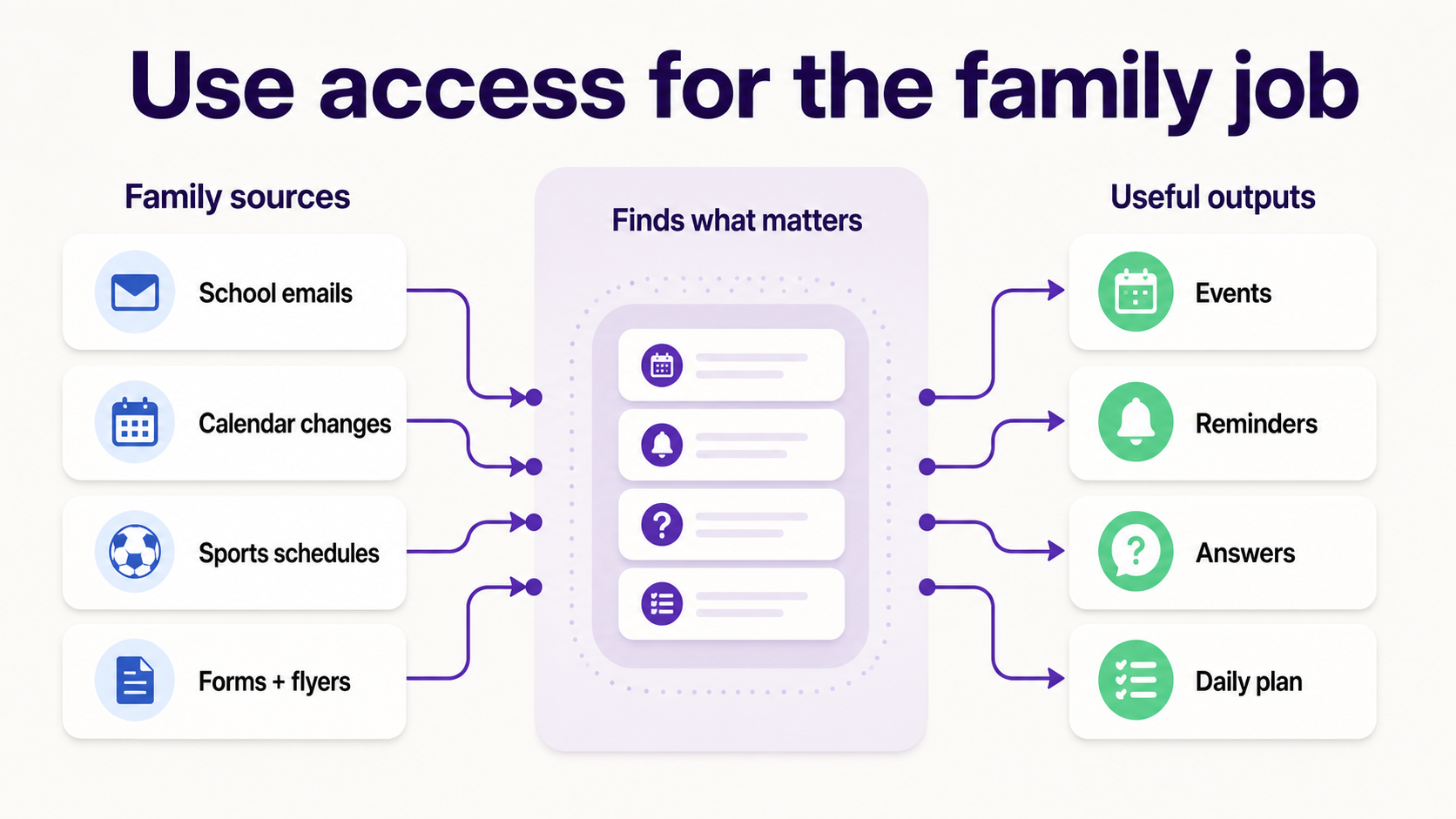
For Fambot, Gmail access is meant to reduce the work parents already do by hand: reading family-related emails, finding the important school details, turning dates into calendar events, creating reminders, and sending a clear daily plan. The useful version of this product is narrow and practical. It should not feel like handing over your whole digital life to a black box.
What happens to my data when I connect Google Calendar to a family app?
When you connect Google Calendar to a family app, you are granting the app permission to read, create, edit, or delete calendar data depending on the scope you approve. A safe family app should ask for the least access needed, show the Google consent screen, use calendar data only for visible family features, and let you revoke access later.
Google’s OAuth system uses “scopes” to define what an app can do. Google says apps that request sensitive or restricted access may need verification, and examples of sensitive scopes include reading Google Calendar events (Google OAuth verification).
That matters because “connect my calendar” can mean different things. Read-only calendar access can view events. Write access can create or update events. Manage access may edit or delete calendar data. Combined Gmail and Calendar access can connect messages to events and reminders.
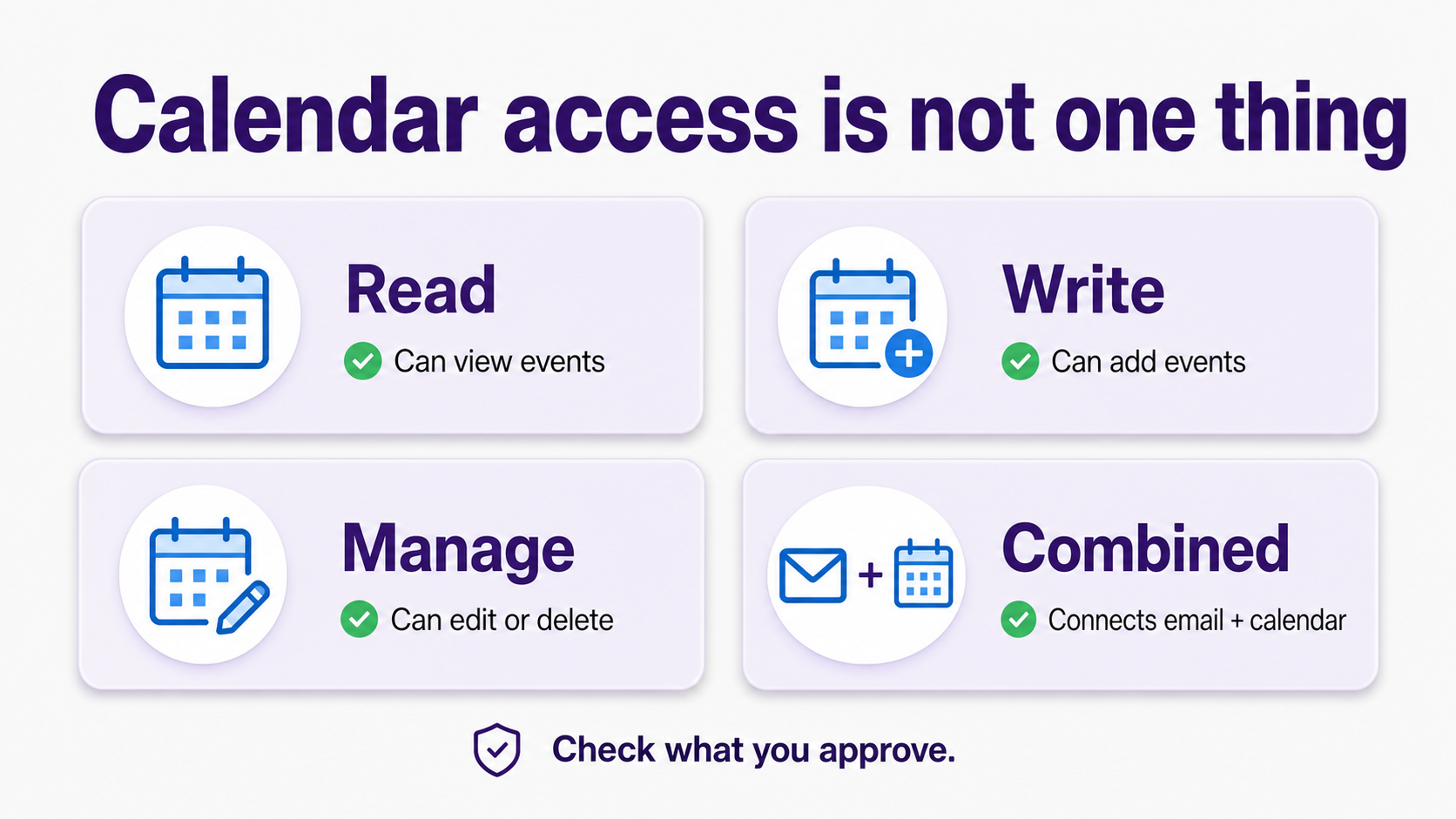
Fambot’s value comes from the combined job: reading family-related messages and calendars, finding what matters, adding useful events and to-dos, and sending parents what they need to know, do, and decide. The privacy question is whether the product uses that access only for that job.
What should a safe Gmail or Google Calendar connection include?
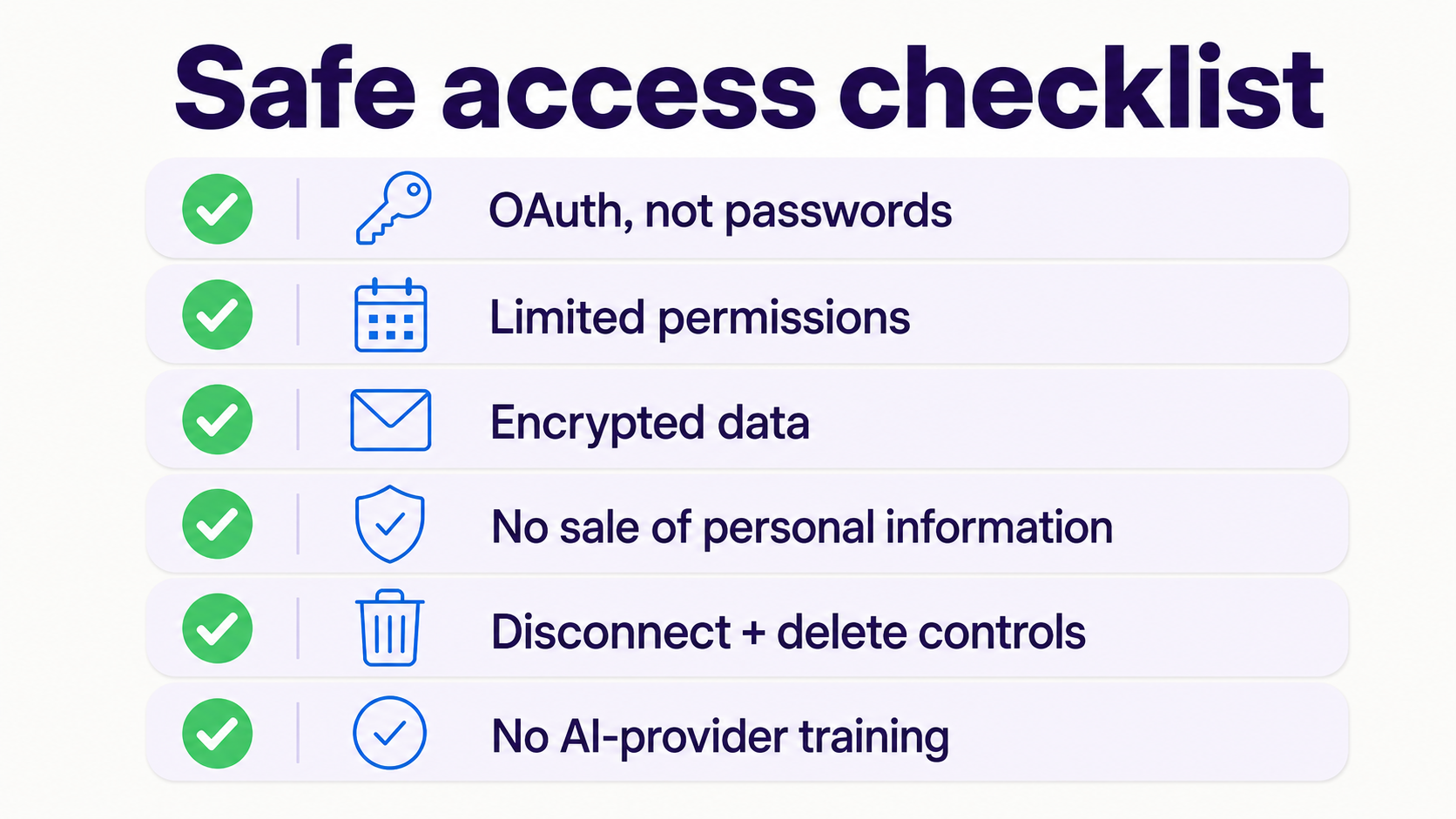
A safe connection should include OAuth, limited permissions, a plain-English privacy policy, encryption in transit and at rest, no sale of personal information, user controls to disconnect, and a deletion path. The app should also say whether humans can review data, whether AI providers train on it, and how support access works.
Google’s API Services User Data Policy requires apps to explain who is requesting data, what data they request, and why. It also tells developers to request only the permissions needed for implemented features, not future maybes (Google API Services User Data Policy).
For Gmail and Calendar access, parents should look for: OAuth instead of password sharing, limited permissions, data encryption, no sale of personal information, disconnect and delete controls, and no AI-provider training on family data.
For WhatsApp groups, parents should ask what group content Fambot can read, what gets stored, what becomes part of the family plan, and whether any group content is shared with AI providers for model training. Parents should also be able to disconnect groups, delete stored data, and control which family members can see details pulled from those conversations.
Google’s policy also bars selling Google user data to third parties such as advertising platforms, data brokers, or information resellers when the app uses covered Google API scope (Google API Services User Data Policy).
Why do parents worry about connecting family data to AI?
Parents worry because family data is personal, scattered, and hard to audit. Gmail and Calendar can reveal where children go to school, who cares for them, what activities they attend, and when the family is away. AI adds a second worry: whether private details will be reused, exposed, or used in ways the family did not expect.
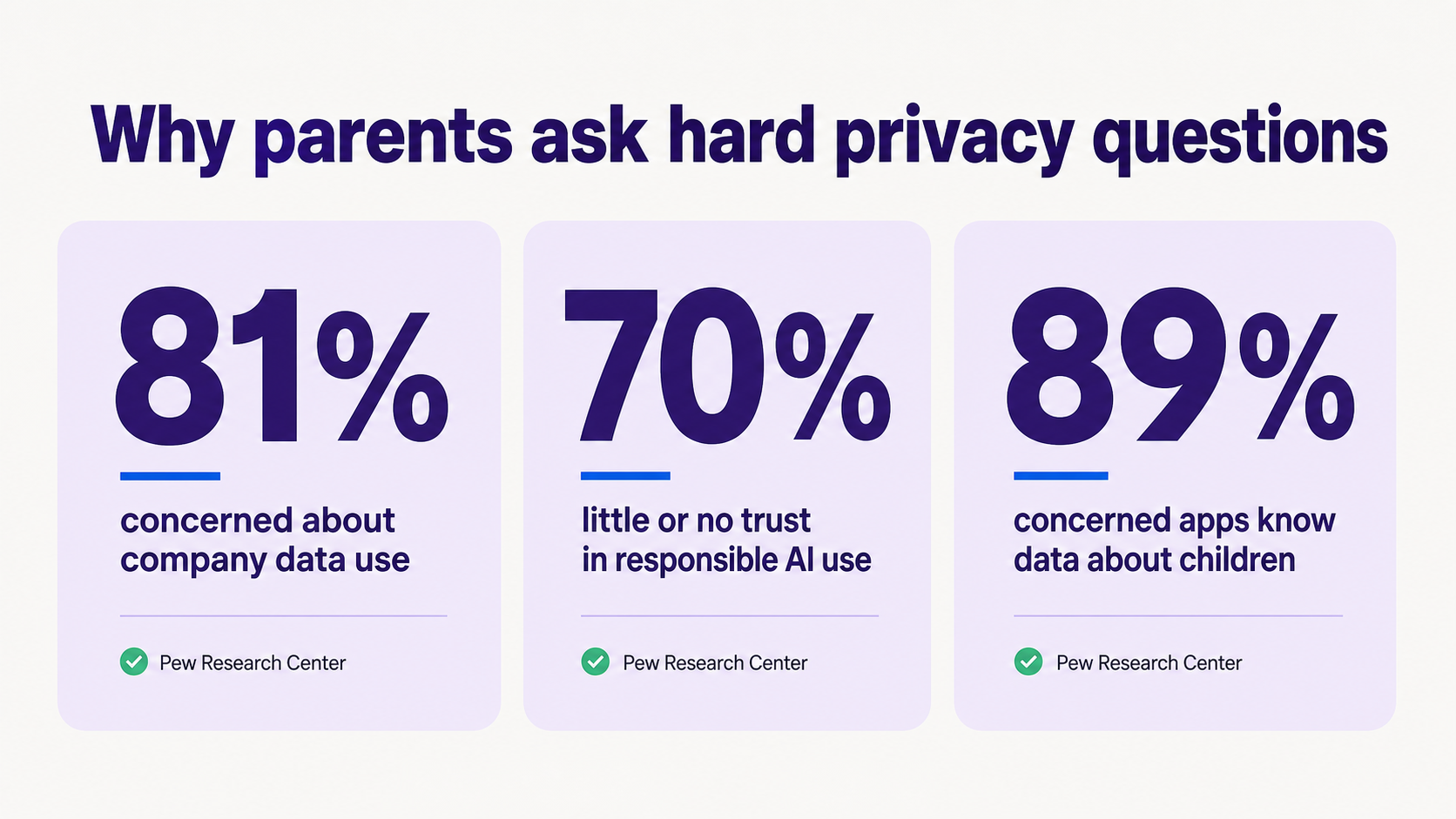
The concern is not irrational. Pew Research Center found that 81% of U.S. adults are very or somewhat concerned about how companies use data collected about them. Pew also found that 70% of adults who have heard of AI have little to no trust in companies to make responsible decisions about how they use AI in products (Pew Research Center).
Children’s data raises the stakes. Pew found that 89% of Americans are concerned that social media sites and apps know personal information about children (Pew Research Center).
A 2023 research paper that studied 20,195 Google Play apps aimed at children or child audiences found that 81.25% of “Family apps” used trackers, despite app-store rules against trackers in children’s apps (Sun et al.).
That does not mean every family app is unsafe. It means parents are right to ask hard questions before connecting sensitive family sources.
How does OAuth make Gmail or Calendar access safer than sharing a password?
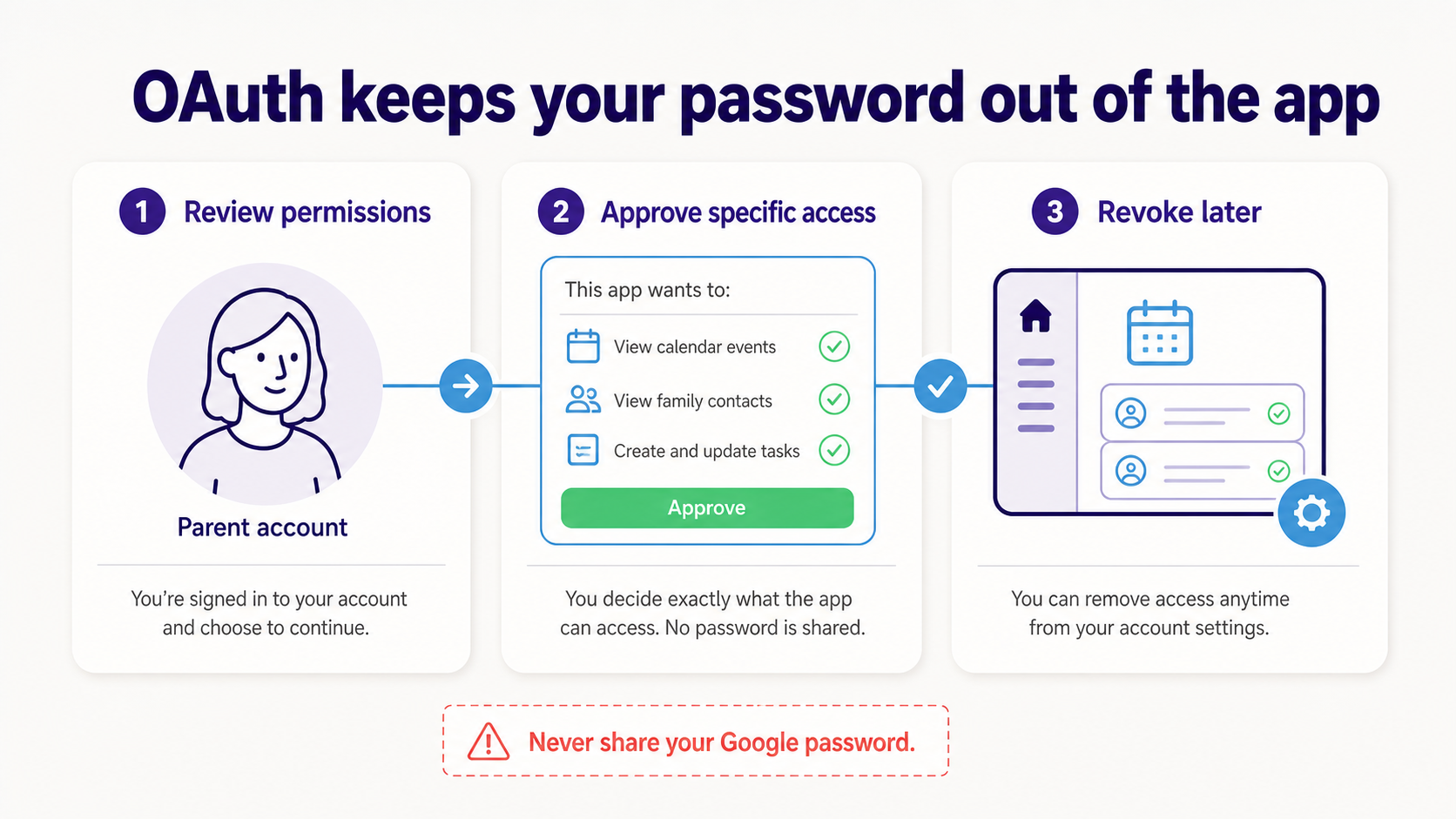
OAuth is safer because it lets a parent grant specific access without giving the app the Google Account password. The parent signs in with Google, reviews the permissions, approves or denies access, and can later revoke the connection from their Google Account settings.
Google explicitly warns users not to share their Google Account password with third-party apps. Google says password sharing can give the app full account access, while linked-app access lets users share only some account data with trusted apps (Google Account Help).
OAuth does not make an app automatically safe. It makes the access more controlled. The app still has to handle the data responsibly after permission is granted.
A study of Google account permissions found that 67% of participants had at least 1 third-party app authorized on their Google account. The same paper found that 79% of participants rarely or never reviewed their authorized apps, and 95% wanted reminders to review them at least once a year after seeing what was connected (Balash et al.).
That is a useful habit for family assistants: connect only apps you trust, then review access every few months.
Should a family assistant read all Gmail, or only family-related emails?
A family assistant should only use Gmail access for the family-related features it promises. In practice, the app may need broad technical access to find relevant school and activity messages, but the product experience should be designed around filtering for family-related emails, school updates, sports schedules, forms, deadlines, calendar changes, and other parent logistics.
This is the core tradeoff. If parents have to forward every message manually, the assistant may be safer in one sense but less helpful. If the assistant can find family-related emails automatically, it can catch details parents would miss, but the trust requirements go up.
Fambot is built for the second job. Parents connect a supported email or calendar account, add family context, and Fambot finds school and family details before parents ask. It turns those details into calendar events, to-dos, reminders, follow-up questions, and a clear daily plan.
That is a real product boundary. The assistant should not use family emails for ads, unrelated personalization, data resale, or model training.
What should parents check before connecting Gmail or Calendar?
Parents should check the consent screen, the privacy policy, the requested permissions, the deletion controls, and the app’s business model. They should also check shared family-account controls: which adults can manage the account, which family members can see plan details, how someone is removed, and how family data can be deleted.
Before connecting, ask these questions:
- Does the app use Google OAuth instead of asking for my password?
- What exact Google permissions does the app request?
- Does the app explain why each permission is needed?
- Can I disconnect from Google later?
- Can I delete app-stored data?
- Does the app sell personal information?
- Can humans read my emails or calendar?
- Can AI providers train on my data?
- Does the app serve children directly or adults managing family logistics?
The FTC says COPPA gives parents control over what information websites and apps can collect from children under 13, and the COPPA Rule creates added requirements for covered companies (Federal Trade Commission).
A family assistant used by parents to manage household logistics is different from a child-directed app. Still, if the product handles children’s information, parents should expect clear safeguards.
Is Fambot safe to connect to Gmail and Google Calendar?
Fambot is designed to be safe for connected family sources by using secure account connections instead of storing passwords, encrypting data in transit and at rest, not selling personal information, giving users control to connect, disconnect, and delete, and not allowing AI providers to train on user data. Parents can manage account controls from the iOS or Android app.
The product reason for connecting Gmail, Outlook, Apple Calendar, Google Calendar, and WhatsApp is specific: Fambot finds important school and activity details, turns them into events and reminders, and sends a daily digest text message with what parents need to know, do, and decide.
That is different from a generic AI chatbot. A generic chatbot waits for parents to copy/paste the right message or ask the right question. Fambot is meant to do the reading, finding, adding, reminding, and answering inside the family sources parents already use.
The safest way to use it is also the plainest: connect only the supported accounts you want Fambot to use, review the permissions, keep family context accurate, and disconnect if the product no longer earns your trust.
When should you not connect Gmail or Google Calendar to a family assistant?
Do not connect Gmail or Calendar if the app asks for your Google password, cannot explain its permissions, lacks a clear privacy policy, uses data for ads, sells personal information, makes deletion hard, or asks for broader access than its family features require. Trust should be earned before access is granted.
Also pause if the app makes fuzzy claims like “we use your data to improve AI” without saying whether that means training models, debugging features, or improving your own user-facing experience.
A good family assistant should make the tradeoff feel clear. You are sharing access so the assistant can find school details, add calendar events, create reminders, answer questions, and send a clear daily plan. If an app cannot say that in plain language, it has not earned access to Gmail, Outlook, Apple Calendar, Google Calendar, or WhatsApp.




