
Kindergarten logistics: what parents need to track in 2026

By David Reich, Founder & CEO of Fambot
Published: August 27, 2026 · Last updated: September 3, 2026
Article Summary (TL;DR)
Kindergarten logistics are a new family system: teacher notes, school emails, portals, forms, supplies, pickup rules, calendar changes, and small deadlines that now shape the day. New school parents should track what they need to know, do, decide, bring, sign, pay for, and ask next, then turn those details into one daily plan.
Quick answer
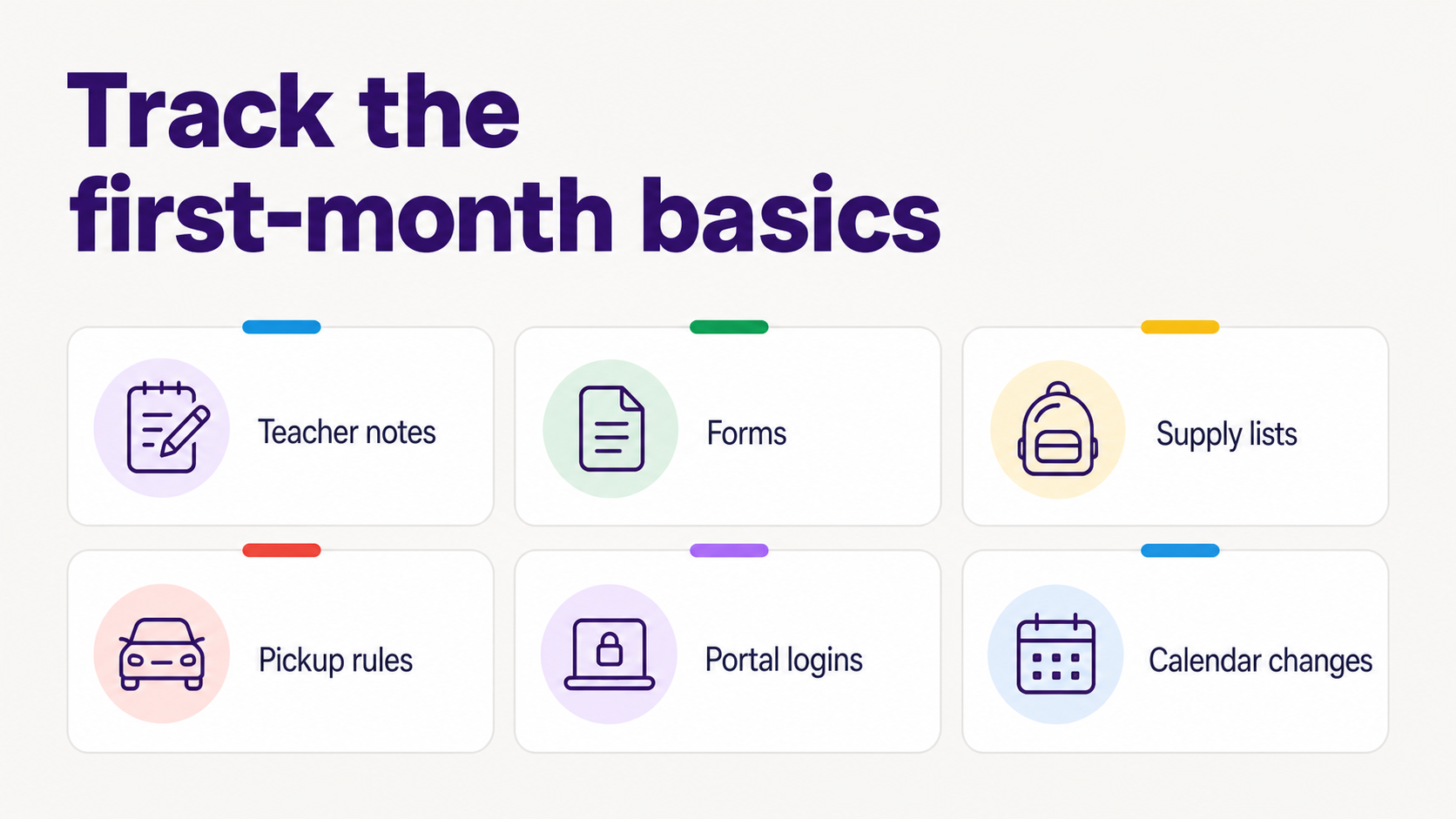
- Track 6 categories first: teacher notes, forms, supply lists, pickup rules, portal logins, and calendar changes.
- Put events on the calendar, put action items on a to-do list, and keep reference details somewhere searchable.
- Treat the first month as setup time. You are learning the school's communication habits, not failing at organization.
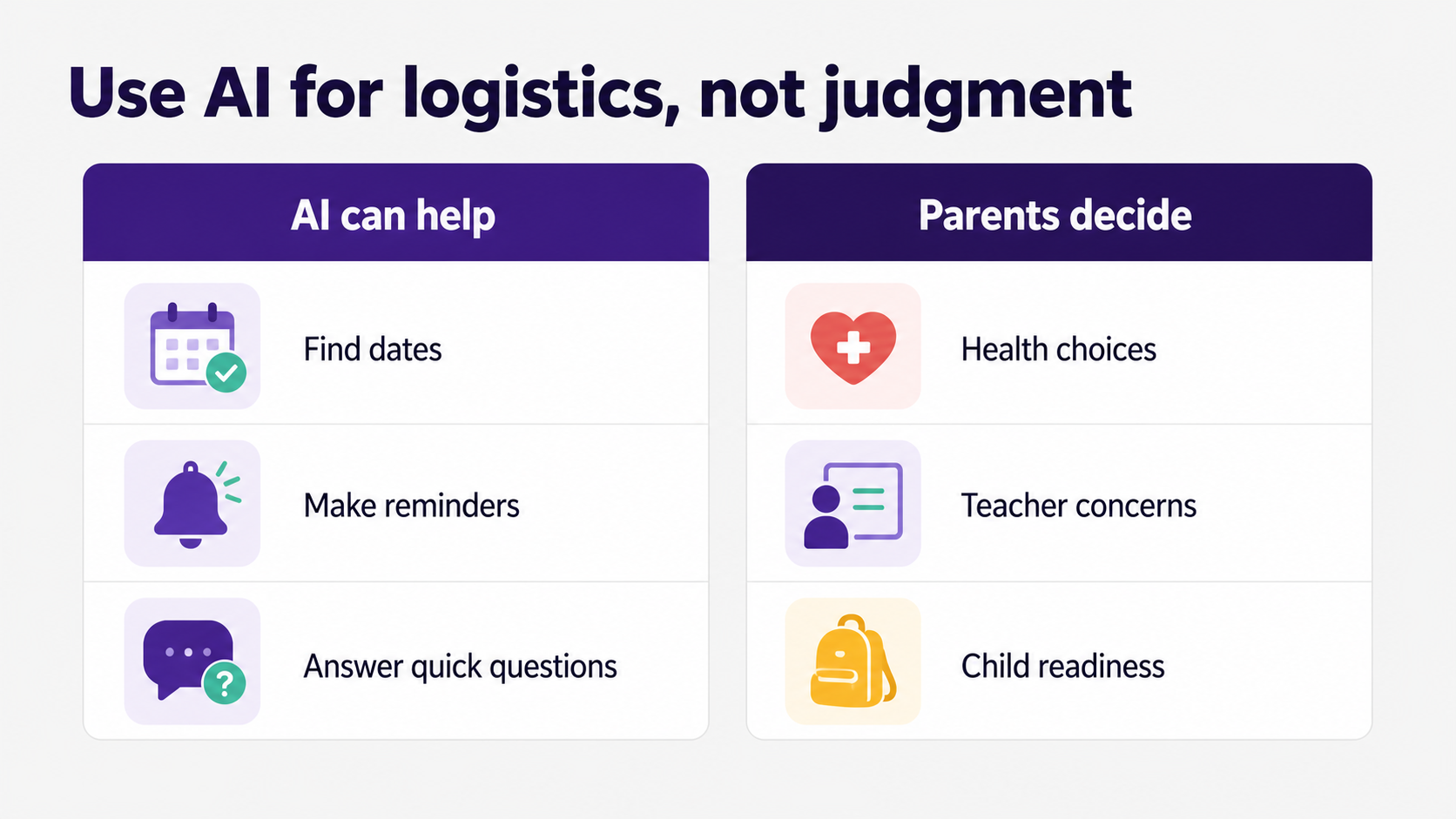
- Use AI for logistics: finding dates, making reminders, summarizing school updates, and answering quick questions. Keep parent judgment for health, readiness, teacher concerns, and emotional decisions.
What should new kindergarten parents keep track of?
New kindergarten parents should keep track of the school details that create action at home: emails, forms, supplies, pickup rules, portal access, calendar changes, teacher notes, lunch instructions, volunteer requests, payment deadlines, and questions that need a reply. The goal is not a perfect filing system. The goal is knowing what needs to happen next.
Start with the things that can break the morning: arrival time, dismissal plan, backpack contents, lunch or snack rules, water bottle, weather gear, and who is allowed to pick up your child.
Then track the things that can sneak up on you: permission slips, picture day, spirit days, conference sign-ups, school holidays, early-release days, classroom volunteer dates, medication forms, field-trip payments, and portal messages.
Kindergarten is a big category because it touches so many families. In fall 2023, U.S. public schools enrolled about 3.5 million kindergarten students, according to NCES data reported in thousands (NCES Digest). The size of that handoff explains why school systems rely on newsletters, portals, forms, and repeat reminders. Families need a system on their side too.
How do I organize kindergarten emails, forms, and supply lists?
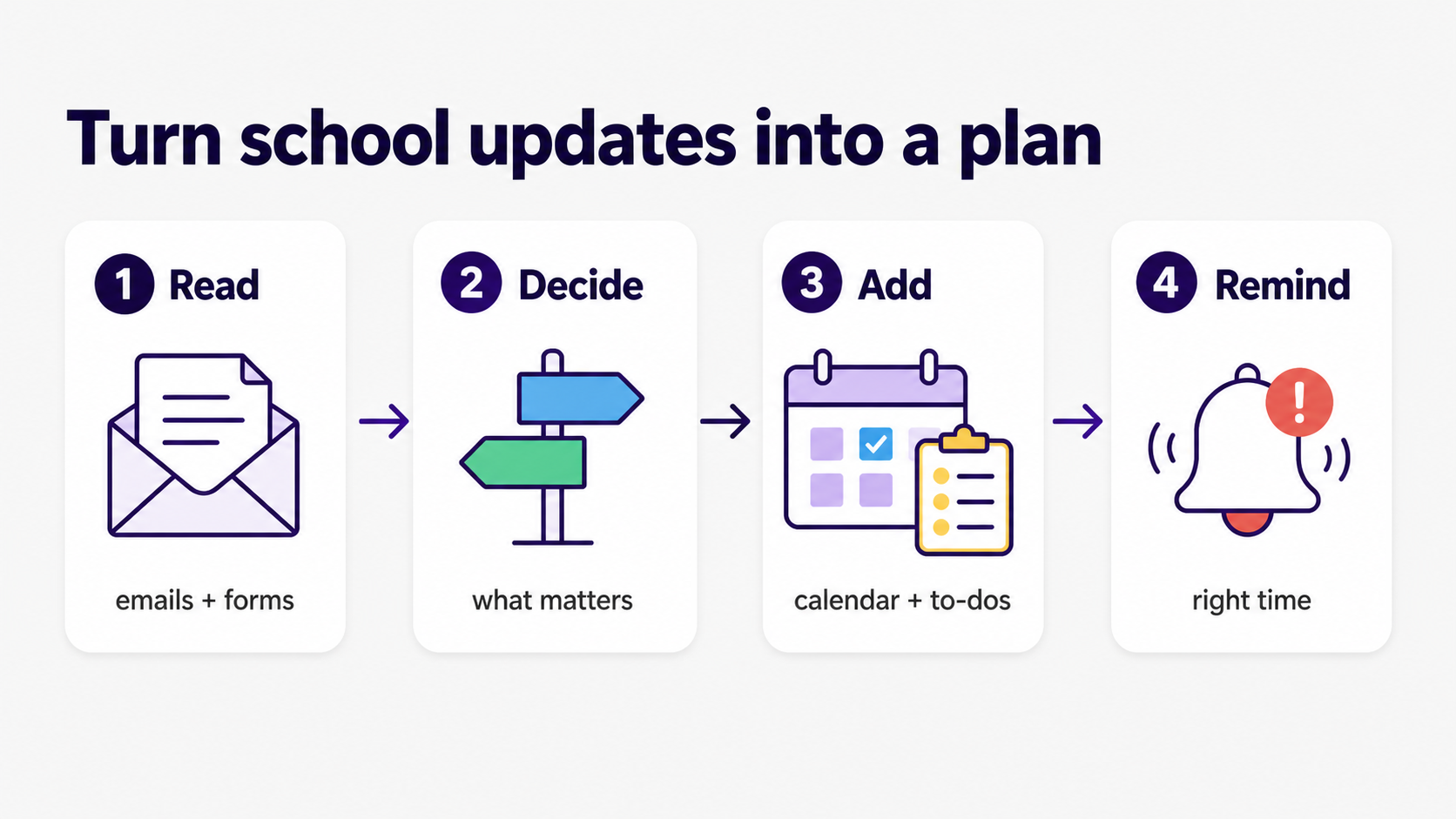
Organize kindergarten information by outcome, not by where it came from. Every school message should become 1 of 3 things: a calendar event, a to-do, or a reference note. If an email asks you to sign, bring, pay, RSVP, choose, upload, or reply, it should not stay trapped in your inbox.
A simple setup works better than an elaborate one:
- Make one school email label or folder. Use it for teacher notes, office newsletters, daycare updates, and portal notifications.
- Make one running to-do list for school actions. Keep it short enough that you will actually check it.
- Put every date on the family calendar as soon as you see it.
- Keep one reference note for stable rules: arrival, pickup, lunch, snack, nurse, office, and daycare.
- Keep one supply list for things to buy, label, wash, pack, or send back.
- Keep screenshots or PDFs only when the original source might disappear behind a portal.
This is also where many parents realize the school is communicating better than it feels. NCES found that in 2019, 59% of parents of K-12 students said their child's school communicated "very well" about how the student was doing between report cards, but only 46% said the same about information on the expected parent role at school (NCES NHES). That gap is exactly where first-time school parents can feel lost.
What makes kindergarten logistics different from preschool or daycare?
Kindergarten logistics are different because school adds new systems around your child: district calendars, classroom notes, portals, attendance rules, nurse forms, office procedures, teacher preferences, specials, lunch accounts, and pickup policies. Preschool may have had routines too, but kindergarten usually brings more people, more messages, and less hand-holding.
The first month is mostly translation work. A teacher note becomes a home routine. A portal alert becomes a deadline. A paper in the backpack becomes a decision. A calendar change becomes a pickup plan. None of those steps are hard alone. The hard part is that they arrive separately.
The American Academy of Pediatrics frames school readiness broadly: social, emotional, behavioral, communication, and family-school partnership all matter, not just academics (HealthyChildren.org). That is a useful reminder for parents too. Your logistics system should protect the child's transition, not turn every school detail into a crisis.
Attendance is one reason the tiny details matter. IES Regional Educational Laboratories note that pre-kindergarten and kindergarten are an important time to build attendance habits, and that regular attendance in the early grades helps set the foundation for school success (IES Regional Educational Laboratories). Getting the school routine right is not busywork. It helps the child show up prepared.
What should go on the calendar, the to-do list, and the reference note?
Put fixed times on the calendar, actions on the to-do list, and rules or details in a reference note. Mixing those together is how parents end up with a calendar full of vague reminders and a brain still carrying the actual instructions.
Use calendar titles that say the action out loud. "Picture day" is fine if you already know the prep. "Picture day, send order form" is better. "Early release" is fine. "Early release, pickup at 12:15" is kinder to your future self.
What should parents do with portals, logins, and apps?
Parents should treat portals and school apps as reference sources, not as places they must remember to manually patrol all day. Save the login, turn on the notifications that actually matter, and move important items out of the portal into your family plan.
Create a tiny portal checklist:
- District or school portal login
- Lunch account or meal system
- Attendance or absence reporting
- Transportation or bus app
- Daycare account
- Classroom communication app
- Health, nurse, or medication forms
- Photo, directory, or consent forms
Be thoughtful with child information. The FTC says COPPA is designed to put parents in control of personal information collected online from children under 13, and covered operators must give parents notice, obtain verifiable consent in many cases, and protect children's information (FTC COPPA FAQs). School-approved tools can be appropriate, but parents should still know what each app is for, what information it collects, and whether it is required.
A good rule of thumb: if the portal contains a date, put it on the calendar. If it contains an action, put it on the to-do list. If it contains a policy, put the plain-English version in your reference note.
How can AI help with a child's first school year?
AI can help with a child's first school year by doing logistics work: summarizing school emails, finding dates, turning forms into reminders, building supply lists, spotting pickup changes, and answering quick questions from information parents already have. AI should support parent judgment, not replace it.
Parents are already testing this boundary. Lurie Children's surveyed 1,004 U.S. parents in April 2026 and found that 81% had used AI for parenting tasks; 2 in 3 said it reduced their mental load, and parents reported saving 58 minutes a week on average (Lurie Children's). The same survey found that 50% of parents always double-check AI parenting advice and 41% sometimes do, which is the right instinct.
Use AI for:
- "What dates are in this school newsletter?"
- "Turn this supply list into a shopping list."
- "What do I need to do before Friday?"
- "Draft a short note asking the teacher about pickup."
- "What did the school say about snack rules?"
Keep human judgment for:
- Health or medication decisions
- Developmental or readiness concerns
- Discipline or emotional issues
- Questions that need the teacher, nurse, pediatrician, or school office
- Anything that feels off after you read the answer
A Lurie Children's pediatrician put the boundary plainly: "Technology cannot replace a parent's intuition" (Lurie Children's). For kindergarten, that means AI can help you find the form. You still decide what question to ask, what the child needs, and when to call the school.
Where does Fambot fit for kindergarten parents?
Fambot fits where the school information turns into family action. Parents can use Fambot from the iOS or Android app to read family-related emails and school updates, find useful details, turn them into calendar events, to-dos, reminders, and follow-up questions, and get a clear daily plan with what they need to know, do, and decide.
For a first-time kindergarten family, that might mean Fambot catches the classroom supply update, adds picture day to the calendar, reminds the family to return the health form, and answers a text like, "What time is pickup on Friday?"
Fambot is most useful when parents do not want another place to rebuild the school system by hand. A calendar stores what someone enters. Fambot is designed to do more of the reading, finding, and reminding that has to happen before the calendar is useful.
It is not a replacement for the teacher, school office, nurse, pediatrician, or parent judgment. It is proactive help with the daily coordination work that keeps the family from finding the permission slip at 9:43 p.m. and whispering several creative things at the backpack.
What is a realistic first-week routine for kindergarten parents?
A realistic first-week routine is a 10-minute reset each evening and a 2-minute check each morning. Do not try to design the perfect family command center during the first week of school. Capture the school details, make the next day clear, and let the system get better as you learn.
At night, check 4 places:
1. School email or teacher app
2. Backpack folder
3. Family calendar
4. School to-do list
Then answer 4 questions:
1. What happens tomorrow?
2. What needs to go in the backpack?
3. What needs a signature, payment, reply, or upload?
4. Who is handling pickup, drop-off, lunch, and daycare?
In the morning, check only the plan for that day. This is the whole point. Morning is not the time to reread the welcome packet, search the portal, and decode the pickup map while your child is asking whether shoes are optional.
What should parents save after the first month?
After the first month, save only the information you will need again: teacher contact details, pickup and attendance rules, portal links, lunch instructions, daycare contacts, health-office procedures, recurring calendar dates, and any forms that will come back later in the year.
Archive the rest. You do not need every welcome email forever. You need the handful of details that answer future questions quickly.
By October, your system should feel lighter than it did in August. The family should know where school dates go, where to-dos live, where pickup rules are saved, and who checks what. That is the win: fewer tiny details floating around loose, and more mornings where everyone leaves with the right backpack, the right form, and a little more patience than yesterday.
Sources
- NCES Digest - Used for fall 2023 public kindergarten enrollment.
- NCES NHES - Used for parent-reported school communication satisfaction percentages.
- HealthyChildren.org - Used for kindergarten readiness, parent-school partnership, and parent judgment guidance from the American Academy of Pediatrics.
- IES Regional Educational Laboratories - Used for early-grade attendance and family engagement context.
- FTC COPPA FAQs - Used for child privacy and parent control basics around online services for children under 13.
- Lurie Children's - Used for 2026 parent AI use survey data and cautions about double-checking AI advice.




