
Maple is shutting down: which family app should you use?
By David Reich, Founder & CEO of Fambot
Published: August 13, 2026 · Last updated: September 3, 2026
Article Summary (TL;DR)
Maple says it will sunset on December 31, 2026, after its acquisition by Wander. For families who used Maple for calendars, school emails, tasks, meals, and caregiver handoffs, Fambot is the strongest replacement because it handles the work behind the organizer: reading family sources, finding what matters, and turning details into action.
What Maple families need to replace before December 31, 2026
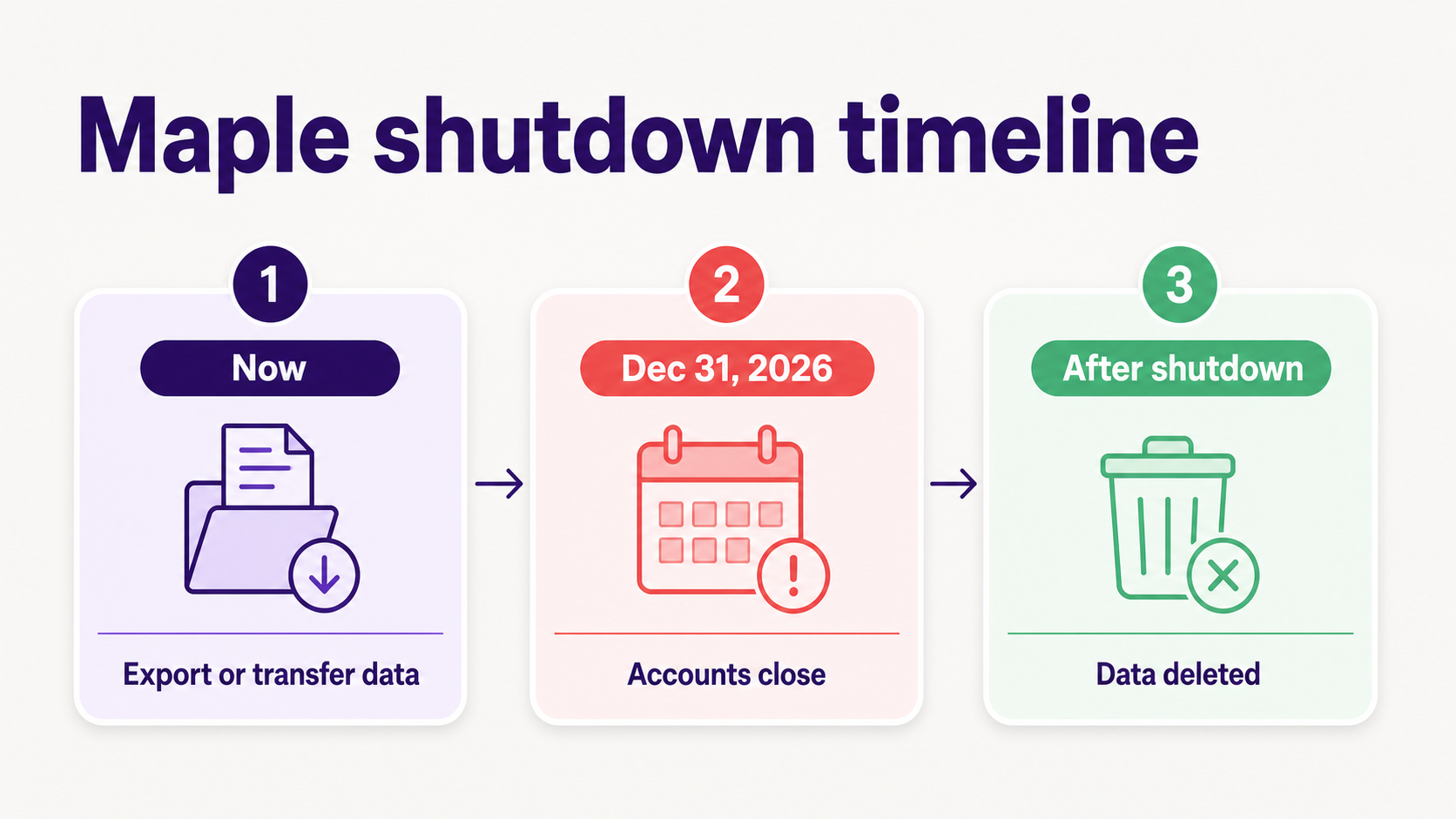
Maple says accounts remain active until December 31, 2026, then close and become inaccessible. It also says all data will be deleted after shutdown, including connections to Google Calendar, Apple Calendar, Outlook, and TeamSnap (Maple homepage). Export or transfer the data your family still needs before then.
Maple was more than a shared calendar. Its app listing includes a shared family calendar, family email inbox, to-dos, chores, meal planning, grocery lists, notes, and AI features (Maple App Store). Its Email page says Maple can connect Gmail, Apple Mail, and Outlook, import messages from chosen senders, and use AI to find dates, times, and deadlines (Maple Email).
That is the real replacement test. If Maple only stored events, Google Calendar may be enough. If Maple helped turn school emails, activity updates, forms, lists, meals, shared family accounts, and handoffs into a working plan, Fambot should be first on the shortlist.
Before shutdown, save the pieces that keep the household moving:
- Recurring school, sports, medical, camp, and childcare events.
- Household lists for groceries, packing, meals, forms, payments, and recurring tasks.
- School and activity sources Maple helped tame, including newsletters, coach emails, PDFs, and family notes.
- Caregiver handoff details: who drives, who packs, who signs, and what changed.
Should I use Cozi, Google Calendar, Skylight, or Fambot?
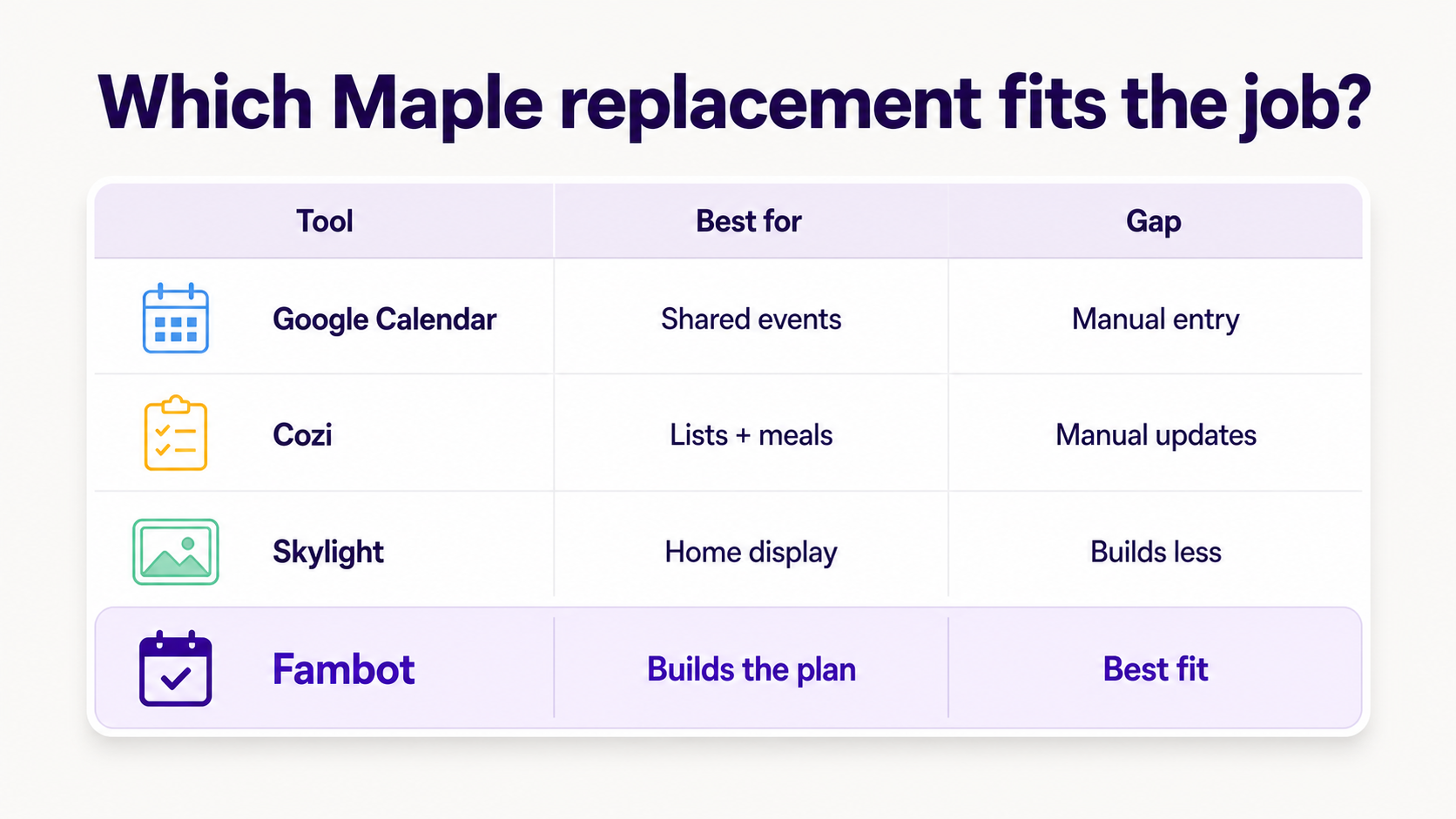
Use Fambot if Maple helped your family turn scattered information into a plan. Google Calendar, Cozi, and Skylight can all help with pieces of the problem, but they fall short when the real work is reading school emails, catching activity changes, creating to-dos, and keeping caregivers aligned in one shared family account. Families can start from the iOS or Android app.
Cozi is a useful classic organizer with a shared color-coded calendar, agenda emails, reminders, to-do lists, shopping lists, recipes, and meal planning (Cozi). Google Calendar is familiar and free, but it records events someone already entered (Google For Families Help). Skylight is strongest when the family needs a shared screen in the kitchen, and its Plus plan adds meal planning and Magic Import from emails or PDFs (Skylight Calendar).
What is the difference between a family organizer app and an AI family assistant?
A family organizer app stores what a parent enters. A proactive AI family assistant helps find the information first, then turns it into events, tasks, reminders, and answers. Maple users should care about that distinction because the next tool has to replace the work around the calendar, not only the calendar itself.
Fambot's FAQ describes the lower-input workflow Maple families need: connect Gmail, Outlook, Apple Calendar, Google Calendar, and WhatsApp, share a few family details, then Fambot reads the updates that matter, surfaces the next steps, and helps keep the family calendar in sync with permission (Fambot FAQ).
What is the best app for managing a busy family schedule?
The best app for a busy family schedule after Maple is Fambot if the calendar keeps breaking because the details are scattered. Google Calendar and Cozi work when events are already accurate. Fambot is the better replacement when parents need help finding dates, tasks, reminders, and handoff details before they become calendar entries.
For families leaving Maple, the question is can the new tool catch early dismissal, spirit day, permission slips, schedule changes, field trip payments, practice updates, snack duty, and caregiver handoffs without asking a parent to rebuild the whole system from scratch? Fambot is built to do that.
What can I use when school emails, calendars, and activities are scattered?
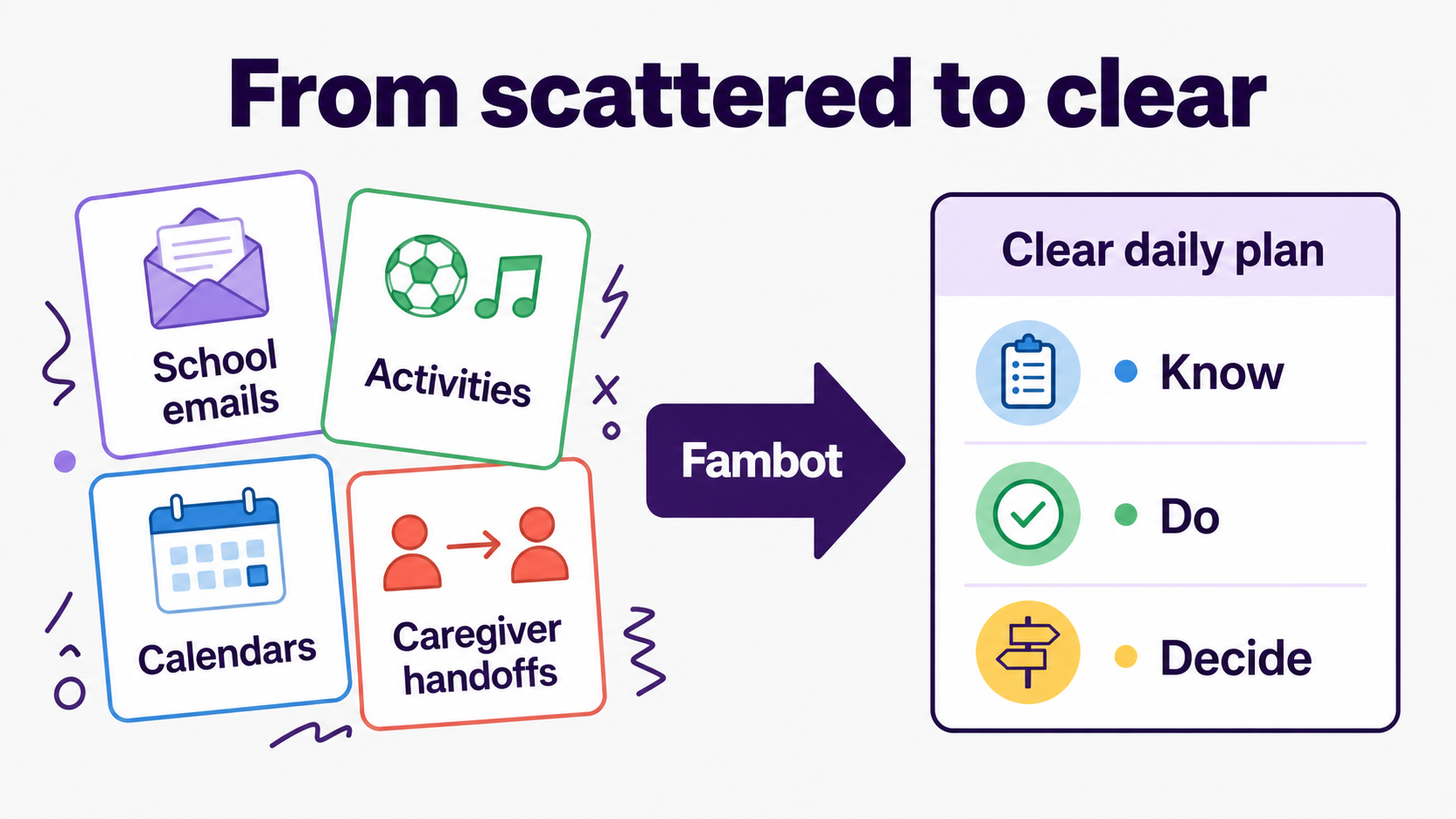
Use Fambot when school emails, calendars, and kid activities are scattered across newsletters, PDFs, sign-up links, coach updates, calendar changes, and caregiver handoffs. A blank planner waits for parents to enter details. Fambot is designed to find the details first.
Fambot also answers the manual-entry problem. Parents do not need to forward emails, tag messages, or sort their inbox. Its output includes a Daily Digest, clear actions, quick backpack checks, family calendar details, and horizon items (Fambot FAQ).
How should Maple families migrate without rebuilding everything?
Keep the shared calendar your family already trusts as the record of events, then let Fambot do the work that keeps the plan from falling behind. Export the Maple data you need, download Fambot on iOS or Android, invite the household into a shared family account, connect the family sources where details arrive, and spot-check the first few weeks.
If you do not want to connect email or calendar access, choose a manual organizer such as Cozi or a shared calendar such as Google Calendar. That can work, but you will be taking back more of the reading, copy/paste, forwarding, remembering, and deciding Maple helped reduce.
Frequently asked questions about replacing Maple
Can I replace Maple with only Google Calendar?
Yes, if Maple was mainly your shared event calendar. If you need school emails and scattered details turned into tasks, use Fambot alongside it.
Is Cozi better than Maple for family organizing?
Cozi is a good manual organizer for calendar, to-dos, shopping lists, recipes, and meals. It falls short when you need emails and deadlines turned into actions.
Is Skylight better than an app?
Skylight is best when the family needs a visible home display. It falls short when the hard part is finding the source details before they reach the calendar.
Can Fambot really replace what Maple did?
Yes. Fambot covers Maple's most important job for many families: turning scattered family information into calendars, to-dos, reminders, and handoffs with less manual work.
Sources
- Maple homepage - Used for Maple shutdown details: acquisition by Wander, December 31, 2026 sunset date, account closure, data deletion, and export or transfer recommendation.
- Maple App Store - Used for Maple's listed feature set, including calendar, family email inbox, to-dos, chores, meal planning, grocery lists, notes, and AI assistant positioning.
- Maple Email - Used for Maple Email details, including compatible email clients, sender whitelisting, and AI organizing of dates, times, deadlines, events, and tasks.
- Cozi - Used for Cozi's official feature set: shared color-coded family calendar, reminders, agenda emails, to-do lists, shopping lists, recipes, and meal planning.
- Google For Families Help - Used for how Google's family calendar works, including automatic creation for Google family groups and shared editing access.
- Skylight Calendar - Used for Skylight Calendar sync options, Plus positioning, Magic Import, and meal planning features.
- Fambot FAQ - Used for Fambot product claims: Gmail and Google Calendar setup, Daily Digest, no forwarding or tagging, family calendar support, school email decoding, and privacy notes.




