
Notion family planner templates vs Fambot in 2026

By David Reich, Founder & CEO of Fambot
Published: August 27, 2026 · Last updated: September 3, 2026
Article Summary (TL;DR)
A Notion family planner template is best when your family wants a flexible workspace and someone has time to keep it current. Fambot is better when the real problem is the work before the planner: reading school updates, finding deadlines, copy/paste, adding tasks, and reminding the family what needs to happen next.
What's the best system for tracking household tasks and family deadlines?
The best system is the one that catches family details before they become another thing a parent has to remember. A maintained Notion planner can work beautifully for lists, routines, and shared reference pages. A proactive AI assistant is a better fit when deadlines are still hiding in school emails, calendar updates, flyers, PDFs, and family messages.
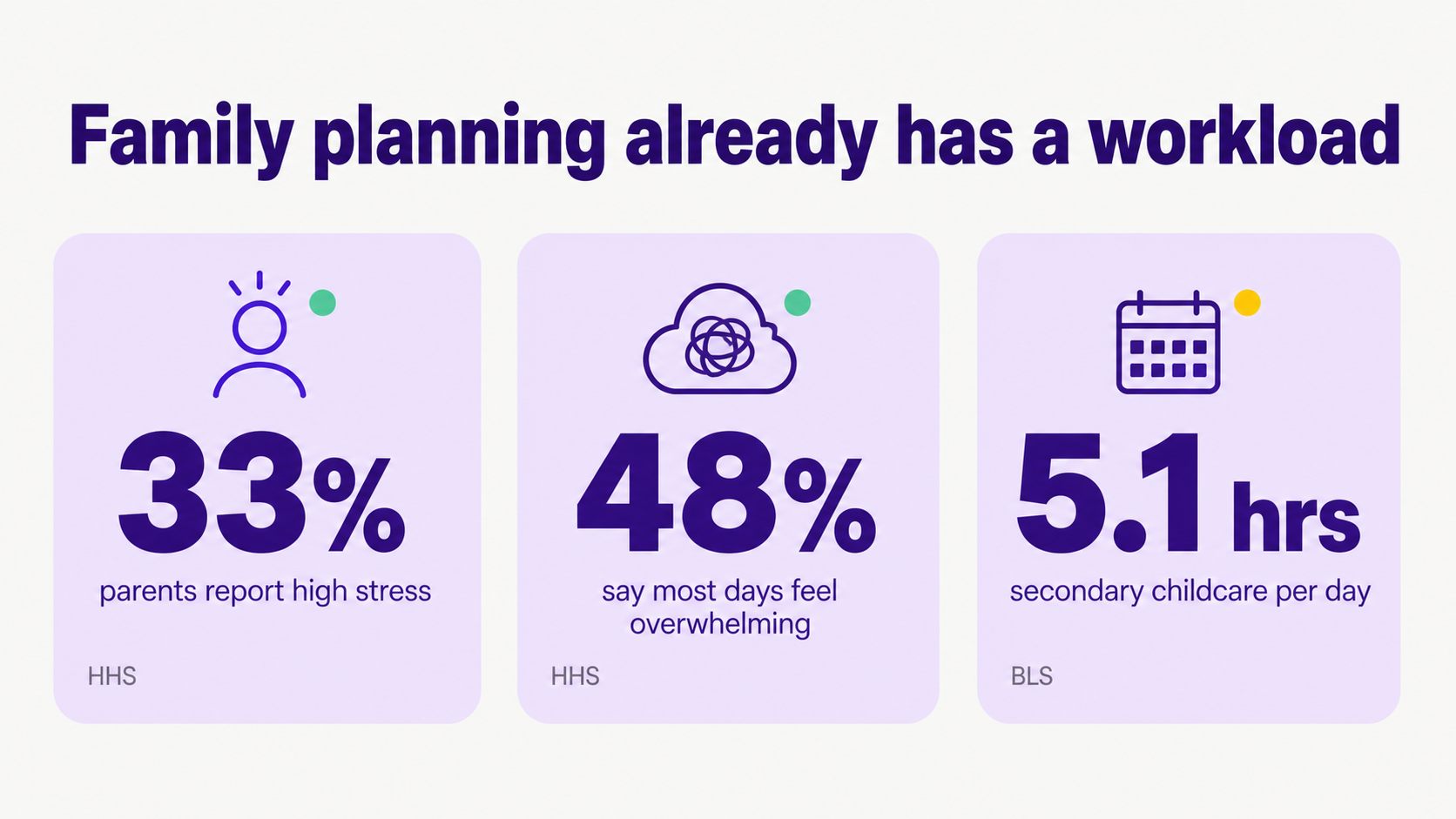
This distinction matters because families already carry a real workload. The U.S. Surgeon General's advisory reports that 33% of parents had high stress in the past month and 48% said most days felt completely overwhelming. It also says "the work of raising a child is just as valuable as the work performed in a paid job" (HHS).
Time-use data points in the same direction. In 2025, the Bureau of Labor Statistics reported that adults in households with at least one child under 13 spent an average of 5.1 hours per day providing secondary childcare, often while doing household activities or other work (BLS). A family system that adds setup, sorting, and checking can become one more chore.
Quick picks: when should parents choose Notion or Fambot?
Choose Notion if your family wants one flexible place for routines, notes, lists, records, meal ideas, house projects, and long-term reference pages. Choose Fambot if your family wants help finding the details that usually make those lists and calendars useful in the first place.
- Choose Notion when someone enjoys building systems and checking them regularly.
- Choose Notion when the family needs a shared home for stable information, like emergency contacts, recurring chores, meal plans, or home projects.
- Choose Fambot when the pain is reading, copy/paste, forwarding, adding calendar events, remembering deadlines, and nudging everyone else.
- Use both when Notion is the family wiki and Fambot handles the incoming daily plan from family-related sources.
How did we compare Notion templates and Fambot?
We compared each option by the work a parent still has to do after setup. The core questions were simple: who finds the deadline, who decides it matters, who turns it into a task, who keeps the plan current, and who can answer a quick follow-up question later?
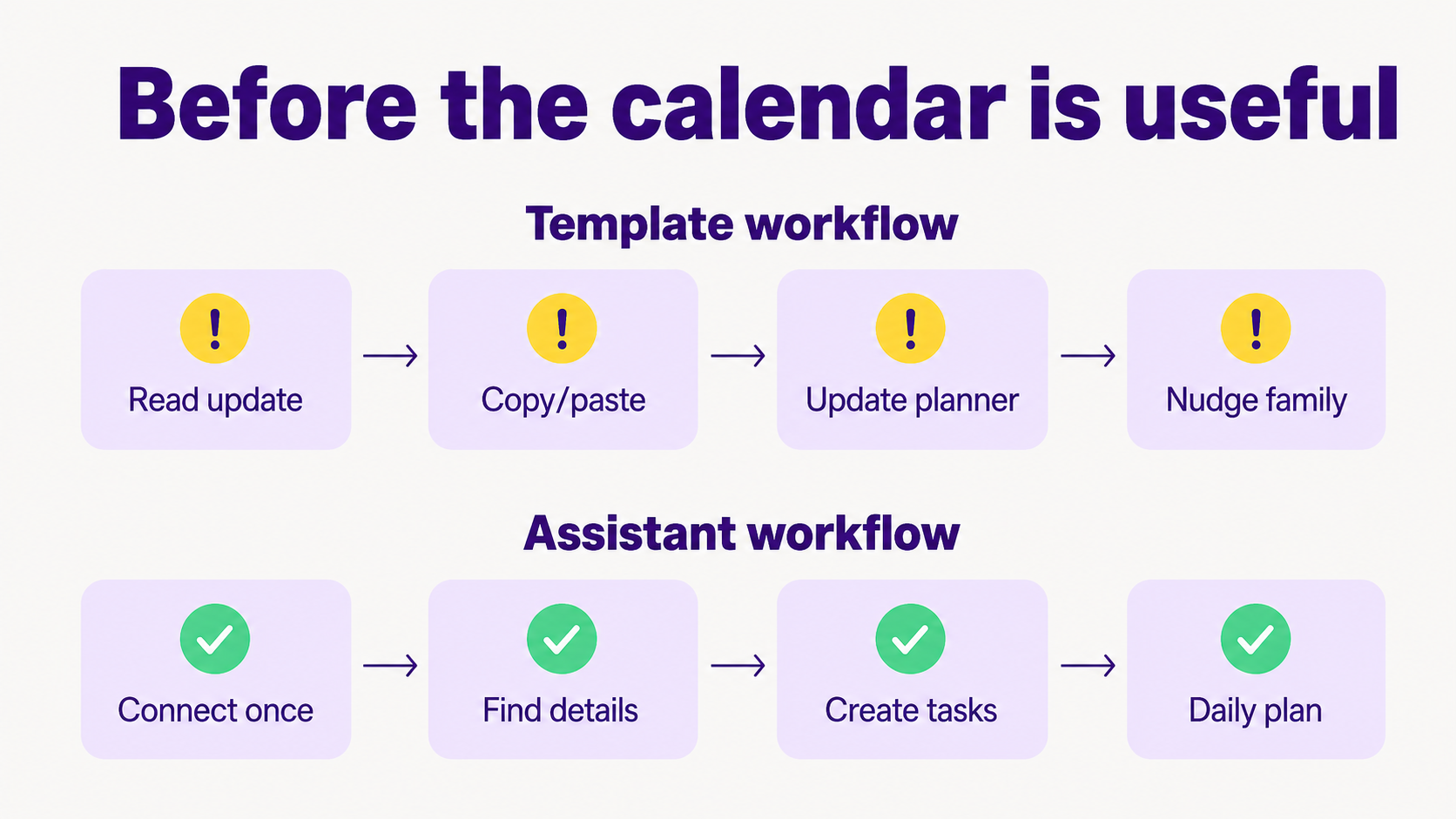
That keeps the comparison grounded in real family life. A beautiful command center can still fail if the same busy parent has to open every message, copy/paste the details, update the calendar, assign the task, and remind the family anyway.
Should I use Notion to organize family life?
Yes, use Notion if you want a flexible family workspace and you're comfortable maintaining it. Notion is especially good for family hubs, chore boards, meal plans, project lists, routines, and shared notes that benefit from structure and customization.
Notion is popular for a reason. The company announced in 2024 that it had passed 100 million users (Notion), and its marketplace lists 308 parenting templates, including 227 chore templates (Notion Marketplace). For families who like to tinker, that is a deep bench.
Templates can also reduce setup work. Notion says database templates let users define and repeat page structures, and repeating database templates can create copies daily, weekly, monthly, or yearly (Notion Help Center: Database templates). That is useful for weekly resets, recurring chores, meal-planning pages, and family meeting notes.
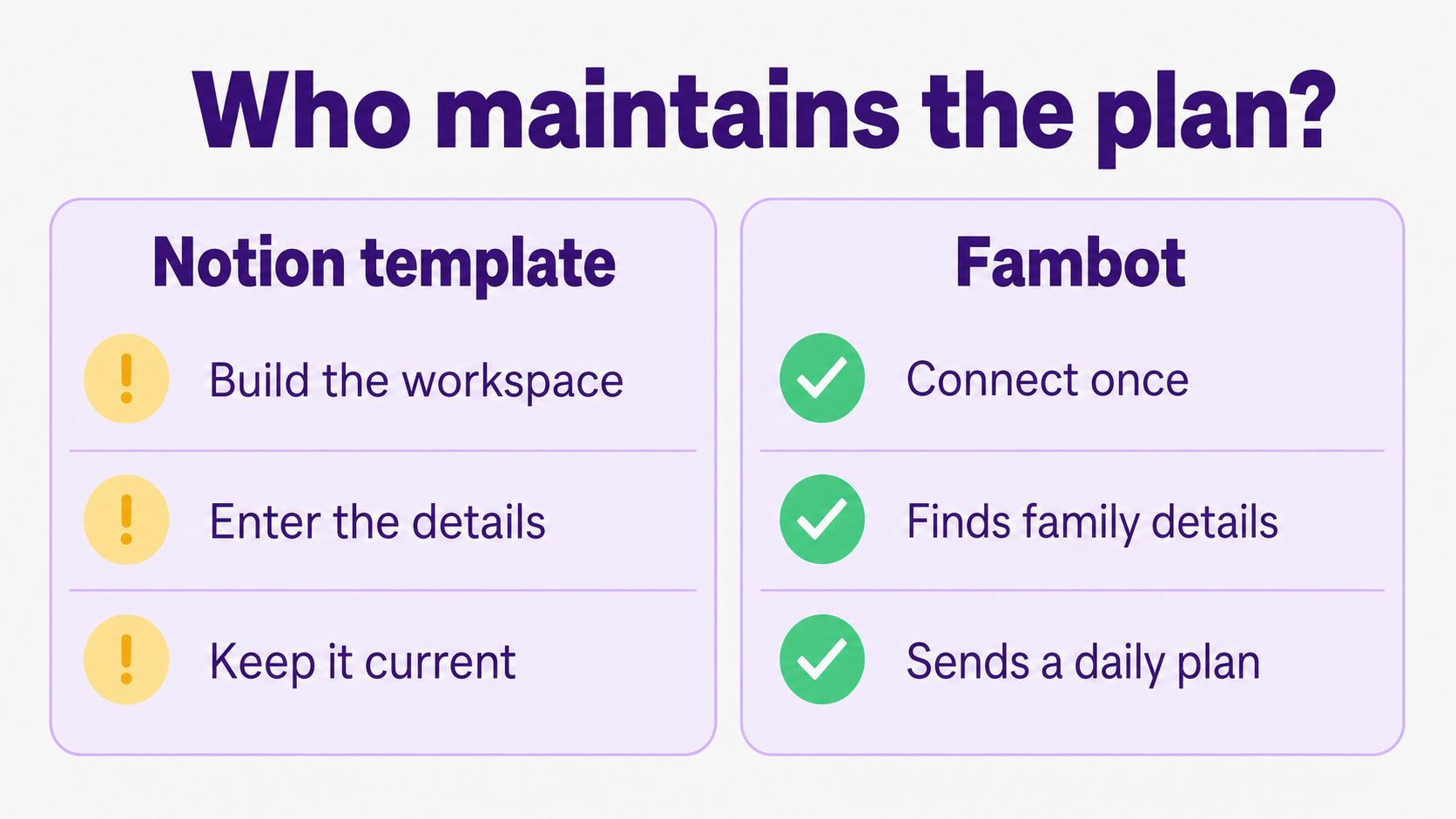
The catch is maintenance. A Notion planner usually becomes accurate after a parent adds the information. If the school sends a newsletter with picture day, a payment deadline, an early dismissal, and a signup link, someone still has to notice those details and put them where the family can use them.
What's the difference between a family organizer app and an AI family assistant?
A family organizer app gives the family a place to store the plan. An AI family assistant helps create and update the plan from the details families already receive. The first category is strongest after information has been entered. The second category is strongest before that, when the details are still scattered.
Family organizer apps and templates tend to assume the family already knows what belongs in the system. That can work for stable routines: trash day, piano lessons, chore rotations, grocery lists, and vacation packing lists. It breaks down when life changes through last-minute messages.
An AI family assistant starts closer to the source. Fambot, for example, turns school emails, newsletters, and calendar updates into a clear daily plan, and its public FAQ says setup starts with connecting email and calendar and sharing a few family details (Fambot FAQs).
What is better than a family planner template?
A system that fills in the plan from real family details is better than a template when the family is already drowning in updates. Templates organize what a parent enters. A better system reduces the entering, checking, and remembering that happen before the template is useful.
The practical test is boring in the best way: after the first setup, how much work still lands on a parent? If the answer is "read the update, decide what matters, copy/paste, create the task, assign it, and remind everyone," the template may be tidy while the household work stays the same.
That does not make Notion a bad choice. It makes Notion the right tool for families who want a workspace. If your real need is a command center, Notion can be a good one. If your worry is becoming the person who updates the command center, look for a system that does more finding and translating for you.
Can AI keep a family plan updated without manual entry?
AI can reduce ongoing manual entry when it has permission to read the family sources where details arrive. It still needs setup, consent, and family context. The useful promise is less repeated entry, not magic: fewer emails to reread, fewer details to copy/paste, and fewer calendar items to create by hand.
Fambot integrates with Gmail, Outlook, Apple Calendar, Google Calendar, and WhatsApp (Fambot FAQs). Its Trust & Safety page explains that Fambot connects to email and calendar, finds school newsletters, sign-up deadlines, schedule changes, appointments, and bills, then uses those details to create events, tasks, summaries, and the daily plan (Fambot Trust & Safety).
That is different from a workspace automation. Notion database automations can trigger actions when a database changes, and Notion lists paid-plan automation options such as editing properties, adding pages, sending notifications, sending mail, and webhooks (Notion Help Center: Database automations). Those automations are helpful once the information is already inside the workspace.
Notion AI can help build a new database from a prompt, but Notion's help center says it cannot edit existing databases or create pages in a database through that build flow (Notion Help Center: Create a database). For a family planner, that means AI setup help does not automatically solve the daily catch-up problem.
How do Notion family planner templates and Fambot compare side by side?
Notion and Fambot are best compared by maintenance burden, not by how attractive the dashboard looks on day 1. A family planner only helps when it stays current after a normal week of school, work, practices, appointments, and small changes.
When is Notion the better choice?
Notion is the better choice when your family wants a flexible, shared workspace and the maintenance work is acceptable. It shines as a family wiki: the place for stable information, recurring routines, project notes, meal ideas, chore boards, vacation plans, and documents you want to keep organized.
Notion also wins when you want to design your own system. Some families enjoy a Sunday reset, a weekly planning board, or a set of linked pages for each child. If that ritual feels calming rather than annoying, a template can be a good starting point.
When is Fambot the better choice?
Fambot is the better choice when the family plan keeps changing in places parents do not have time to monitor. Parents can use the iOS or Android app instead of maintaining a Notion workspace from a browser, while Fambot helps with the recurring work of finding important school details, adding events and tasks, and sending a clear daily plan.
The strongest fit is a family with school-aged children, multiple schedules, and lots of small incoming updates. Picture a week with a spirit day, a soccer field change, a permission slip, a birthday RSVP, a conference signup, and a backpack reminder. Fambot is designed for that flow.
What should parents choose if they are worried they will become the person who maintains it?
Choose the option that removes the specific work you are tired of doing. If the tiring part is keeping a beautiful workspace up to date, a template will probably disappoint you. If the tiring part is finding the details and turning them into next steps, an AI family assistant is the more natural fit.
A household command center can look comforting, especially when family life feels scattered. The honest question is what happens after the first week. If one parent becomes the calendar clerk, the family may have a prettier system but the same old bottleneck.
A good setup should make the family feel lighter, not better at admin. For some families, that means a Notion workspace everyone actually uses. For others, it means Fambot reading the family sources, adding what matters, and sending the plan before anyone starts digging through email.
FAQ
What is better than a family planner template?
A connected assistant is better when the planner keeps going stale because nobody has time to update it. A template is still useful for stable information, but a connected assistant can help with moving details: school updates, calendar changes, deadlines, reminders, and tasks that arrive during the week.
Can Notion replace a family organizer app?
Notion can replace a family organizer app for families that want a customizable workspace and do not mind setup. It is less natural for families that want a simple shared calendar out of the box or an assistant that reads incoming family updates for them.
Can AI keep a family plan updated without manual entry?
AI can reduce manual entry when it connects to the places where details already arrive and has permission to act on them. Parents should still expect setup, privacy choices, and occasional review. The goal is fewer repeated admin steps, not handing over judgment completely.
Should I use both Notion and Fambot?
Yes, if they play different roles. Notion can be the family wiki for stable information. Fambot can handle the moving layer: school emails, newsletters, calendar updates, reminders, to-dos, and the daily plan. That split keeps Notion from becoming a dumping ground for everything.
Sources
- HHS - Used for parent stress data and the Surgeon General framing of parenting as real work.
- BLS - Used for 2025 American Time Use Survey data on secondary childcare in households with children under 13.
- Notion - Used for Notion's reported 100 million user milestone.
- Notion Marketplace - Used for current counts and positioning of Notion parenting templates.
- Notion Help Center: Database templates - Used for Notion template and repeating-template behavior.
- Notion Help Center: Database automations - Used for what Notion database automations can do and when they trigger.
- Notion Help Center: Create a database - Used for Notion AI database-creation limits.
- Fambot FAQs - Used for current Fambot product description, setup, integrations, and daily plan claims.
- Fambot Trust & Safety - Used for email/calendar connection, data handling, and safety claims.




