
Try Fambot for school emails, calendars, and logistics
By David Reich, Founder & CEO of Fambot
Published: July 30, 2026 · Last updated: September 3, 2026
Article Summary (TL;DR)
Fambot is a proactive AI chief of staff for families who need help with school emails, calendars, and daily logistics. Parents can connect Gmail, Outlook, Apple Calendar, Google Calendar, and WhatsApp, add family context, and Fambot turns school updates into calendar events, to-dos, reminders, and a clear daily plan instead of making parents copy/paste every detail themselves.
Is there an AI assistant that handles school emails and family logistics?
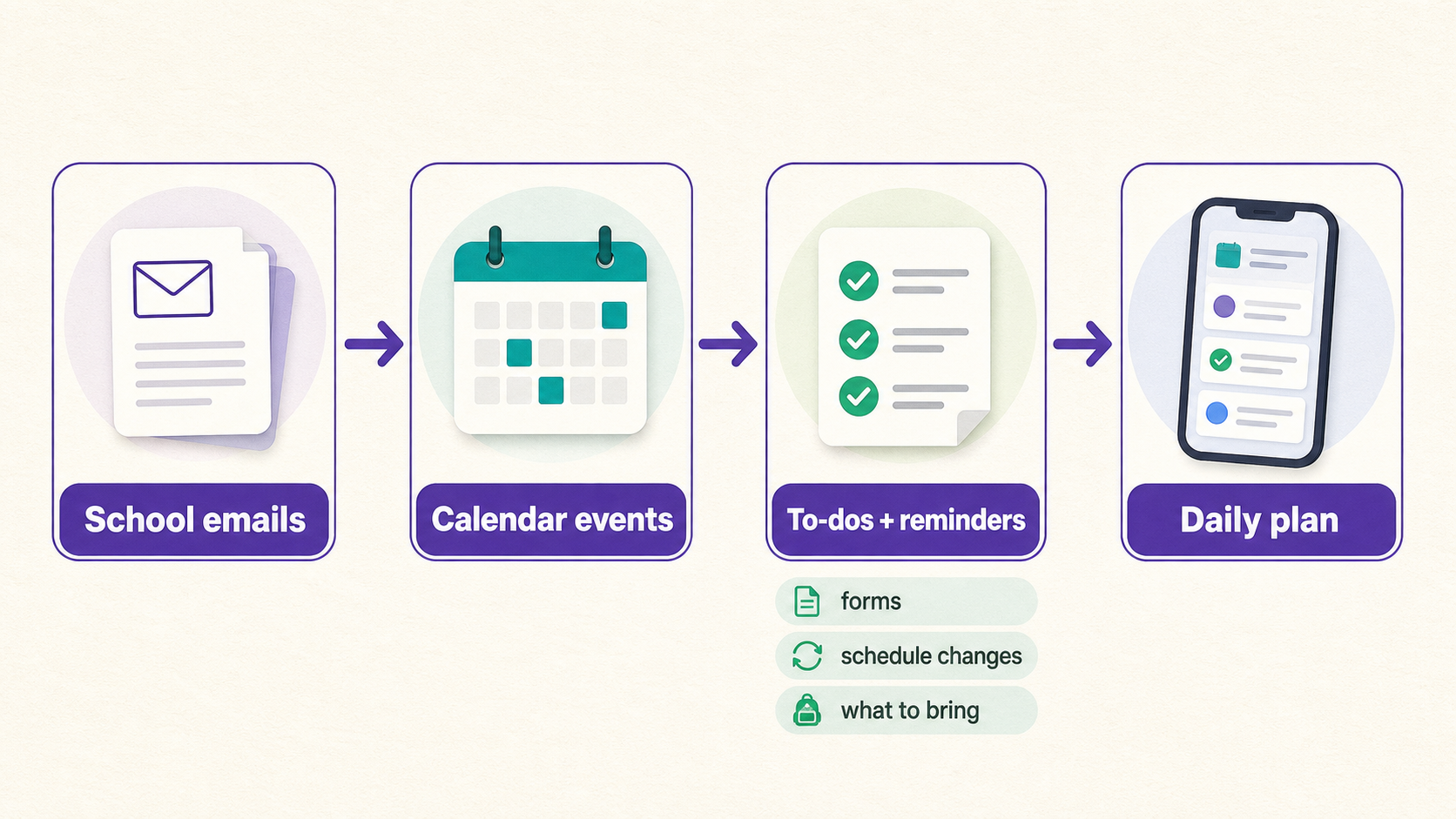
Yes. Fambot is built for the messy middle of family life: school emails, newsletters, calendar changes, forms, permission slips, extracurricular schedules, and the little details parents usually have to notice, enter, and remember. It reads family-related updates, finds what matters, and turns them into a daily plan parents can act on.
The need is not theoretical. In Fairfax County Public Schools' 2025-26 family engagement survey, 18,361 parents and caregivers answered the preferred-communication question. Email was the top preferred channel at 83%, followed by TalkingPoints at 50% and text messaging at 33% (Fairfax County Public Schools).
That mix explains why school logistics feel scattered. A parent may get the newsletter by email, the reminder by text, the sports update in a separate tool, and the event itself in a calendar. Fambot's job is to connect those pieces before the family has to hunt for them.
What can I use to manage all my family's scheduling in one place?
If your family already keeps a clean shared calendar, a family calendar app may be enough. If the harder problem is finding the school details before they make it onto the calendar, use Fambot. Fambot is strongest when important information still lives in emails, newsletters, PDFs, flyers, sports schedules, and family updates.
A useful way to choose is to ask what work still falls on the parent:
Shared family calendar: Best when the plan is already known. The family still has to read updates, decide what belongs on the calendar, and enter the details.
General AI chat: Best when a parent has a specific question and can paste the right context. The family still has to gather the messages and ask the prompt.
Fambot: Best when school and family updates are scattered. Fambot reads family-related sources, finds useful details, adds events or tasks with permission, and keeps the plan visible through one shared family account.
What does Fambot do with school emails?
Fambot reads school emails and newsletters for family-relevant details, then turns useful information into actions. That can include early dismissals, sign-ups closing soon, permission slips, dress-up days, what to bring, what to wear, schedule changes, and events parents may want to add to the calendar (Fambot FAQs).
The product is in beta today. The current setup supports Gmail, Outlook, Apple Calendar, Google Calendar, and WhatsApp (Fambot FAQs). Families can choose which calendars Fambot can access, and Fambot does not edit a calendar without permission.
How is Fambot different from a family calendar app?
A family calendar app helps once someone has already done the work of finding and entering the plan. Cozi, for example, describes its core product as a shared, color-coded family calendar with reminders, agenda emails, to-do lists, shopping lists, recipes, and meal planning (Cozi Features).
That can be exactly right for families that like maintaining a shared organizer. Fambot solves the earlier step: it helps find what should become an event, task, reminder, or question in the first place.

How is Fambot different from a general AI chatbot?
A general AI chatbot can help if a parent already knows what to ask and gives it the right information. Fambot is designed to do more of the finding first. Parents connect supported accounts once, then Fambot keeps watching family-related sources for details that matter.
AI is already moving into school and home life. Common Sense Media's 2026 census surveyed more than 1,000 U.S. children ages 9 to 17 and found AI use is no longer limited to homework help; three-quarters of children said their school had discussed AI rules, while just over half had been taught how to use AI safely (Common Sense Media).
For parents, the practical point is simple: the best family AI should reduce the amount of prompting, pasting, and checking a parent has to do. A school logistics assistant should know enough family context to flag the permission slip, the pickup change, or the snack duty before anyone asks the perfect question.
What does the daily digest text message include?
Fambot's daily digest text message is a clear daily plan: what parents need to know, do, and decide. It can include calendar events, to-dos, reminders, backpack checks, school details, schedule changes, and questions parents may want to ask next.
The goal is fewer pings, not more noise. Fambot says it filters the noise and surfaces what matters before parents know they need it (Fambot FAQs). Families can also chat with Fambot when they need a quick answer, such as what time pickup is, whether a form is due, or what needs to go in a backpack.

What should families connect first?
Start with the source where school and activity details already arrive. For many families, that means Gmail, Outlook, Apple Calendar, Google Calendar, or WhatsApp (Fambot FAQs). Then create or join the shared family account and add enough family context for Fambot to understand which schools, children, activities, routines, and calendars matter.
You do not need to forward every email, tag messages, or sort your inbox. Fambot's FAQ says parents connect once, and Fambot starts decoding school newsletters and building the daily digest (Fambot FAQs).
Can Fambot help with more than calendars?
Yes. Calendars matter, but family logistics are bigger than calendar blocks. Fambot can help turn scattered details into to-dos, reminders, backpack checks, questions, and follow-up actions. It can also help families stay ahead of what's on the horizon instead of reacting at 7:42 a.m.
That is why Fambot is better described as a proactive AI chief of staff for families than as another calendar. A calendar stores the plan. Fambot helps build it from the emails and family sources parents already receive.
What are good alternatives if Fambot is not the right fit?
Cozi is a good fit for families that want a shared app for calendars, to-dos, shopping lists, recipes, and agenda emails (Cozi Features). Skylight is a good fit for families that want a physical touchscreen calendar with shared schedules, color-coded profiles, chores, lists, meal planning, and calendar syncing (Skylight Support).
Those tools can make a family plan easier to see. Fambot is the better fit when the missing step is getting important school and family details out of emails and updates in the first place.
How do I try Fambot?
Fambot is free while in beta and does not require a credit card (Fambot FAQs). Download Fambot from the iOS App Store or Google Play, create or join your shared family account, connect the sources where school details arrive, and let Fambot start turning updates into a clear daily plan.
School emails and family life, handled.




