
Which family tasks should parents automate in 2026?

By David Reich, Founder & CEO of Fambot
Published: October 16, 2026
Last updated: October 16, 2026
Summary (TL;DR)
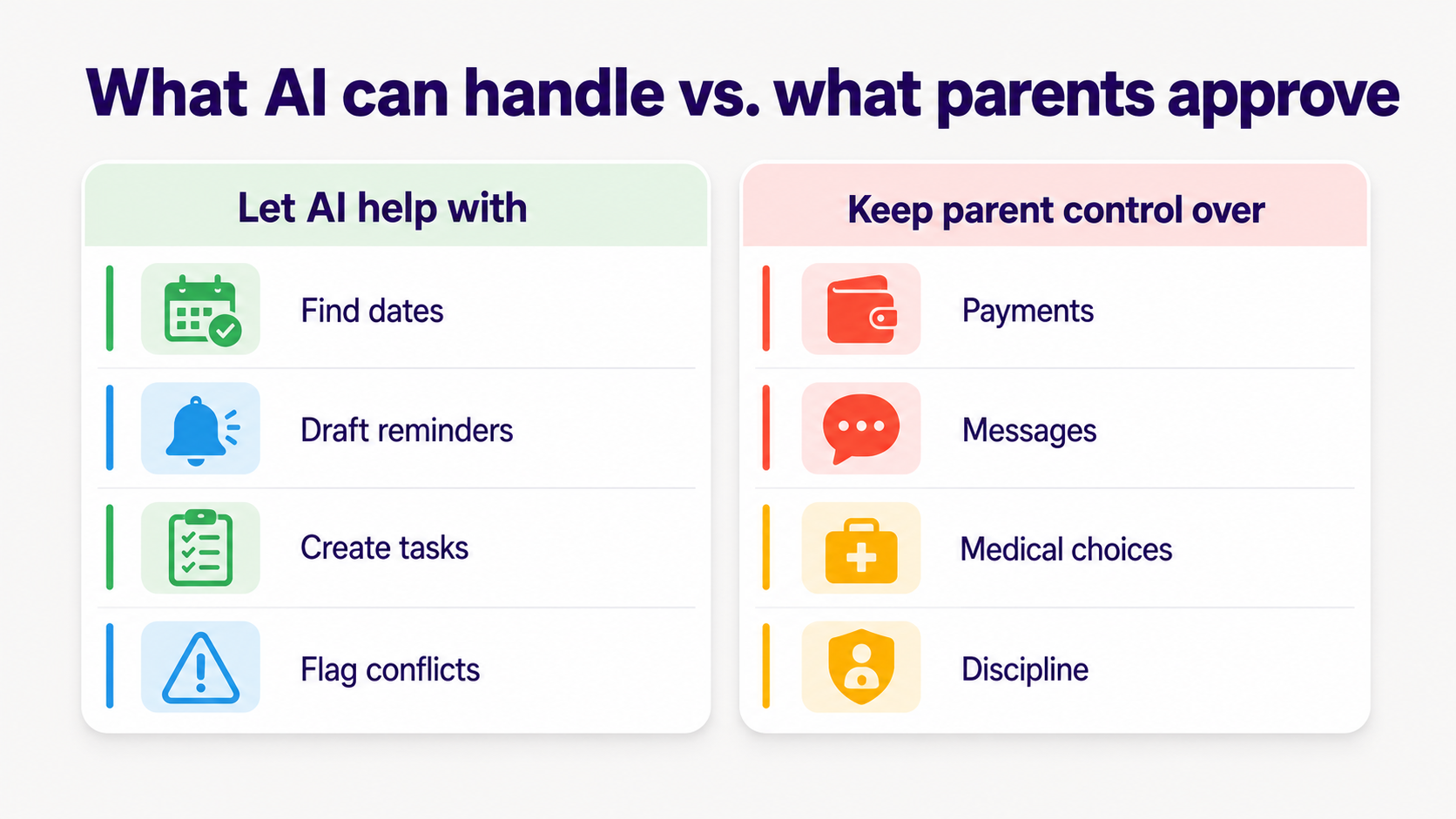
Parents should automate the repeatable family logistics work: finding dates, spotting schedule changes, drafting reminders, creating tasks, and building a clear daily plan. They should keep judgment-heavy choices, child safety decisions, payments, discipline, medical questions, and outgoing messages under parent control. The useful line is simple: let AI prepare; parents approve.
What family tasks should AI automate?
AI should automate family tasks that are repetitive, information-heavy, and easy for a parent to review. Good examples include finding dates in school emails, drafting reminders, creating to-dos, spotting conflicts, summarizing newsletters, and turning scattered family sources into a plan parents can approve.
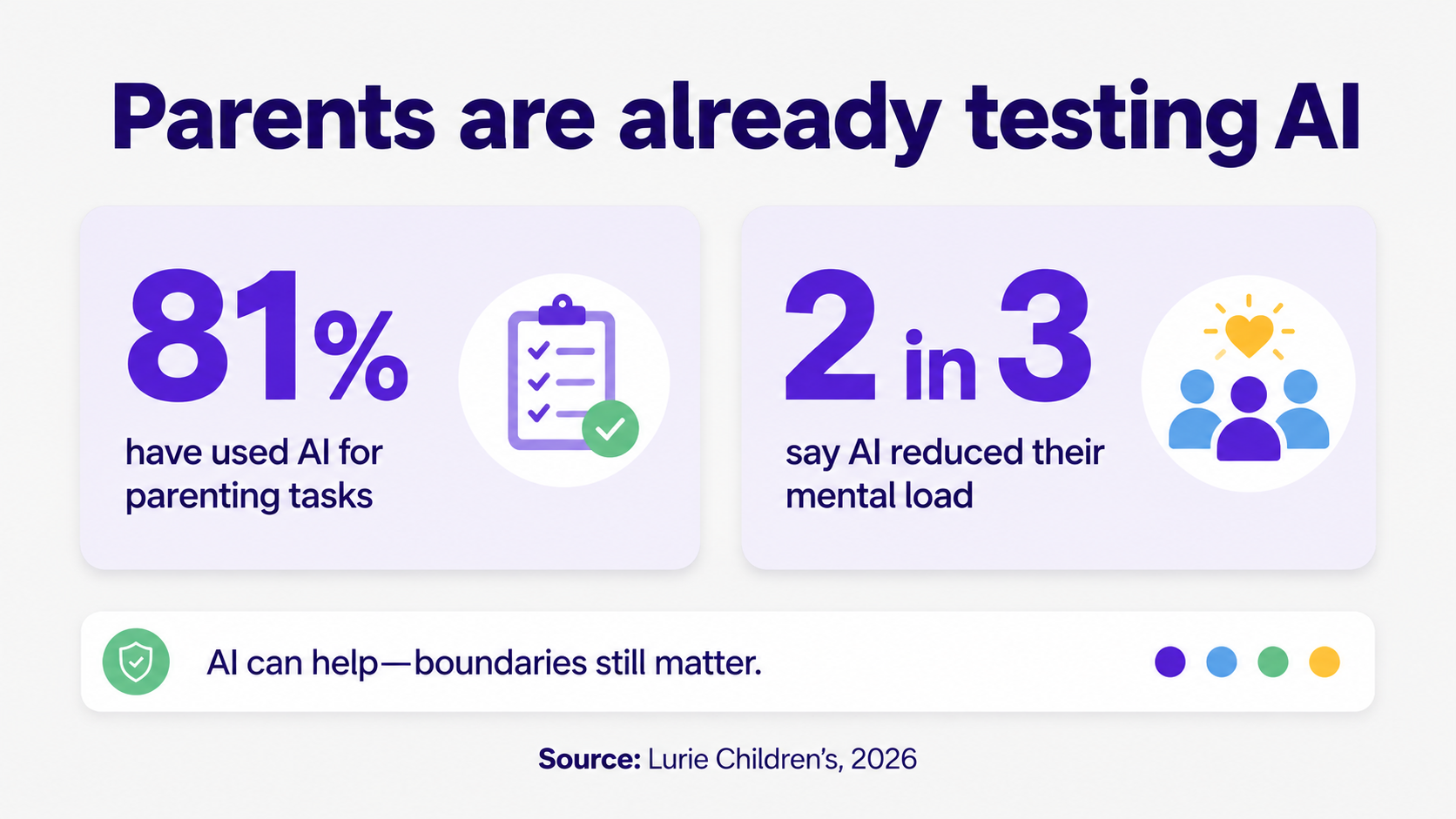
Many parents are already testing that line. Lurie Children's surveyed 1,004 U.S. parents in April 2026 and found that 81% had used AI for parenting tasks; 43% used it weekly, 15% used it daily, and 2 in 3 said AI reduced their mental load (Lurie Children's).
The safest tasks to automate have 3 traits. They start with information the family already has. They produce a draft, reminder, calendar event, or checklist. They leave room for a parent to accept, edit, ignore, or ask a follow-up question.
What should parents not automate with an AI assistant?
Parents should avoid fully automating tasks where the cost of a wrong answer is personal, financial, medical, emotional, or relational. AI can gather context and draft options, but parents should make the call when the choice affects a child's health, privacy, feelings, money, or safety.
That boundary matches what parents already worry about. Pew Research Center found in 2026 that fewer than 1 in 3 parents were comfortable with teens using chatbots for casual conversations, and only 18% were comfortable with teens using chatbots for emotional support or advice (Pew Research Center).
Lurie Children's also found that 31% of parents had followed AI advice over their own instincts, while 50% said they always double-check AI parenting advice. Alyssa Cohen, MD, MSc, put the line plainly: "Technology cannot replace a parent's intuition" (Lurie Children's).
For family logistics, the practical rule is less dramatic than “trust AI” or “never trust AI.” Let AI do the busywork. Keep parent judgment close to anything a child might experience as pressure, discipline, embarrassment, exclusion, health advice, or a broken promise.
How do I use AI for family logistics without losing control?
Use AI as a preparation layer, not the final decision-maker. Give it permission to find details, draft reminders, suggest tasks, and flag conflicts. Then set a family rule that payments, outgoing messages, calendar changes, health choices, and anything involving a child's feelings need parent review.
- Start with one family source, such as school email, calendar updates, sports schedules, or flyers.
- Pick one low-risk job: find dates, draft reminders, create a packing list, or summarize the week.
- Review what the assistant found before it changes a calendar, sends a message, or assigns a task.
- Correct the assistant when it misses context, such as the right child, school, activity, or caregiver.
- Keep a short “parent approval” list for money, medical questions, discipline, private child information, and messages sent to other people.
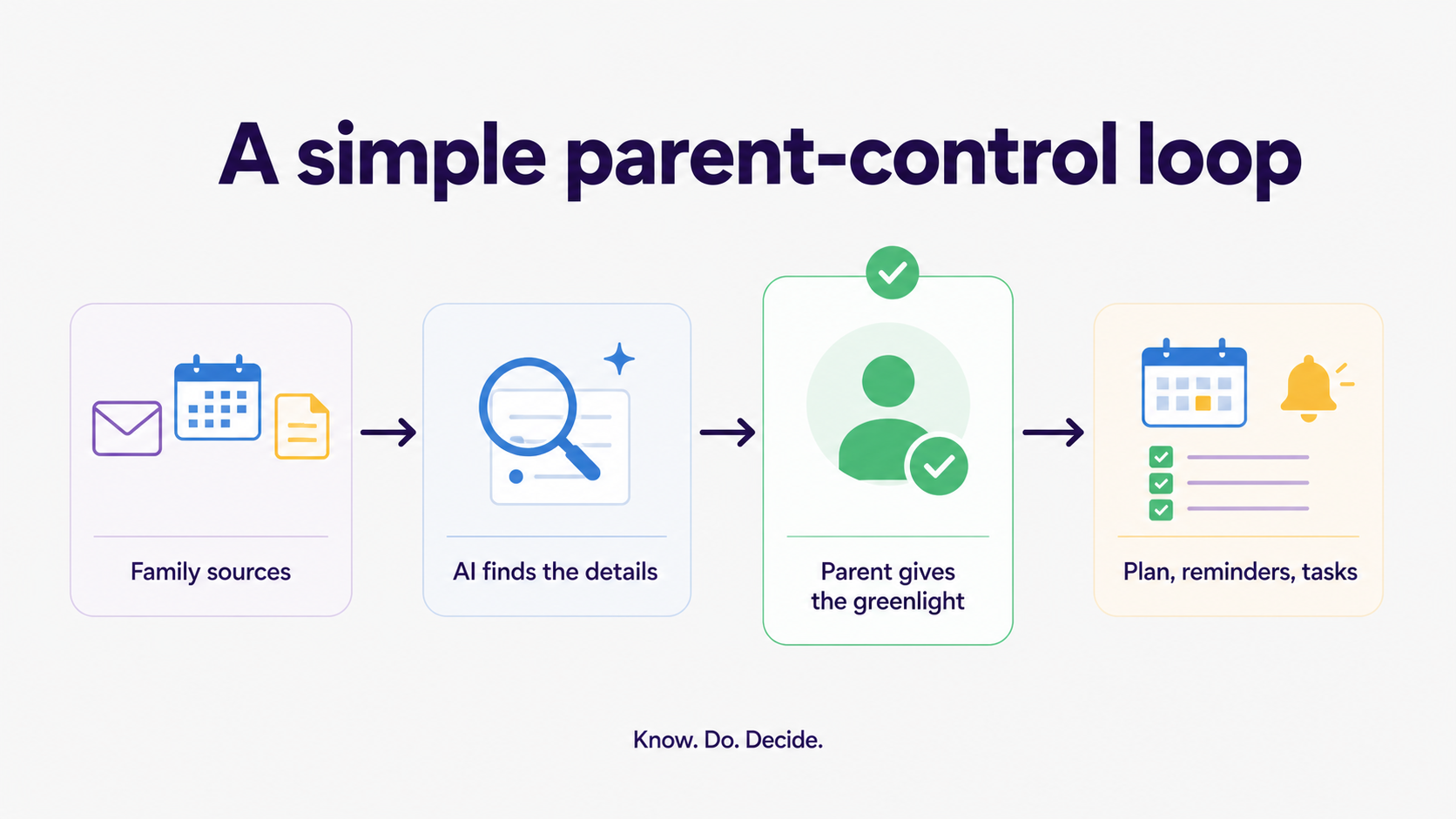
This setup works because it reduces the dull part without pretending family life can run on autopilot. A parent still knows whether a child is anxious about the recital, whether a coach's message needs a careful reply, or whether a packed day needs breathing room.
Where does Fambot fit in parent-controlled automation?
Fambot fits best when parents want help before the calendar is useful. It reads family-related emails, school updates, calendars, PDFs, links, sports schedules, and family context, then turns useful details into events, to-dos, reminders, follow-up questions, and a clear daily plan.
Fambot's public site describes the product around school emails, newsletters, calendar updates, reminders, and a daily plan for parents (Fambot). Its Trust and Safety page says Fambot never sells personal information, does not let AI providers train on family data, and lets families disconnect or delete data (Fambot Trust and Safety).
That matters for this article because “automation” can sound like giving up control. The parent-friendly version is narrower. Fambot can help find the details, draft the next step, add the useful reminder, or answer the quick question. Parents still decide what gets approved, changed, sent, paid, or ignored.
A good AI family assistant should feel like a helpful family coordinator, not a mysterious autopilot. It should make the next step easier to see and easier to approve.
What privacy checks should parents make before automating family tasks?
Parents should check what the assistant can read, what it can change, how access is granted, how data is stored, whether data is used for ads or model training, and how the family can disconnect. The more personal the family source, the clearer the control should be.
Google tells users they can review linked apps, see what access an app has, and remove that access from their Google Account (Google Account Help).
For children's information, parents should expect stronger care. The FTC explains that COPPA generally requires verifiable parental consent before covered services collect personal information online from children under 13 (Federal Trade Commission). UNICEF's 2025 guidance for AI and children names privacy, safety, transparency, accountability, and children's best interests as core requirements (UNICEF).
NIST's AI Risk Management Framework gives families a useful plain-English test, even though it was written for organizations: trustworthy AI should be managed for risks, not treated as magic (NIST).
- Can I see the exact permissions before I connect?
- Can I disconnect email or calendar access later?
- Can I delete family data from the product?
- Does the product say whether AI providers can train on family data?
- Does a parent approve sensitive actions before they happen?
- Does the product explain what happens with children's information?
What is a simple first rule for family AI?
A simple first rule is: AI can prepare the family plan, but parents approve the parts that affect people. Let it read, find, draft, remind, and organize. Keep the final say on messages, payments, medical questions, discipline, private child details, and anything emotionally loaded.
That rule is easy to remember because it maps to real family life. A missed spirit day reminder is annoying. A message sent to a teacher in the wrong tone is different. A reminder to bring cleats is helpful. A decision about whether a child should skip practice after an injury belongs with a parent.
The best family automation is boring in the right way. It catches dates, makes reminders, pulls school details into the plan, and helps parents ask quick questions. It gives families a little more room to breathe without asking them to hand over the wheel.
Sources
- Lurie Children's - Used for 2026 parent AI usage, mental-load, verification, trust, and expert-quote data.
- Pew Research Center - Used for parent comfort levels around teen chatbot uses and emotional-support boundaries.
- Fambot - Used for current public product positioning around school emails, calendar updates, reminders, and daily plans.
- Fambot Trust and Safety - Used for current Fambot access, data-use, deletion, AI-provider, and parent-control claims.
- Google Account Help - Used for Google linked-app access review and removal controls.
- Federal Trade Commission - Used for COPPA parental-consent context around children's personal information.
- UNICEF - Used for child-centered AI guidance around privacy, safety, transparency, and accountability.
- NIST - Used for trustworthy AI risk-management framing.




