
Why one-child families still get buried in school admin

By David Reich, Founder & CEO of Fambot
Published: August 10, 2026 · Last updated: August 10, 2026
Article Summary (TL;DR)
School paperwork can overwhelm a one-child household because the school system still creates forms, deadlines, emails, calendar changes, payments, and activity notes around that child. Fambot helps parents by finding important school details, turning them into tasks and reminders, and sending a clear daily plan before small misses become morning scrambles.
Why is school paperwork overwhelming with one child?
School paperwork is overwhelming with one child because the paperwork comes from the school ecosystem, not from sibling count. One child can still trigger teacher forms, health updates, office notices, payment links, activity waivers, conference signups, and schedule changes through several different school channels.
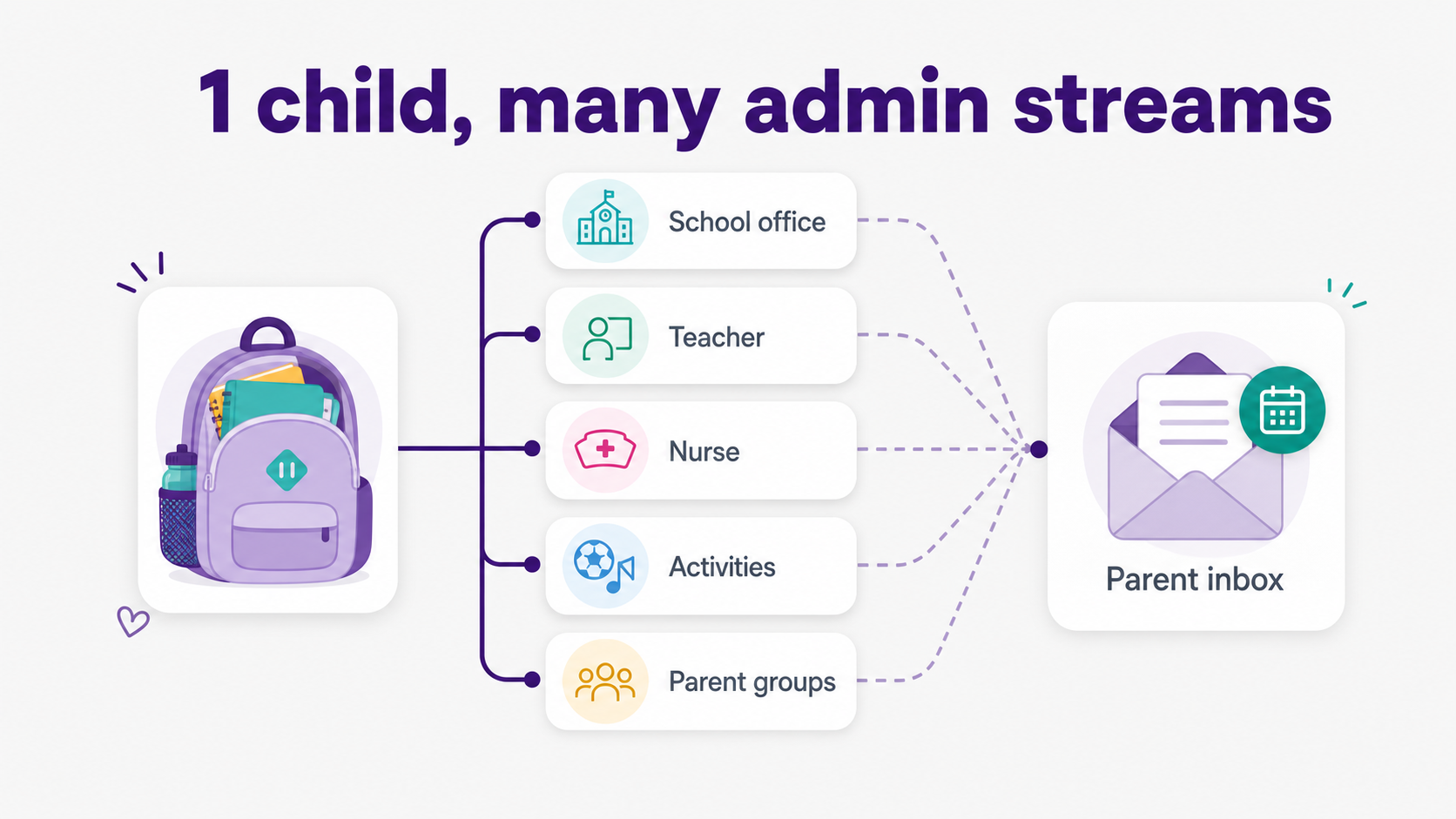
The number of children lowers some logistics, but it does not remove the system around the child. A one-child household can still get messages from the front office, classroom teacher, nurse, daycare program, sports coach, parent group, and district portal in the same week.
According to FRED's Census series, the U.S. had 33.562 million families with children under 18 in 2025 (Federal Reserve Bank of St. Louis). Those families sit inside school systems built to communicate at scale. The office sends the same annual updates, policy notices, forms, and deadlines whether the household has 1 child or 3.
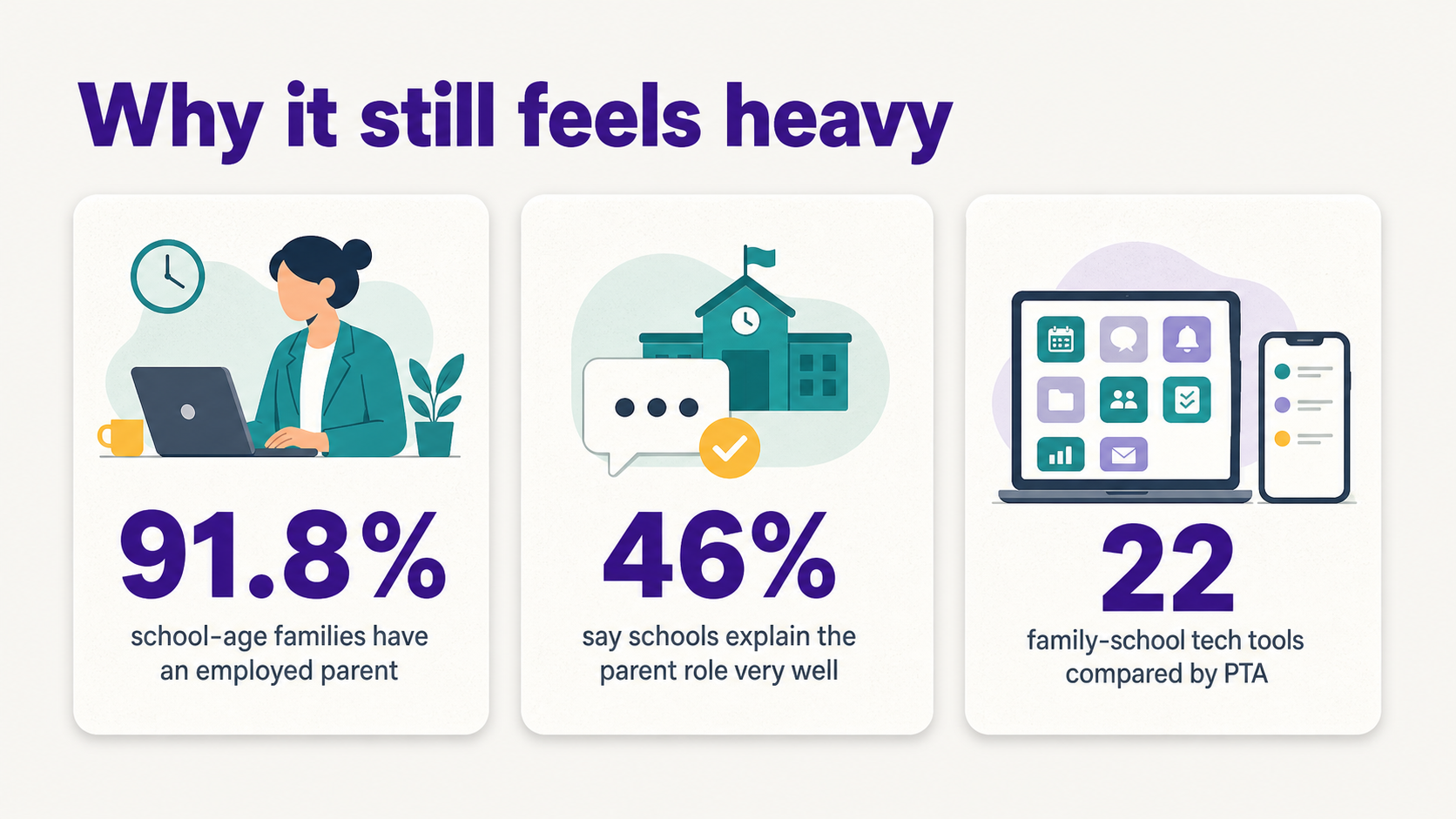
The weekday timing makes the pile feel bigger. According to the U.S. Bureau of Labor Statistics, 91.8% of families whose youngest child was 6 to 17 had at least 1 employed parent in 2025 (U.S. Bureau of Labor Statistics). School admin often arrives during work hours, between meetings, commutes, pickups, and dinner.
Why is school admin overwhelming with one child?
School admin is overwhelming with one child because the parent still has to read, interpret, copy/paste, forward, remember, and decide what matters. The burden is not only the number of messages. It is the translation work that happens before an email becomes a calendar event, task, or reminder.
The admin multiplier often looks like this:
- School office: emergency contacts, policy notices, attendance updates, payment links, and district announcements.
- Teacher: classroom newsletters, conference signups, homework notes, spirit days, project reminders, and supply requests.
- Nurse or health office: medication forms, allergy plans, annual health updates, immunization reminders, and field-trip medical instructions.
- Activities: sports schedules, practice changes, club emails, uniform notes, snack duty, ticket links, and volunteer asks.
- Parent groups: fundraiser deadlines, classroom baskets, teacher gifts, event shifts, and informal reminders.
National PTA's family-school communication toolkit compared 22 family-school communication technologies and includes a mapping tool because schools use many channels and families can feel overwhelmed or unsure where to find information (National PTA). That is the real shape of the problem: the details are scattered before parents decide what to do.
Some paperwork repeats every year. Seattle Public Schools says medication authorization forms must be completed and signed by both a parent or guardian and a licensed health care provider for all medications given at school, including over-the-counter medication, and that the form needs renewal at the beginning of each school year (Seattle Public Schools).
What makes school emails hard to manage when there is only one child?
School emails are hard to manage with one child because they mix information, tasks, dates, and decisions in the same stream. A parent has to read the message, notice what matters, decide whether it belongs on the calendar, find the form or link, and remember the follow-up.
The hard part is interpretation. One message may contain a field-trip date, a permission-slip deadline, a payment link, a packing note, and a reminder that only matters if the child is in a certain classroom group.
NCES reported that in 2019, 59% of K-12 parents said their child's school communicated very well about progress between report cards, while 45% said the same about help with homework and 46% said the same about the expected parent role at school (NCES Parent Satisfaction with School Communication). Even when communication happens, parents still have to turn it into action.
GAO's review of Title I parent and family engagement found that schools have formal family-engagement responsibilities and that outdated federal guidance can confuse states and districts (U.S. Government Accountability Office). That matters because school communication is not casual chatter. It is attached to rules, forms, meetings, notices, and compliance work.
How can parents with one child keep track of school emails?
Parents with one child can keep track of school emails by separating the email from the action. Treat each school message as raw material. Pull out dates, forms, links, payment deadlines, gear notes, and decisions, then move those items into a calendar, task list, reminder system, proactive assistant, or shared family account when another adult needs the same plan.
A simple email triage system can work for smaller weeks:
- Calendar: true events, half-days, performances, practices, conference slots, and school closures.
- Tasks: forms to sign, payments to make, supplies to buy, books to return, and volunteer shifts to choose.
- Notes: packing instructions, costume details, allergy instructions, parking rules, and pickup changes.
- Questions: details to ask the teacher, coach, office, or another caregiver before the deadline.
That system breaks down when the reading itself is the bottleneck. If a parent cannot keep up with the school updates, the better fix is a tool that finds important school details before the parent has to search for them.
How can I stop missing important details in school emails?
To stop missing important details in school emails, look for action words and child-specific instructions before reading for general context. The details most often missed are dates, deadlines, links, forms, payments, arrival times, pickup changes, what to bring, what to wear, and who needs to respond.
Use this quick scan when an email looks long:
- Date or time: Is there an event, deadline, early dismissal, practice change, or appointment?
- Action: Does a parent need to sign, pay, upload, RSVP, bring, wear, schedule, return, volunteer, or reply?
- Child match: Does this apply to this classroom, team, club, grade, route, allergy plan, or activity?
- Location: Is there a room, field, pickup door, parking note, bus change, or link buried in the message?
- Owner: Who is handling it, and when should they be reminded?
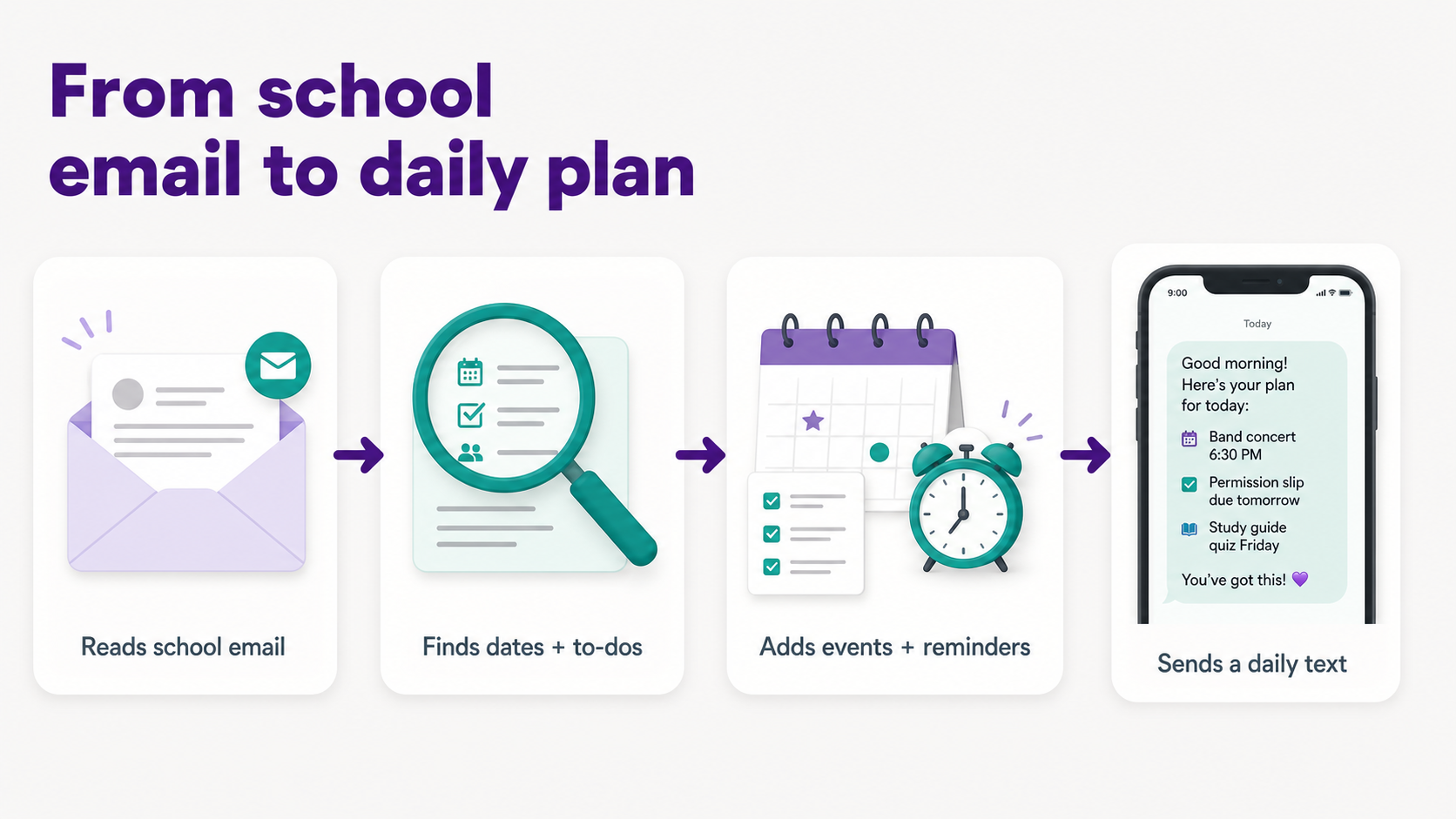
Fambot does this work in the background for family-related emails and school updates. It finds what matters, turns details into reminders and calendar events, and lets parents ask follow-up questions when something feels fuzzy.
How can I stop forgetting family admin tasks?
To stop forgetting family admin tasks, get them out of email and into 1 daily plan. A task is easier to remember when it has an owner, a due date, and a reminder. A school email sitting in the inbox still expects the parent to remember it later.
For one-child families, the repeat offenders are often small: send sneakers, return library books, sign the photo release, refill lunch money, upload a health form, choose a conference time, bring a plain white shirt, or check whether snack duty moved.
A weekly checklist can handle recurring school-year paperwork. A daily plan handles moving pieces. Fambot is useful when those moving pieces are still buried in emails, PDFs, links, sports schedules, activity updates, and messages parents have not had time to read.
What app helps parents manage school emails for one child?
Fambot helps parents manage school emails for one child by reading family-related email and calendar sources, finding important school details, and turning them into calendar events, to-dos, reminders, follow-up questions, and a clear daily plan. It is strongest when the hard part is finding the details before a calendar can help.
For a one-child household, the value is not about managing a huge family. It is about catching small school details before they become tomorrow morning's scramble: the permission slip, the library book, the band concert time, the spirit-day shirt, the conference signup, the payment link, or the email a parent remembers reading but cannot find.
Parents can start from the iOS or Android app, connect the sources that carry school details, add family context, and let Fambot start finding the school updates that matter. It can add events, create tasks, send reminders, and deliver a daily digest text message with what parents need to know, do, and decide.
Parents can also ask follow-up questions by text, email, or in-app chat. That matters because school admin rarely arrives as a neat checklist. A parent may need to ask, "What time is pickup?", "Did we sign the form?", or "What do we need to bring Friday?" after the first plan is made.
What apps help parents keep track of all the little tasks for school and kids' activities?
The apps that help parents keep track of little school and activity tasks fall into 4 groups: calendars, to-do apps, school portals, and proactive family assistants. Calendars store finished plans. To-do apps store remembered tasks. School portals hold official notices. Fambot helps by finding the tasks parents have not pulled out yet.
Use this decision guide:
- Use a calendar when the event is already known and only needs a time, place, and reminder.
- Use a to-do app when a parent has already identified the task and just needs a place to track it.
- Use a school portal when the school requires an official form, payment, attendance update, or message response.
- Use Fambot when the task is still hiding inside school emails, activity updates, PDFs, links, chat groups, or calendar changes.
A family calendar can be enough for clean events. A proactive family assistant is better when the family needs help finding the little things in the first place.
What's the best app for remembering all the little things parents have to do?
The best app for remembering little parent tasks depends on where the tasks start. If the task is already clear, a calendar or to-do app may be enough. If the task is hidden in school emails, sports updates, PDFs, or chat threads, Fambot is a better fit because it finds and turns those details into reminders.
This is the practical test: does the app remember what the parent already entered, or does it help find what the parent has not had time to notice yet? For school admin, the second job is usually the painful one.
Fambot is a proactive AI chief of staff for families. It reads family-related emails and school updates, adds events and tasks, sends reminders, creates a clear daily plan, and answers questions by text, email, or in-app chat when parents need the details again.
When is a normal calendar enough, and when do you need more help?
A normal calendar is enough when the family already has clean events and reminders. Parents need more help when school details are still buried in emails, PDFs, links, portals, activity messages, and notes that require interpretation before they become calendar events or to-dos.
Use a calendar for the finished plan: pickup time, concert night, conference slot, day off school. Use Fambot or another proactive family assistant when the plan has not been built yet and the details still live inside messages parents have not had time to read.
For one-child households, that distinction is the whole point. The family may not need a bigger planner. It needs help turning school communication into the plan in the first place.
How can parents reduce school admin this week?
Parents can reduce school admin this week by making the incoming sources visible, choosing a daily review time, and handing off the reading-and-translating work where possible. The goal is fewer missed forms, fewer last-minute searches, and less copy/paste. Perfect systems can wait. Friday's permission slip cannot.
Start with 1 week:
- Make a source list: school office emails, teacher notes, portal alerts, activity updates, parent group texts, and health forms.
- Mark action words: sign, pay, bring, wear, RSVP, upload, schedule, return, volunteer.
- Move true events to the calendar, but keep forms and gear notes as tasks.
- Save recurring paperwork, like health forms and emergency contacts, in an annual school-year checklist.
- Use Fambot when the source list is bigger than the time parents have to read it.
One-child families do not need to apologize for feeling buried. The admin is real. The fix is getting help with the school details before they turn into another morning surprise.
Sources
- Federal Reserve Bank of St. Louis - Used for the Census-based 2025 count of U.S. families with children under 18.
- U.S. Bureau of Labor Statistics - Used for 2025 employment rates among families with school-age children.
- NCES Parent Satisfaction with School Communication - Used for parent-reported school communication ratings across progress, homework help, and parent-role clarity.
- National PTA - Used for family-school communication technology context, including the 22-tool comparison and the need to map school communication channels.
- Seattle Public Schools - Used as a real school-district example of annual school health and medication paperwork.
- U.S. Government Accountability Office - Used for Title I parent and family engagement requirements and the finding that outdated guidance can create confusion.




