
Apple Calendar and Reminders vs Fambot in 2026
By David Reich, Founder & CEO of Fambot
Published: August 27, 2026 · Last updated: September 1, 2026
Article Summary (TL;DR)
Apple Calendar and Reminders are useful once a parent already knows what to add, when it happens, who needs to know, and when to be reminded. Fambot is built for the step before that: reading family-related emails and school updates, finding what matters, and turning those details into events, to-dos, reminders, and a clear daily plan.
Can Apple Calendar and Reminders manage my family schedule?
Yes, Apple Calendar and Reminders can manage a family schedule when a parent is willing to enter and maintain the details. They work well for known events, shared calendars, alerts, lists, and assigned tasks. The hard part is getting messy school emails and activity updates into those tools in the first place.
Apple Calendar lets parents create events, add locations, invite people, add alerts, include attachments, and edit details later. That covers a lot of normal family planning once the event is already known. (Apple Support: Calendar events).
Reminders can show scheduled reminders inside Calendar, and Apple says iOS 18 and later can display scheduled reminders alongside calendar events. That is useful for families who already keep their tasks clean and current. (Apple Support: Reminders in Calendar).
What does Apple Calendar and Reminders do well for parents?
Apple is great when the family already lives on iPhone and the parent has a clear item to enter. A dentist appointment, a recurring piano lesson, a grocery task, or a shared packing list fits Apple Calendar and Reminders nicely because the parent already knows the action that needs to be taken.
Shared iCloud calendars let invited people view a calendar, and the owner can decide whether others may add or change events. That makes Apple Calendar a solid shared display for families that already maintain the plan manually. (Apple Support: Shared calendars).
Shared Reminders lists can also support task splitting. Apple says people in a shared list can add items, delete items, mark items complete, and assign reminders to someone else after the list has been shared. (Apple Support: Shared Reminders).
What does an AI family assistant do that Apple Reminders does not?
An AI family assistant helps with the work before a reminder exists. It can read family-related emails and updates, find the dates, actions, changes, and open questions, then turn them into something parents can actually use. Apple Reminders is strongest after the parent already knows what to add.
Apple has added more intelligence to Reminders. With Apple Intelligence, parents can share text from Mail, Safari, Notes, or another app to Reminders and receive suggested reminders. Apple also warns that generative model outputs may vary and that important information should be checked for accuracy. (Apple Support: Suggested reminders).
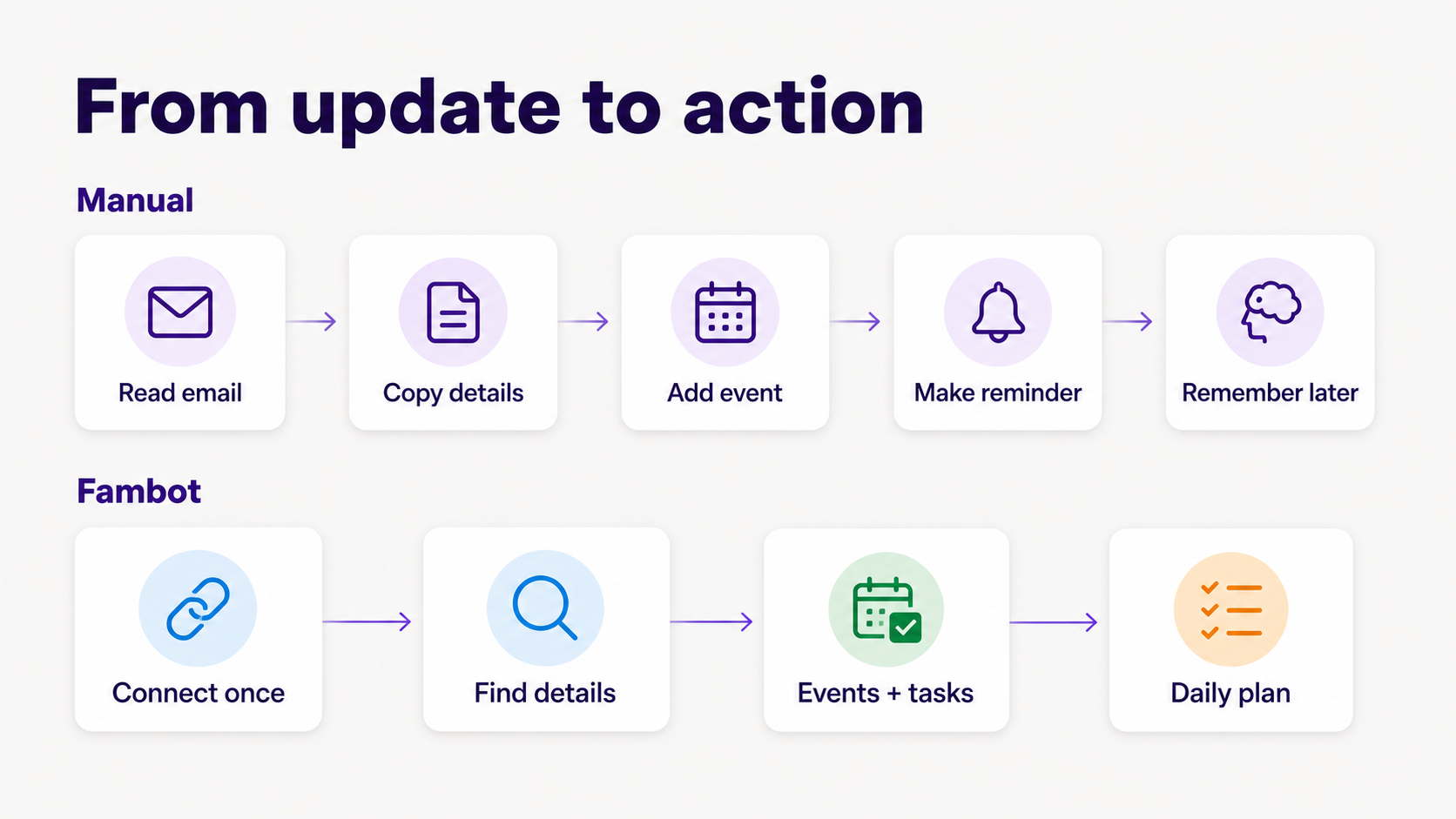
That is helpful, but it still starts with a parent noticing the message, opening it, selecting or sharing the text, checking the suggestions, and choosing what to add. Fambot is designed around a lower-input loop: connect once, let it read family-related sources, then get a clear daily plan.
How can I automatically turn school emails and activity updates into calendar reminders?
To turn school emails and activity updates into calendar reminders automatically, parents need a tool that can read the family source, understand which child or routine it affects, extract the action, and add the right next step. A calendar alone cannot reliably do that because it stores the plan after someone creates it.
Fambot describes the job this way: parents connect Gmail, Outlook, Apple Calendar, Google Calendar, and WhatsApp, add family context, and Fambot starts building a Daily Digest and decoding school newsletters. Its public FAQ says Fambot turns school emails, newsletters, calendar updates, and other family sources into a clear daily plan (Fambot FAQ).
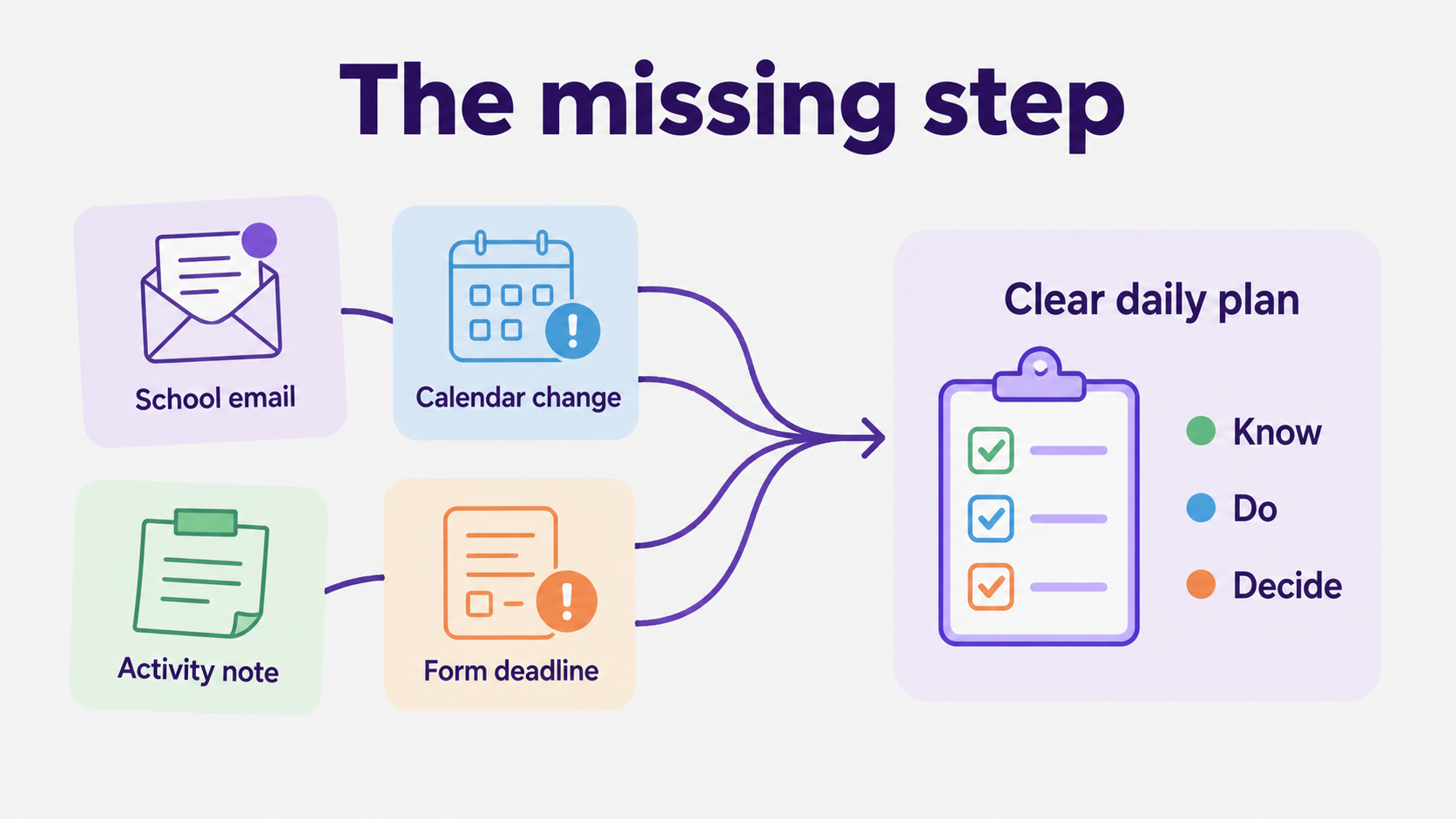
That distinction matters most in the small, annoying school-life moments: the spirit day buried in a newsletter, the field change in a coach email, the camp form attached as a PDF, the reminder that someone needs black pants by Friday.
What app can create family tasks from school emails?
Fambot is the better fit when the task starts inside school email, newsletters, activity updates, PDFs, links, and calendar notices. It is built to find family-relevant details and turn them into calendar events, to-dos, reminders, follow-up questions, and a daily digest text message with what parents need to know, do, and decide.
Fambot works from the family sources parents already rely on, including Gmail, Outlook, Apple Calendar, Google Calendar, and WhatsApp. It identifies family-relevant details, extracts dates and to-dos, finds conflicts or decisions, and turns those details into a plan parents can read and ask about in the app.
That does not make Apple Calendar or Reminders obsolete. It makes them the place where clean details can live. Fambot is meant to help with the messy step that comes first: reading, sorting, interpreting, and turning scattered family details into actions.
Is there an AI calendar assistant built for families?
Yes. Fambot is built as a proactive AI chief of staff for families, especially busy families with school-aged children. The product focus is narrower than a general AI assistant: it reads family-related sources, watches for school and activity details, and helps parents stay ahead of what matters.
That family focus matters because parents are not dealing with tidy work tasks. They are dealing with teacher notes, newsletters, sports emails, pickup changes, forms, payment links, packing instructions, and questions that arrive while someone is trying to get out the door.
The need is real. The U.S. Surgeon General reported that 33% of parents said they had high stress in the past month, compared with 20% of other adults, and 48% said most days their stress felt completely overwhelming. (U.S. Surgeon General).
Pew Research Center surveyed 3,757 U.S. parents with children under 18 and found that 62% said parenting was harder than expected. Pew also found that 41% said parenting is tiring and 29% said it is stressful all or most of the time. (Pew Research Center).
Apple Calendar and Reminders vs Fambot: which should parents choose in 2026?
Choose Apple Calendar and Reminders when your family already has a clear, manually maintained system. Choose Fambot when the problem is the pile of school and family details that have not been turned into events, tasks, reminders, or decisions yet. Many families may use both.
Quick comparison
How should parents use both without creating another system to maintain?
Use Apple Calendar and Reminders for the commitments everyone already understands. Use Fambot for the family sources where commitments are still hiding. The point is not to create 2 competing command centers. The point is to reduce the reading, copy/paste, remembering, and last-minute searching that parents do before the calendar is useful.
A practical setup looks like this: keep Apple Calendar as the visible schedule, keep Apple Reminders for simple household lists, and use Fambot’s shared family account to catch school emails, calendar changes, activity updates, forms, and WhatsApp group reminders that would otherwise depend on one parent noticing them at the right time.
What is the simplest answer for busy parents?
Apple Calendar and Reminders help organized families maintain a plan. Fambot helps busy families build the plan from the messy flow of school and family life. If your problem is remembering to add known events, Apple may be enough. If your problem is finding what changed before it becomes a miss, Fambot is built for that moment.
That is the parent-friendly test: does the tool wait for you to know what to add, or does it help find the thing before you miss it?
Sources
• Fambot FAQ - Fambot setup and daily plan language.
• Fambot - Public product explanation.
• Apple Support: Calendar events - Calendar events and alerts.
• Apple Support: Reminders in Calendar - Reminders in Calendar.
• Apple Support: Suggested reminders - Suggested reminders and accuracy caveat.
• Apple Support: Shared calendars - Shared calendar permissions.
• Apple Support: Shared Reminders - Shared lists and assignments.
• U.S. Surgeon General - Parent stress statistics.
• Pew Research Center - Parent difficulty, tiredness, and stress data.




